Canonical recently announced the release of Ubuntu 24.04 LTS, codenamed “Noble Numbat”. This update underscores Ubuntu’s ongoing commitment to enhancing performance and security, focusing on optimizing developer productivity. The latest version features an optimized Linux kernel 6.8 and significant system management upgrades as detailed in the release notes. In this blog post, we highlight the key features and improvements that Ubuntu 24.04 LTS brings to the table, specifically tailored for users of Microsoft/Azure.
Unified marketplace offering
Ubuntu 24.04 LTS introduces a consolidated Azure Marketplace experience. Easily find the official Ubuntu images created by Canonical and endorsed by Microsoft for Azure, all under a single offering: ubuntu-24_04-lts. This simplification aids your search and selection process, helping you choose the right image for your needs and ensuring optimal compatibility and performance. [Explore the Ubuntu 24.04 images on the Azure Marketplace].
Optimized for Azure
Ubuntu 24.04 LTS is finely tuned to enhance performance on Azure infrastructure, ensuring that the Ubuntu images are fully compatible and support the latest cloud features as they are released. This optimization boosts system efficiency, speed, and reliability. Integration with Azure Guest Patching and the Update Management Center facilitates streamlined and continuous system updates, thereby reinforcing the overall security and stability of Ubuntu deployments.
Enhanced developer toolchains
.NET 8 is fully compatible with Ubuntu 24.04 LTS from launch, being directly available through the official Ubuntu feeds. This synchronization with the .NET release cadence ensures developers have immediate access to the latest features and updates. Additionally, .NET 8 introduces streamlined package management and new Ubuntu container images, boosting development flexibility and deployment efficiency. (Read more in this Microsoft’s blog post).
The commitment to developer productivity also extends to other popular programming languages, including TCK-certified Java versions and the latest Rust toolchains, enhancing support and smoothing the development experience.
Confidential Computing
Ubuntu continues to lead in confidential computing with support for Confidential VMs, including capabilities for confidential AI. This is facilitated by utilizing advanced hardware security extensions such as AMD’s 4th Gen EPYC processors with SEV-SNP and NVIDIA H100 Tensor Core GPUs. These features help safeguard data at runtime from system vulnerabilities and unauthorized access, making them particularly suitable for AI training and data inference involving sensitive information.
Windows Subsystem for Linux (WSL)
Ubuntu 24.04 LTS enhances its WSL integration using the same installer technology as Ubuntu Server. This update includes support for cloud-init, standardizing developer environments across installations and ensuring consistent and streamlined workflows.
Wrapping up
As we explore the capabilities of Ubuntu 24.04 LTS, Microsoft/Azure users will experience an integration that is tailored to current technological needs and equipped for upcoming developments. This version is supported for up to 12 years, providing a stable and reliable foundation that enterprises and developers can rely on for long-term projects and innovation.
20 years in the making. Ubuntu 24.04 LTS brings together the latest advancements from the Linux ecosystem into a release that is built to empower open source developers and deliver innovation for the next 12 years.
The road to Noble Numbat has proven to be an exciting journey through successively ambitious interim releases, experimenting with new approaches to security (and tackling last minute CVEs), evolving our core desktop apps, and continuing our commitment to performance and compatibility across a wide array of hardware supported by the brand new Linux 6.8 kernel.
Whilst each LTS is a significant milestone, it’s never the final destination. We look forward to extending and expanding on what we’ve delivered today both within the lifecycle of Ubuntu 24.04 LTS and in future releases, always considering how we can live up to our mission, and the values of Ubuntu Desktop.
Let’s get into the details.
Rethinking provisioning
Addressing the fundamental issue of “how do I get Ubuntu on this machine?” is still one of our biggest priorities. Whilst today Ubuntu ships pre-installed on millions of desktops, laptops and workstations around the world thanks to our partnerships with OEMs like Dell, HP and Lenovo, more than ten times as many users install the operating system themselves each year. Here’s what we’re adding to simplify Ubuntu installations.
Unifying the stack
Over the last few interim releases we have aligned the underlying tech stack of the desktop installer to use the same Subiquity back end as Ubuntu server, creating a consistent codebase across both platforms to deliver feature parity and easier maintainability. This is complemented by a brand new front end built in Flutter which has been iterated on significantly over the past year to improve access to accessibility options, increase clarity on the user experience and deliver a polished and improved experience.
Additional encryption options
As part of this migration we’ve brought ZFS guided install back as a filesystem option and added support for ZFS encryption. We’ve also added improved guidance for dual-boot setups, particularly in relation to BitLocker. One major request from users has been support for hardware-backed full disk encryption and it makes its first appearance in an experimental form in Ubuntu 24.04 LTS. This implementation has certain limitations at launch which restrict its use to those devices that only require a generic kernel with no third party drivers or kernel modules, and does not currently support firmware upgrades. We intend to extend the hardware compatibility of this feature over time within the lifecycle of this release, with support for NVIDIA drivers as our first priority.
Integrated autoinstall
One of the most exciting new additions is the surfacing of autoinstall support in the graphical installer. Users or enterprises who want to create a customised, repeatable, automated installation flow can now provide the address of a local or remote autoinstall.yaml file and let Subiquity take over from there.
Check out this getting started tutorial to see how easy it is to automate user-creation, install additional apps and configure your filesystem in a format you can use across multiple machines.
This brings us a number of steps closer to the long term goal of zero touch provisioning, and we plan to add additional support for SSO authentication to access protected autoinstall files in a corporate environment at a later date.
New core apps
The new features don’t stop once you’ve installed Ubuntu Desktop. The new App Center (also flutter-based) is another notable highlight, bringing a modern, more performant new look to app discovery with clearer categories and application management functionality. Since its initial launch, the App Center now includes a new ratings service to allow users to vote on the quality of their apps and view an aggregated score from other users. These scores, combined with the other rich meta-data available from the Snap Store, will make it easier for us to deliver additional discovery mechanisms such as top charts, most popular or recently updated.
While the App Center defaults to a snap-centric view by default to enable us to deliver these usability features, you can still use it to find and install deb packages via the search toggles.
As part of the new App Center development we’ve split out firmware updates into their own dedicated app. This not only allows a richer experience managing firmware but also improves performance since the old Ubuntu Software application would need to remain permanently running in the background to check for new firmware on previous releases.
GNEW GNOME
Ubuntu Desktop 24.04 LTS continues our commitment to shipping the latest and greatest GNOME with version 46. This release delivers a host of performance and usability improvements including file manager search and performance, expandable notifications and consolidated settings options for easier access.
As usual, Ubuntu builds on the excellent foundation provided by GNOME with a number of extensions and additions. The colour picker allows users to tailor their desktop highlights to their taste, triple buffering improves performance on Intel and Raspberry Pi graphics drivers and the addition of the Tiling Assistant extension enables quarter screen tiling support for better workspace management.
Consistent networking across desktop and server with Netplan 1.0
In Ubuntu 23.10 we included Netplan as the default tool to configure networking on desktop, unifying the stack across server and cloud where Netplan has been the default since 2016. This change enables administrators to consistently configure their Ubuntu estate regardless of platform. With the recent release of Netplan 1.0, all platforms also benefit from new features around wireless compatibility and usability improvements such as netplan status –diff.
It is important to note that Netplan does not replace NetworkManager and will not impact workflows that prefer the previous configuration methods. NetworkManager has bidirectional integration with Netplan, meaning changes made in either configuration are updated and reflected in both.
You can read more about this bidirectionality in Lukas’ previous blog. To find out what’s new in Netplan 1.0, check out his recent announcement.
Comprehensive GPO support with Active Directory
Ubuntu Desktop is highly prevalent in enterprise engineering and data science teams in enterprise, academic and federal institutions around the globe, whilst Windows remains the corporate OS of choice for other departments. Canonical’s Landscape is highly effective at monitoring, managing and reporting on the compliance of Ubuntu instances across desktop, server and cloud, however desktop IT administrators are often looking for solutions that help them manage mixed Ubuntu and Windows devices.
On-premise Active Directory has been the preferred management tool for Windows administrators for many years, and still represents the majority share of organisations. User authentication with Active Directory on Linux has been a standard for some time as part of the System Services Security Daemon (SSSD), however in Ubuntu 22.04 LTS we introduced additional support for Group Policy Objects (GPOs) allowing further compliance configuration. Over the course of our interim releases this GPO support has been expanded to cover the majority device and user policies requested by Active Directory administrators, including:
Privilege management and removal of local admins
Remote scripts execution
Managing apparmor profiles
Configuring network shares
Configuring proxy settings
Certificate autoenrollment
In addition to the pre-existing policies available on Ubuntu 22.04 LTS. This delivers a best in class solution for administrators looking to empower their developers with Ubuntu Desktop.
Going forward, our attention is now turning to support third party cloud-based identity providers following a proof of concept implementation of Azure Active Directory enrollment in Ubuntu 23.04. We are currently in the process of expanding on the functionality delivered in that release as part of a new implementation and look forward to talking more about that in the near future.
Finally, for those developers who remain on Windows due to internal policy requirements, we are continuing to invest in enterprise tooling for Ubuntu on Windows Subsystem for Linux (WSL). Ubuntu 24.04 LTS supports cloud-init instance initialisation, enabling administrators to seed custom config files on their developer’s machines to create standardised Ubuntu environments. This is a more robust solution than existing import/export workflows and represents the first step toward future management and compliance tooling.
Secure software management in Ubuntu Desktop 24.04 LTS
Underneath the hood, Ubuntu 24.04 LTS also includes a number of security improvements for those developing and distributing software within the Ubuntu ecosystem. In Ubuntu 23.10 we landed a new version of software-properties that changed the way Personal Package Archives (PPAs) are managed on Ubuntu.
PPAs are a critical tool for development, testing and customisation, enabling users to install software outside of the official Ubuntu archives. This allows for a great deal of software freedom but also comes with potential security risks due to the access they are granted to your OS. In Ubuntu 24.04 LTS, PPAs are now distributed as deb822-formatted.sources files with their signing key directly embedded into the file’s signed-by field. This establishes a 1:1 relationship between the key and the repository, meaning one key cannot be used to sign multiple repositories and removing a repository also removes its associated key. In addition, APT now requires repositories to be signed using stronger public key algorithms.
Unprivileged user namespace restrictions
Another significant security enhancement is the restriction of unprivileged user namespaces. These are a widely used feature of the Linux kernel that provide additional security isolation for applications that construct their own sandboxes, such as browsers which would then use that space to execute untrusted web content. So far so good, however the ability to create unprivileged user namespaces can expose additional attack surfaces within the Linux kernel and has proven to be a step in a significant number of exploits. In Ubuntu 24.04 LTS, AppAmor is now used to selectively control access to unprivileged user namespaces on a per application basis so that only applications with legitimate need can leverage this functionality.
You can read more about this change as well as a range of other security enhancements to the latest Ubuntu release in the security team’s deep dive.
Improved proposed pocket
The proposed pocket is used as a staging area for software updates prior to their release to the wider Ubuntu user base. In the past this pocket has been an all-or-nothing experience, with users who opt in to updates from proposed needing to take all updates that were available. As a result the chance of introducing system instability was significantly increased, disincentivising those who wanted to provide testing support for specific features in advance of their wider availability.
In Ubuntu 24.04 LTS we have lowered the default apt priority of updates in “proposed” to allow users to specify exactly which packages they want to install and which they want to remain stable. This change is designed to increase the confidence of users who want to test specific features ahead of their general release.
Building the future, together
This brings us to the end of this deep dive into the motivations and decisions behind just some of the features of the latest Long Term Supported release of Ubuntu Desktop. It has been a challenging and exciting experience to see each of these building blocks come together over the last three interim releases. With Ubuntu Desktop 24.04 LTS our goal has been to build a platform ready to stand the test of time, and the foundation for your next, great open source project.
As always, the story continues. Thank you for joining us.
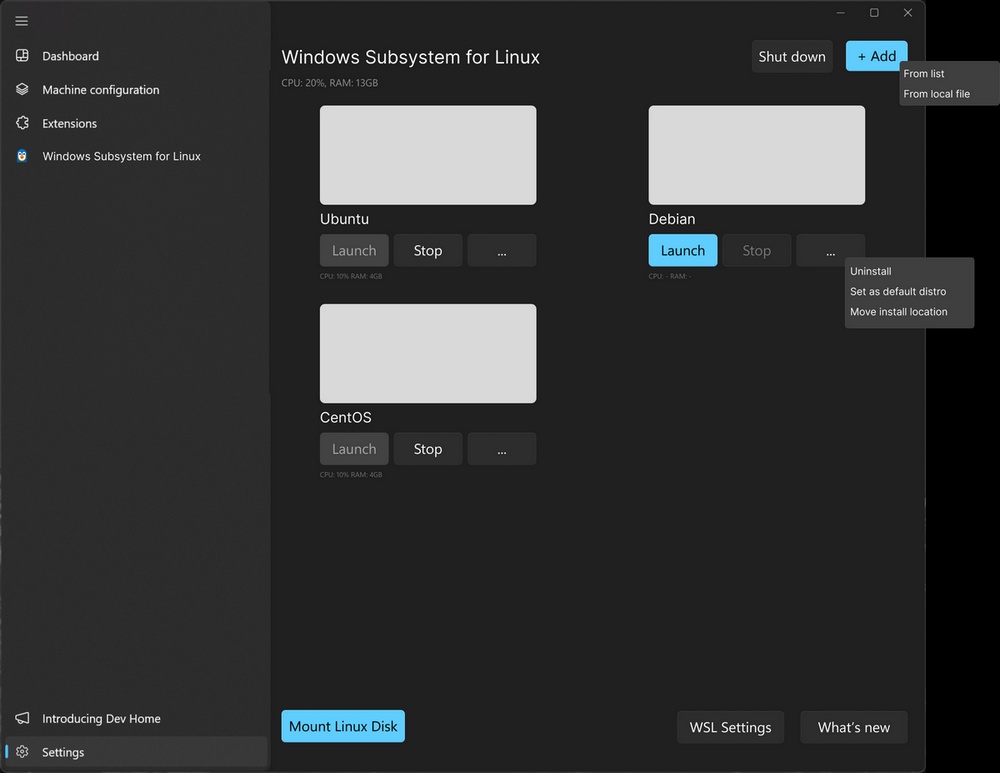
Bonne nouvelle si vous utilisez WSL (Windows Subsystem for Linux), vous devriez bientôt échapper au bon vieux terminal puisque Microsoft travaille actuellement sur une interface qui nous permettra de gérer nos distros Linux adorées directement depuis Windows 11.
Les petits gars de chez Microsoft ont tout prévu puisqu’il y aura un onglet dédié dans Dev Home qui va permettre de voir vos VM, d’afficher leur conso, de les supprimer, de les mettra par défaut…etc. Bref, de tout gérer en mode click-o-drome comme d’hab chez krosoft.
Ils ont également pensé à un système pour y monter des disques formatés sous Linux, gérer les mises à jour et nous tenir au jus des dernières nouveautés. C’est pas beau ça ?
Le but pour Microsoft, c’est surtout de démocratiser WSL et de le rendre accessible au plus grand nombre. Bon, bien sûr pour le moment, tout n’est pas encore parfait et il y a encore du taf pour rendre l’intégration vraiment fluide et trouver le bon équilibre entre simplicité et fonctionnalités. Mais je leur fais confiance ^^.
Bref, surveillez bien les mises à jour de Dev Home dans les prochains mois, parce que ça va bouger ! Et si vous voulez suivre l’avancée du projet, n’hésitez pas à checker régulièrement le repo GitHub.
Vous utilisez Linux sur Windows à l'aide de la fonctionnalité Windows Subsystem for Linux ? Sachez que Microsoft devrait vous permettre de gérer vos distributions Linux à partir de l'interface graphique. Faisons le point sur cette nouveauté à venir.
Les utilisateurs de Windows 10 et Windows 11 peuvent utiliser Linux depuis leur système d'exploitation principal à l'aide de la fonctionnalité Windows Subsystem for Linux, dont la version 2 s'appuie sur Hyper-V pour permettre l'utilisation d'un véritable noyau Linux. Ceci permet aux utilisateurs de pouvoir utiliser Ubuntu, Debian, etc... Directement depuis Windows.
Voici d'ailleurs quelques tutoriels sur le sujet :
Actuellement, la configuration et la gestion de Windows Subsystem for Linux s'effectue à partir de la ligne de commande, via l'exécutable "wsl.exe". Par exemple, la commande ci-dessous sert à obtenir la liste des distributions Linux actuellement installées.
wsl --list
À en croire une suggestion pour WSL apparue sur le GitHub de Microsoft, les développeurs souhaiteraient ajouter à Windows une interface graphique permettant de gérer les distributions Linux installées dans le cadre de la fonction WSL. Sur GitHub, l'entreprise américaine a demandé des idées sur l'utilisation de Dev Home pour gérer toutes les distributions Linux installées.
Une copie d'écran a même été ajoutée. Sur cette image, nous pouvons voir plusieurs options, dont la possibilité de lancer, démarrer, d'ajouter ou de désinstaller une distribution Linux, mais aussi de déplacer la distribution Linux vers un autre emplacement. Autres informations intéressantes : la quantité de RAM et de CPU consommée par Windows Subsystem for Linux. Par ailleurs, ceci devrait permettre de lancer une distribution Linux en tant que l'utilisateur de son choix ("as a specific user").
Cette nouveauté permettrait aux utilisateurs d'avoir plus facilement une vue d'ensemble sur les distributions Linux installées, et ceci pourrait aussi faciliter leur gestion. De quoi rendre WSL plus accessible ? Probablement. En tout cas, cette nouvelle interface pourrait être intégrée directement à l'application Dev Home destinée aux développeurs... Quoi qu'il en soit, cette interface graphique manque actuellement à WSL...

 Connexion