Vue lecture

Il y a de nouveaux articles disponibles, cliquez pour rafraîchir la page.

Canonical releases Landscape 24.04 LTS

With 12 years of support, Landscape 24.04 LTS adds snap and repository management controls to a modernised systems management web portal and API.
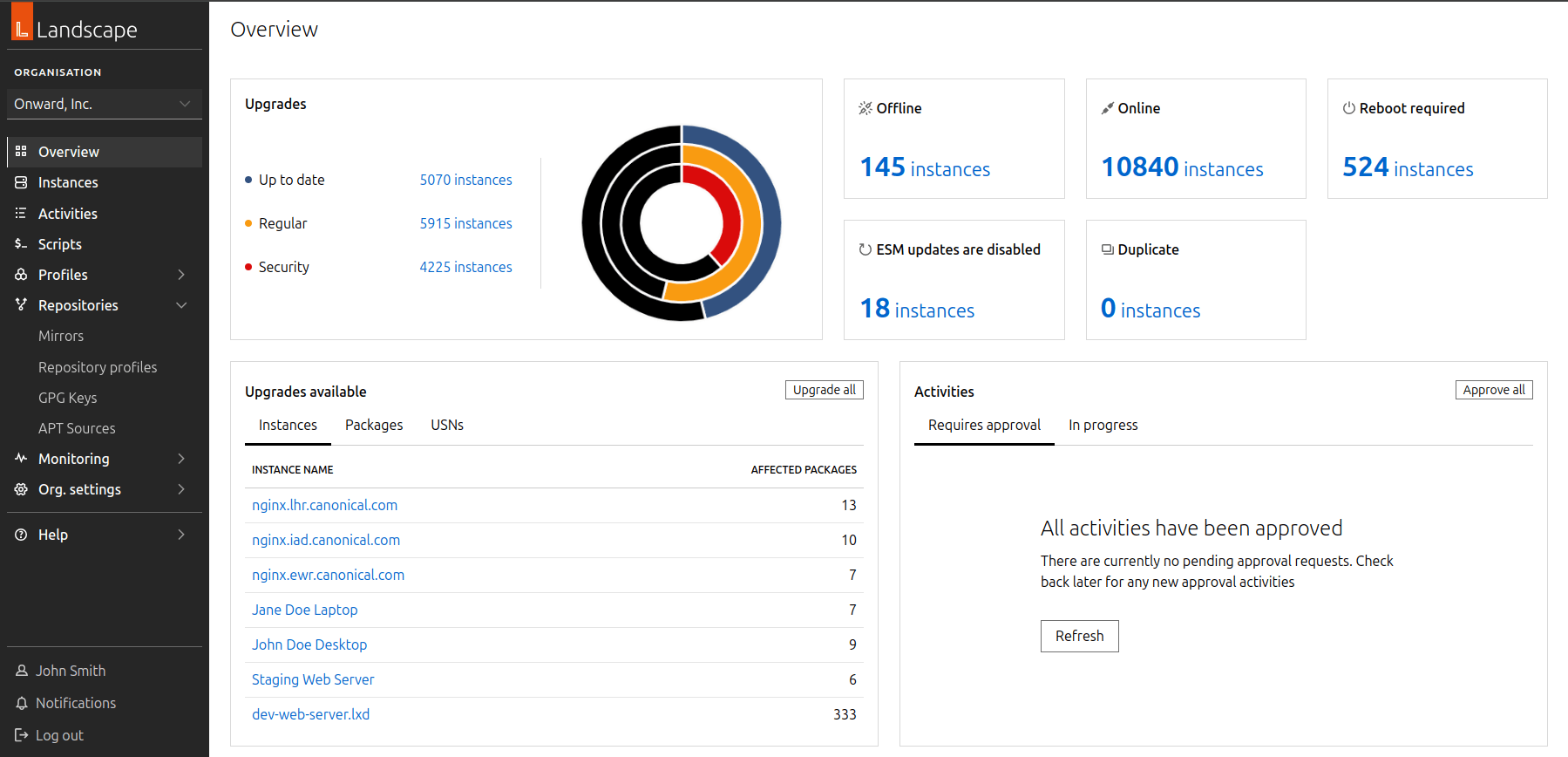
Screenshot of the new Landscape Dashboard

London, 30 April 2024.

Today Canonical announced the availability of Landscape’s first LTS release. Landscape 24.04 LTS features a new versioned API, a new web portal with accessibility and performance in mind, and intuitive controls for software distribution. Landscape 24.04 LTS comprises Landscape Server and Landscape Client. With a modernised backend and web portal in place, engineering teams can work efficiently, focusing on patches and new features.

Predictable release cadence and 12 years of support for LTS versions

Building on Canonical’s commitment to reliability, Landscape releases going forward will align with Ubuntu LTS and interim releases for predictable security coverage, feature patches, and bug fixes.

Landscape Server 24.04 can be installed on Ubuntu 22.04 LTS and Ubuntu 24.04 LTS releases with Ubuntu Pro. Landscape Server 24.04 is compatible with the previous four Ubuntu LTS releases (Ubuntu 16.04 LTS onwards), and will manage future Ubuntu releases including Ubuntu 26.04 LTS.

Like Ubuntu 24.04 LTS, this Landscape release gets a 12 year commitment for security maintenance and support. Landscape 24.04 LTS will get five years of bug fixes and incremental feature patches until August 2029. Ubuntu Pro subscribers can continue using Landscape 24.04 LTS after these 5 years for a total of 12 years, with the Legacy Support add-on.

A new web portal built with Canonical’s Vanilla Framework

Vanilla Framework provides consistent and uniform design patterns across Canonical’s products. Landscape joins MAAS, LXD UI, and others with a responsive React JS driven user interface. This web portal is built using a new versioned API serving JSON data. This API enhancement ensures seamless integration for developers, offering a forward-looking assurance that applications developed with a particular API version will remain robust and reliable, regardless of future updates to Landscape and its accompanying API endpoints.

The Monitoring feature from the legacy Landscape web portal has not yet been migrated to Landscape 24.04 LTS, yet. Monitoring will arrive as an incremental patch for Landscape 24.04 LTS with a modern charting library, a monitoring API, and companion documentation.

Lastly, the web portal provides a significant improvement in Lighthouse scores for Accessibility. The dashboard’s accessibility scores as measured by Lighthouse improved from 70% to 95%. Landscape 24.04 LTS has a web portal which is accessible to users with deficiencies in colour vision, complete colour blindness, and other visual impairments.

Save terabytes in storage and bandwidth with point-in-time repository snapshots
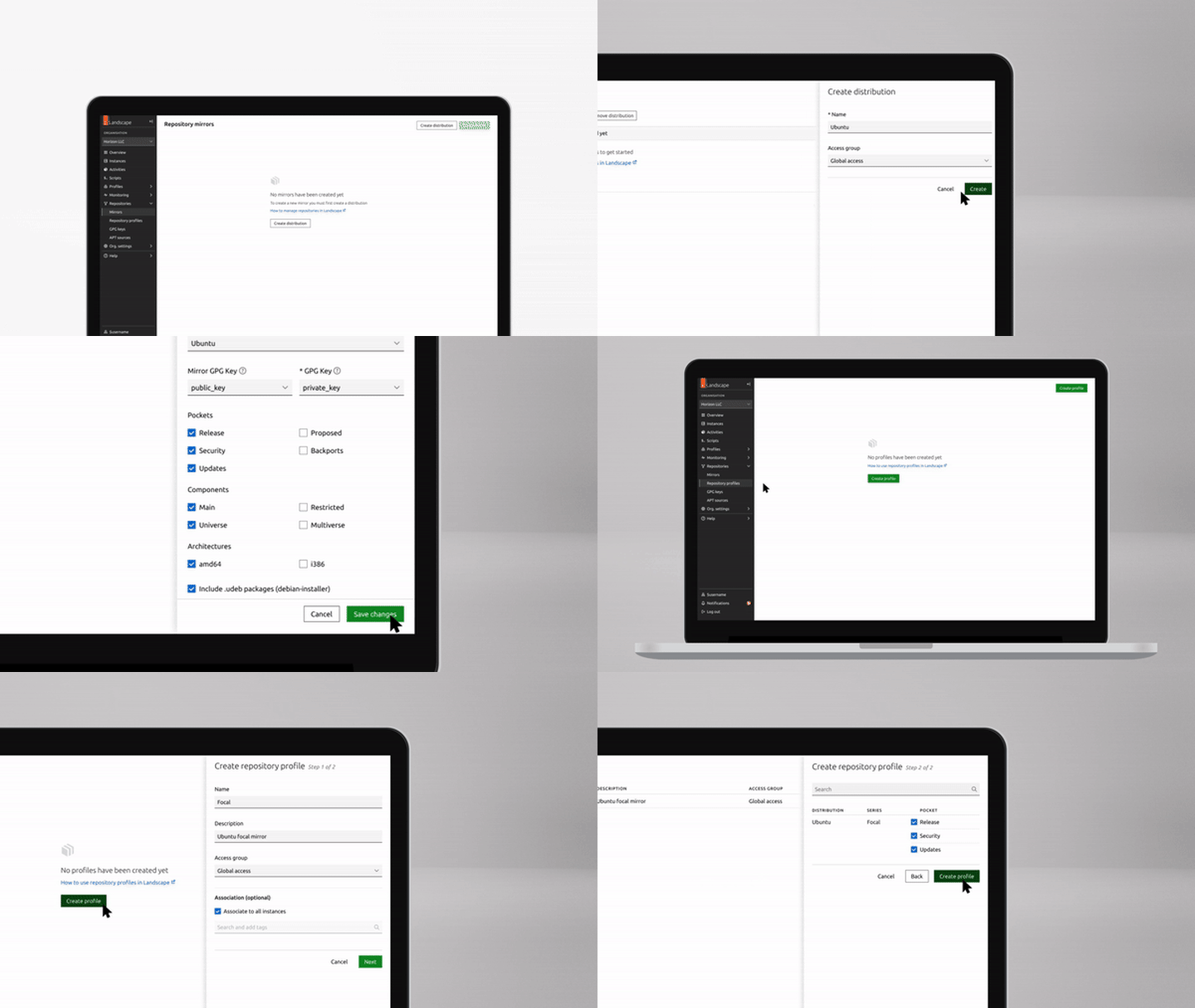
An overview of the repository management experience in the new Landscape web portal.

Landscape’s new web portal includes an intuitive point-and-click repository mirroring experience, and the repository snapshot service is available as a source when mirroring repositories. In late 2023, Canonical became the first Linux provider to integrate a repository snapshot service with Microsoft Azure’s update mechanisms. Landscape 24.04 LTS brings this simplified and safe deployment practice capability on-premises, and to mixed and hybrid cloud environments.

Benefits of Landscape’s repository snapshot service include predictable updates, consistency across deployments, and simplified repository mirroring, providing improved resilience and security for Ubuntu workloads.

Beyond the conveniences afforded to system administrators, the repository snapshots implementation also saves over 100 terabytes of disk space and network throughput, for organisations making complete repository mirrors every week. Canonical’s on-demand repository snapshot capability extends back to February 2023 for non-ESM (Expanded Security Maintenance) repositories. This innovation frees storage and network resources, because scheduled mirroring and archival of these mirrors becomes unnecessary.

Snap management for Ubuntu and Ubuntu Core

Beyond managing Ubuntu interim and LTS releases, Landscape 24.04 LTS also manages Ubuntu Core, Canonical’s snap based, immutable and strictly-confined operating system. A strictly confined Landscape Client snap package provides snap package management, remote script execution, monitoring and inventory capabilities to Ubuntu, for anyone interested in consuming the latest Landscape Client as a snap package.

Snap management capabilities also exist in the Landscape Client Debian package, available in the Main repository for Ubuntu 24.04 LTS, and in ppa:landscape/self-hosted-24.04 for previous versions of Ubuntu.

Distribution of updated snap revisions is controlled through the Snap Store, which organisations can self-host as a snap store proxy, or as a brand store if there is a need to distribute proprietary non-public snaps within the organisation. Snap management in Landscape 24.04 LTS can add, remove, update, and pause updates from Snap Store, snap store proxy, and brand stores.

Landscape has historically provided fine grained management of Debian packages installed through the apt package manager. With Landscape 24.04 LTS, similar management capabilities arrive for snap packages, with consideration for revisions and channels, which are specific to the snap ecosystem. By default, snap packages self-update through transactional over-the-air updates, and have the ability to rollback automatically if the upgrade fails. Organisations and individuals interested in uniformity across machines can pin revisions of a snap to machines, and ensure consistency between machines that must be uniformly configured.

Next steps

About Canonical

Canonical, the publisher of Ubuntu, provides open source security, support and services. Our portfolio covers critical systems, from the smallest devices to the largest clouds, from the kernel to containers, from databases to AI. With customers that include top tech brands, emerging startups, governments and home users, Canonical delivers trusted open source for everyone.

Learn more at canonical.com.
Canonical releases Ubuntu 24.04 LTS Noble Numbat

Canonical’s 10th Long Term Supported release sets a new standard in performance engineering, enterprise security and developer experience.

London, 25 April 2024.

Today Canonical announced the release of Ubuntu 24.04 LTS, codenamed “Noble Numbat”, available to download and install from https://ubuntu.com/download.

Ubuntu 24.04 LTS builds on the advancements of the last three interim releases as well as the contributions of open source developers from around the world to ensure a secure, optimised and forward looking platform.

“Ubuntu 24.04 LTS takes a bold step into performance engineering and confidential computing to deliver an enterprise-grade innovation platform, supported for at least 12 years”, said Mark Shuttleworth, CEO of Canonical. “For developers we are delighted to announce TCK certified Java, an LTS for .NET and the latest Rust toolchain.”

Performance engineering tools pre-enabled and pre-loaded

Canonical is dedicated to raising the bar for quality and performance across the entire Ubuntu ecosystem. 

Ubuntu 24.04 LTS delivers the latest Linux 6.8 kernel with improved syscall performance, nested KVM support on ppc64el, and access to the newly landed bcachefs filesystem. In addition to upstream improvements, Ubuntu 24.04 LTS has merged low-latency kernel features into the default kernel, reducing kernel task scheduling delays.

Ubuntu 24.04 LTS also enables frame pointers by default on all 64-bit architectures so that performance engineers have ready access to accurate and complete flame graphs as they profile their systems for troubleshooting and optimisation.

“Frame pointers allow more complete CPU profiling and off-CPU profiling. The performance wins that these can provide far outweigh the comparatively tiny loss in performance. Ubuntu enabling frame pointers by default will be a huge win for performance engineering and the default developer experience”, said Brendan Gregg, Computer Performance Expert and Fellow at Intel. Tracing with bpftrace is now standard in Ubuntu 24.04 LTS, alongside pre-existing profiling tools to provide site reliability engineers with immediate access to essential resources.

Integrated workload accelerators bring additional performance improvements. Canonical and Intel worked together to integrate Intel® QuickAssist Technology (Intel® QAT) for the first time ever in an LTS. Intel QAT enables users to accelerate encryption and compression in order to reduce CPU utilisation and improve networking and storage application performance on 4th Gen and newer Intel Xeon Scalable processors. 

“Ubuntu is a natural fit to enable the most advanced Intel features. Canonical and Intel have a shared philosophy of enabling performance and security at scale across platforms”, said Mark Skarpness, Vice President and General Manager of System Software Engineering at Intel.

Increased developer productivity with LTS toolchains

Ubuntu 24.04 LTS includes Python 3.12, Ruby 3.2, PHP 8.3 and Go 1.22 with additional focus dedicated to the developer experience for .NET, Java and Rust.

With the introduction of .NET 8, Ubuntu is taking a significant step forward in supporting the .NET community. NET 8 will be fully supported on Ubuntu 24.04 LTS and 22.04 LTS for the entire lifecycle of both releases, enabling developers to upgrade their applications to newer .NET versions prior to upgrading their Ubuntu release. This .NET support has also been extended to the IBM System Z platform.

“We are pleased about the release of Canonical Ubuntu 24.04 LTS and the increased performance, developer productivity, and security that it provides our joint customers,” said Jeremy Winter, Corporate Vice President, Azure Cloud Native. “Ubuntu is an endorsed Linux distro on Microsoft Azure, and an important component for many of Microsoft’s technologies, including .NET, Windows Subsystem for Linux, Azure Kubernetes Service, and Azure confidential computing. Microsoft and Canonical have a close engineering relationship spanning everything from update infrastructure in Azure to developer tooling, notably .NET 8 which is part of the Noble Numbat release from day one. We look forward to continuing our strong collaboration with Canonical to enhance developer productivity and provide a robust experience for Ubuntu on Azure.”

For Java developers, OpenJDK 21 is the default in Ubuntu 24.04 LTS while maintaining support for versions 17, 11, and 8. OpenJDK 17 and 21 are also TCK certified, which means they  adhere to Java standards and ensure interoperability with other Java platforms. A special FIPS-compliant OpenJDK 11 package is also available for Ubuntu Pro users.

Ubuntu 24.04 LTS ships with Rust 1.75 and a simpler Rust toolchain snap framework. This will support the increasing use of Rust in key Ubuntu packages, like the kernel and Firefox, and enables future Rust versions to be delivered to developers on 24.04 LTS in years to come.

New management tools for Ubuntu Desktop and WSL

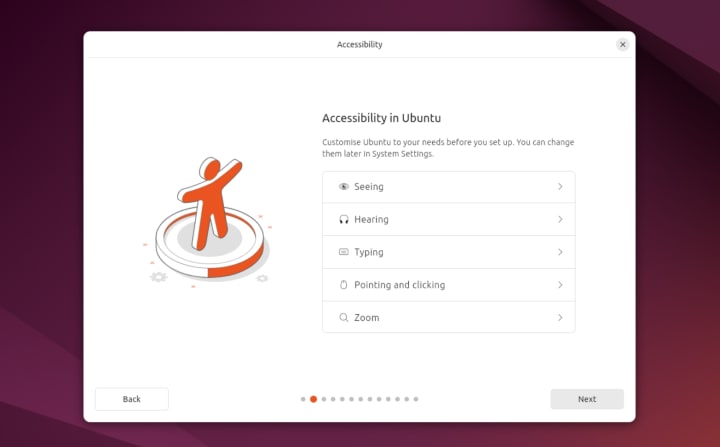
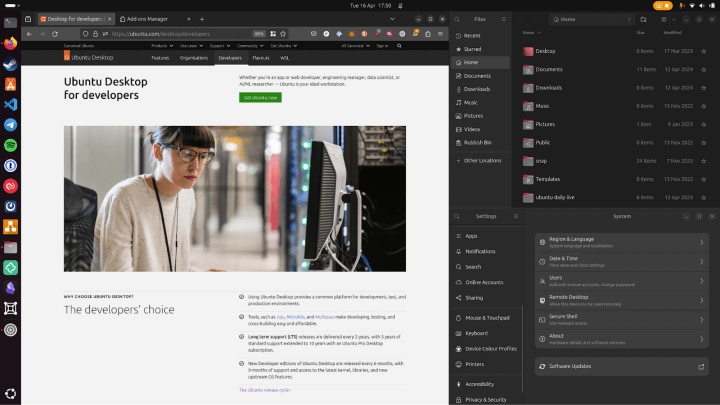
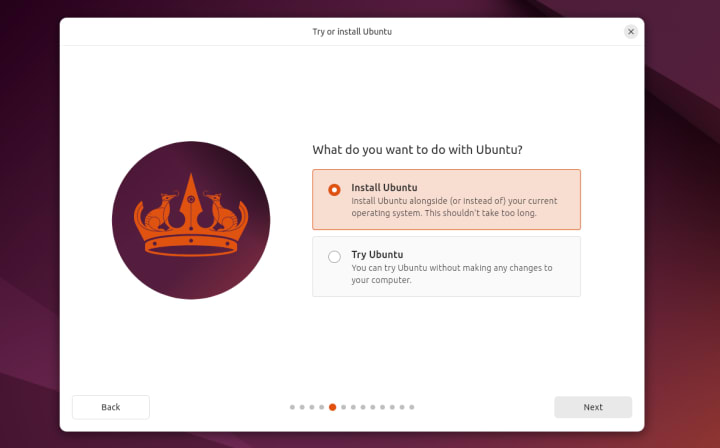
For the first time in an LTS, Ubuntu Desktop now uses the same installer technology as Ubuntu Server. This means that desktop administrators can now use image customisation tools like autoinstall and cloud-init to create tailored experiences for their developers. The user interface has also received a makeover, with a modern design built in Flutter.

For those managing mixed Windows and Ubuntu environments, the Active Directory Group Policy client available via Ubuntu Pro now supports enterprise proxy configuration, privilege management and remote script execution.

Canonical continues to invest in Ubuntu on Windows Subsystem for Linux (WSL) as a first class platform for developers and data scientists. Starting with Ubuntu 24.04 LTS, Ubuntu on WSL now supports cloud-init to enable image customisation and standardisation across developer estates.

Confidential computing on the cloud and private data centres

Confidential computing secures data at runtime from vulnerabilities within the host privileged system software, including the hypervisor. It also protects data against unauthorised access by 

infrastructure administrators. Today, Ubuntu offers the most extensive portfolio of confidential virtual machines, available across Microsoft Azure, Google Cloud, and Amazon Web Services.

Ubuntu is also the first and only Linux distribution to support confidential GPUs on the public cloud, starting with a preview on Microsoft Azure. Building on the silicon innovation of NVIDIA H100 Tensor Core GPUs and AMD 4th Gen EPYC processors with SEV-SNP, Ubuntu  confidential VMs are ideal to perform AI training and inference tasks on sensitive data.

Ubuntu also supports confidential computing in private data centres. Thanks to a strategic collaboration between Intel and Canonical, Ubuntu now seamlessly supports Intel® Trust Domain Extensions (Intel® TDX) on both the host and guest sides, starting with an Intel-optimised Ubuntu 23.10 build.  With no changes required to the application layer, VM isolation with Intel TDX greatly simplifies the porting and migration of existing workloads to a confidential computing environment.

12 years of support with new Ubuntu Pro add-on 

To meet the needs of Canonical’s enterprise customers, Ubuntu 24.04 LTS gets a 12 year commitment for security maintenance and support. As with other long term supported releases, Noble Numbat will get five years of free security maintenance on the main Ubuntu repository. Ubuntu Pro extends that commitment to 10 years on both the main and universe repositories. Ubuntu Pro subscribers can purchase an extra two years with the Legacy Support add-on

The 12 year commitment also applies to earlier Ubuntu releases, starting with 14.04 LTS. The LTS expansion offers benefits for individuals and organisations who want to gain even more stability while building on top of Ubuntu’s wide array of open source software libraries. 

Next steps

About Canonical 

Canonical, the publisher of Ubuntu, provides open source security, support and services. Our portfolio covers critical systems, from the smallest devices to the largest clouds, from the kernel to containers, from databases to AI. With customers that include top tech brands, emerging startups, governments and home users, Canonical delivers trusted open source for everyone. 

Learn more at https://canonical.com/

Ubuntu Desktop 24.04 LTS: Noble Numbat deep dive

20 years in the making. Ubuntu 24.04 LTS brings together the latest advancements from the Linux ecosystem into a release that is built to empower open source developers and deliver innovation for the next 12 years.

The road to Noble Numbat has proven to be an exciting journey through successively ambitious interim releases, experimenting with new approaches to security (and tackling last minute CVEs), evolving our core desktop apps, and continuing our commitment to performance and compatibility across a wide array of hardware supported by the brand new Linux 6.8 kernel.

Whilst each LTS is a significant milestone, it’s never the final destination. We look forward to extending and expanding on what we’ve delivered today both within the lifecycle of Ubuntu 24.04 LTS and in future releases, always considering how we can live up to our mission, and the values of Ubuntu Desktop.

Let’s get into the details.

Rethinking provisioning

Addressing the fundamental issue of “how do I get Ubuntu on this machine?” is still one of our biggest priorities. Whilst today Ubuntu ships pre-installed on millions of desktops, laptops and workstations around the world thanks to our partnerships with OEMs like Dell, HP and Lenovo, more than ten times as many users install the operating system themselves each year. Here’s what we’re adding to simplify Ubuntu installations.

Unifying the stack

Over the last few interim releases we have aligned the underlying tech stack of the desktop installer to use the same Subiquity back end as Ubuntu server, creating a consistent codebase across both platforms to deliver feature parity and easier maintainability. This is complemented by a brand new front end built in Flutter which has been iterated on significantly over the past year to improve access to accessibility options, increase clarity on the user experience and deliver a polished and improved experience.

Additional encryption options

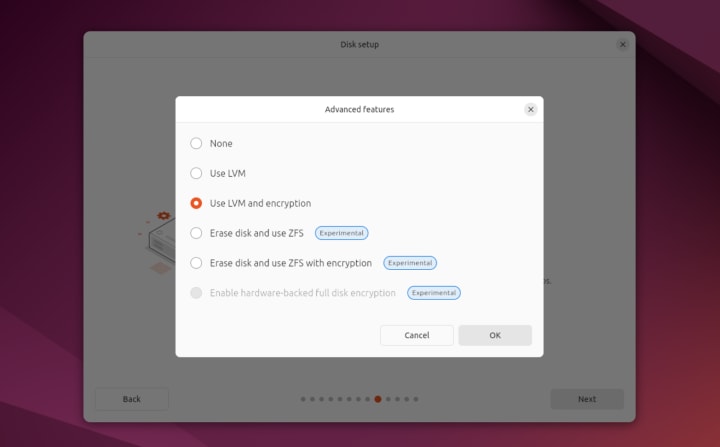
As part of this migration we’ve brought ZFS guided install back as a filesystem option and added support for ZFS encryption. We’ve also added improved guidance for dual-boot setups, particularly in relation to BitLocker. One major request from users has been support for hardware-backed full disk encryption and it makes its first appearance in an experimental form in Ubuntu 24.04 LTS. This implementation has certain limitations at launch which restrict its use to those devices that only require a generic kernel with no third party drivers or kernel modules, and does not currently support firmware upgrades. We intend to extend the hardware compatibility of this feature over time within the lifecycle of this release, with support for NVIDIA drivers as our first priority.

Integrated autoinstall

One of the most exciting new additions is the surfacing of autoinstall support in the graphical installer. Users or enterprises who want to create a customised, repeatable, automated installation flow can now provide the address of a local or remote autoinstall.yaml file and let Subiquity take over from there.

Check out this getting started tutorial to see how easy it is to automate user-creation, install additional apps and configure your filesystem in a format you can use across multiple machines.

This brings us a number of steps closer to the long term goal of zero touch provisioning, and we plan to add additional support for SSO authentication to access protected autoinstall files in a corporate environment at a later date.

New core apps

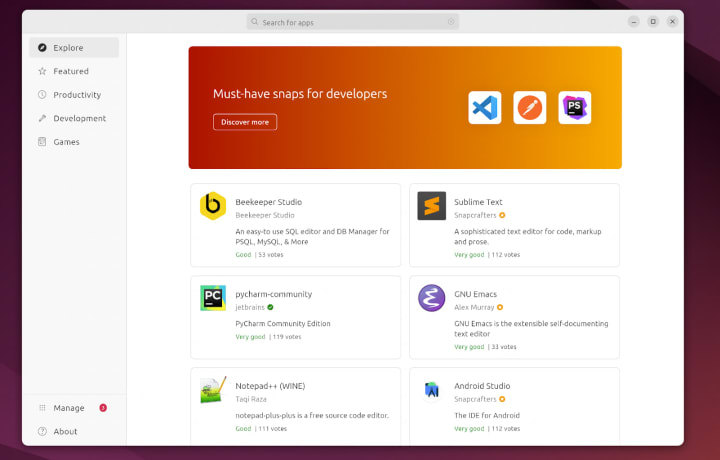
The new features don’t stop once you’ve installed Ubuntu Desktop. The new App Center (also flutter-based) is another notable highlight, bringing a modern, more performant new look to app discovery with clearer categories and application management functionality. Since its initial launch, the App Center now includes a new ratings service to allow users to vote on the quality of their apps and view an aggregated score from other users. These scores, combined with the other rich meta-data available from the Snap Store, will make it easier for us to deliver additional discovery mechanisms such as top charts, most popular or recently updated.

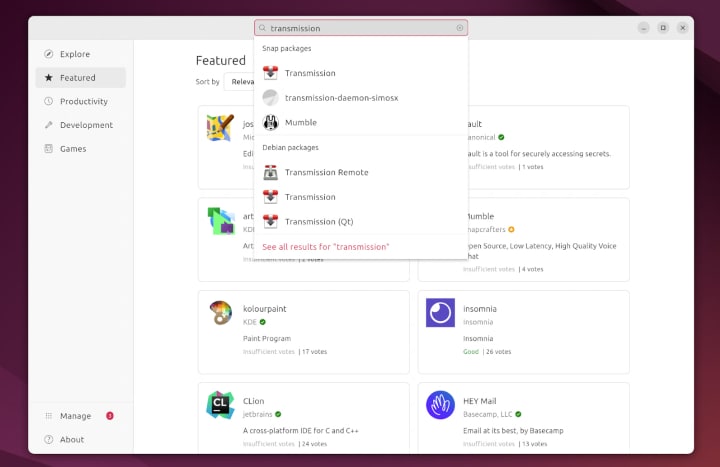
While the App Center defaults to a snap-centric view by default to enable us to deliver these usability features, you can still use it to find and install deb packages via the search toggles.

As part of the new App Center development we’ve split out firmware updates into their own dedicated app. This not only allows a richer experience managing firmware but also improves performance since the old Ubuntu Software application would need to remain permanently running in the background to check for new firmware on previous releases.

GNEW GNOME

Ubuntu Desktop 24.04 LTS continues our commitment to shipping the latest and greatest GNOME with version 46. This release delivers a host of performance and usability improvements including file manager search and performance, expandable notifications and consolidated settings options for easier access.

As usual, Ubuntu builds on the excellent foundation provided by GNOME with a number of extensions and additions. The colour picker allows users to tailor their desktop highlights to their taste, triple buffering improves performance on Intel and Raspberry Pi graphics drivers and the addition of the Tiling Assistant extension enables quarter screen tiling support for better workspace management.

Consistent networking across desktop and server with Netplan 1.0

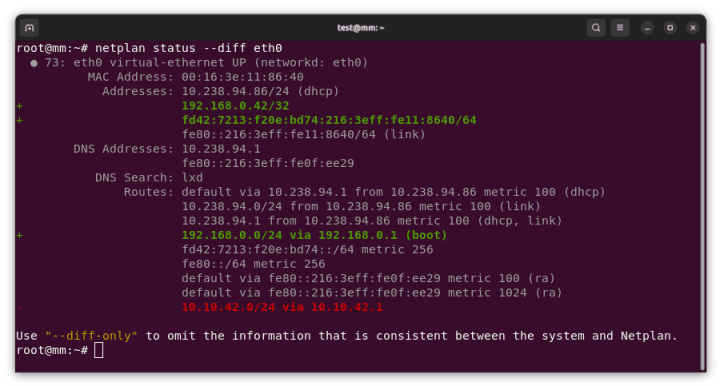
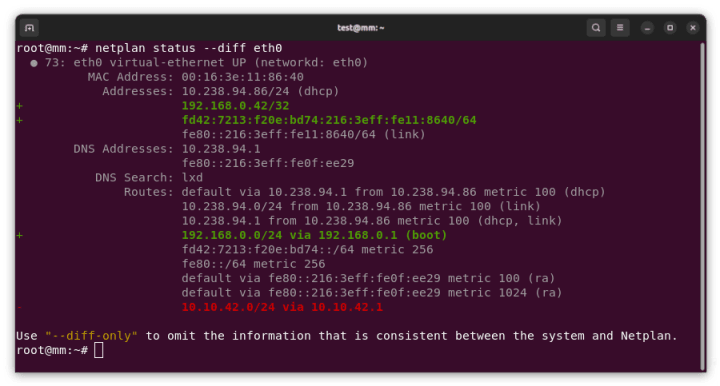
In Ubuntu 23.10 we included Netplan as the default tool to configure networking on desktop, unifying the stack across server and cloud where Netplan has been the default since 2016. This change enables administrators to consistently configure their Ubuntu estate regardless of platform. With the recent release of Netplan 1.0, all platforms also benefit from new features around wireless compatibility and usability improvements such as netplan status –diff.

It is important to note that Netplan does not replace NetworkManager and will not impact workflows that prefer the previous configuration methods. NetworkManager has bidirectional integration with Netplan, meaning changes made in either configuration are updated and reflected in both.

You can read more about this bidirectionality in Lukas’ previous blog. To find out what’s new in Netplan 1.0, check out his recent announcement.

Comprehensive GPO support with Active Directory

Ubuntu Desktop is highly prevalent in enterprise engineering and data science teams in enterprise, academic and federal institutions around the globe, whilst Windows remains the corporate OS of choice for other departments. Canonical’s Landscape is highly effective at monitoring, managing and reporting on the compliance of Ubuntu instances across desktop, server and cloud, however desktop IT administrators are often looking for solutions that help them manage mixed Ubuntu and Windows devices.

On-premise Active Directory has been the preferred management tool for Windows administrators for many years, and still represents the majority share of organisations. User authentication with Active Directory on Linux has been a standard for some time as part of the System Services Security Daemon (SSSD), however in Ubuntu 22.04 LTS we introduced additional support for Group Policy Objects (GPOs) allowing further compliance configuration. Over the course of our interim releases this GPO support has been expanded to cover the majority device and user policies requested by Active Directory administrators, including:

  • Privilege management and removal of local admins
  • Remote scripts execution
  • Managing apparmor profiles
  • Configuring network shares
  • Configuring proxy settings
  • Certificate autoenrollment

In addition to the pre-existing policies available on Ubuntu 22.04 LTS. This delivers a best in class solution for administrators looking to empower their developers with Ubuntu Desktop.

Going forward, our attention is now turning to support third party cloud-based identity providers following a proof of concept implementation of Azure Active Directory enrollment in Ubuntu 23.04. We are currently in the process of expanding on the functionality delivered in that release as part of a new implementation and look forward to talking more about that in the near future.

Finally, for those developers who remain on Windows due to internal policy requirements, we are continuing to invest in enterprise tooling for Ubuntu on Windows Subsystem for Linux (WSL). Ubuntu 24.04 LTS supports cloud-init instance initialisation, enabling administrators to seed custom config files on their developer’s machines to create standardised Ubuntu environments. This is a more robust solution than existing import/export workflows and represents the first step toward future management and compliance tooling.

Secure software management in Ubuntu Desktop 24.04 LTS

Underneath the hood, Ubuntu 24.04 LTS also includes a number of security improvements for those developing and distributing software within the Ubuntu ecosystem. In Ubuntu 23.10 we landed a new version of software-properties that changed the way Personal Package Archives (PPAs) are managed on Ubuntu. 

PPAs are a critical tool for development, testing and customisation, enabling users to install software outside of the official Ubuntu archives. This allows for a great deal of software freedom but also comes with potential security risks due to the access they are granted to your OS. In Ubuntu 24.04 LTS, PPAs are now distributed as deb822-formatted.sources files with their signing key directly embedded into the file’s signed-by field. This establishes a 1:1 relationship between the key and the repository, meaning one key cannot be used to sign multiple repositories and removing a repository also removes its associated key. In addition, APT now requires repositories to be signed using stronger public key algorithms.

Unprivileged user namespace restrictions

Another significant security enhancement is the restriction of unprivileged user namespaces. These are a widely used feature of the Linux kernel that provide additional security isolation for applications that construct their own sandboxes, such as browsers which would then use that space to execute untrusted web content. So far so good, however the ability to create unprivileged user namespaces can expose additional attack surfaces within the Linux kernel and has proven to be a step in a significant number of exploits. In Ubuntu 24.04 LTS, AppAmor is now used to selectively control access to unprivileged user namespaces on a per application basis so that only applications with legitimate need can leverage this functionality.

You can read more about this change as well as a range of other security enhancements to the latest Ubuntu release in the security team’s deep dive.

Improved proposed pocket

The proposed pocket is used as a staging area for software updates prior to their release to the wider Ubuntu user base. In the past this pocket has been an all-or-nothing experience, with users who opt in to updates from proposed needing to take all updates that were available. As a result the chance of introducing system instability was significantly increased, disincentivising those who wanted to provide testing support for specific features in advance of their wider availability.

In Ubuntu 24.04 LTS we have lowered the default apt priority of updates in “proposed” to allow users to specify exactly which packages they want to install and which they want to remain stable. This change is designed to increase the confidence of users who want to test specific features ahead of their general release.

Building the future, together

This brings us to the end of this deep dive into the motivations and decisions behind just some of the features of the latest Long Term Supported release of Ubuntu Desktop. It has been a challenging and exciting experience to see each of these building blocks come together over the last three interim releases. With Ubuntu Desktop 24.04 LTS our goal has been to build a platform ready to stand the test of time, and the foundation for your next, great open source project.

As always, the story continues. Thank you for joining us.

Get started today

Introducing Netplan v1.0 – stable, declarative network management

New “netplan status –diff” subcommand, finding differences between configuration and system state

As the maintainer and lead developer of Netplan, I’m proud to announce the general availability of Netplan v1.0 after more than 7 years of development efforts. Over the years, we’ve had approximately 80 individual contributors from around the globe. This includes many contributions from our Netplan core-team at Canonical as well as organisations like Microsoft and Deutsche Telekom. Those contributions, alongside the many we receive from our community of individual contributors, solidify Netplan as an active and trusted open source project. To make Netplan even more dependable, we have also started shipping upstream patch releases, such as 0.106.1 and 0.107.1, which make it easier to integrate fixes into our users’ custom workflows.

With the release of version 1.0 the team have focused on stability. Being a major version upgrade, it allowed us to drop some long-standing legacy code from the libnetplan1 library. Removing this technical debt increases the maintainability of Netplan’s codebase going forward. The upcoming Ubuntu 24.04 LTS and Debian 13 releases will ship Netplan v1.0 to millions of users worldwide.

Netplan 1.0 highlights

In addition to stability and maintainability improvements, it’s worth looking at some of the new features that were also included in the latest release:

  • Simultaneous WPA2 & WPA3 support.
  • Introduction of a stable libnetplan1 API.
  • Mellanox VF-LAG support for high performance SR-IOV networking.
  • New hairpin and port-mac-learning settings, useful for VXLAN tunnels with FRRouting.
  • New netplan status –diff subcommand, finding differences between configuration and system state.

I’d also like to shed some light on new functionality that was integrated within the past two years for those upgrading from the previous Ubuntu 22.04 LTS which used Netplan v0.104:

  • We added support for the management of new network interface types, such as veth, dummy, VXLAN, VRF or InfiniBand (IPoIB). 
  • Wireless functionality was improved by integrating Netplan with NetworkManager on desktop systems, adding support for WPA3 and adding the notion of a regulatory-domain, to choose proper frequencies for specific regions. 
  • To improve maintainability, we moved to Meson as Netplan’s buildsystem, added upstream CI coverage for multiple Linux distributions and integrations (such as Debian testing, NetworkManager, snapd or cloud-init), checks for ABI compatibility, and automatic memory leak detection. 
  • We increased consistency between the supported backend renderers (systemd-networkd and NetworkManager), by matching physical network interfaces on permanent MAC address when the match.macaddress setting is being used, and added new hardware offloading functionality for high performance networking, such as Single-Root IO Virtualisation virtual function link-aggregation (SR-IOV VF-LAG).

The much improved Netplan documentation, that is now hosted on “Read the Docs”, and new command line subcommands, such as netplan status, make Netplan an accessible tool for declarative network management and troubleshooting.

Further integrations

Those changes pave the way to integrate Netplan into 3rd party projects, such as system installers or cloud deployment methods. By shipping the new python3-netplan Python bindings to libnetplan, it is now easier than ever to access Netplan functionality and network validation from other projects. We are proud that the Debian Cloud Team chose Netplan to be the default network management tool in their official cloud-images for Debian Bookworm and beyond. Ubuntu’s NetworkManager package now uses Netplan as it’s default backend on Ubuntu 23.10 Desktop systems and beyond. Further integrations happened with cloud-init and the Calamares installer.

Learn More

Please check out the Netplan version 1.0 release on GitHub! If you want to learn more, follow our activities on Netplan.io, GitHub, Launchpad, IRC or our Netplan Developer Diaries blog on discourse.

The Coronation of a New Mascot: Noble Numbat

Whether it’s via a popular vote, divine providence or magical women lying in ponds distributing swords, it has often been individuals of great renown or noble birth who have ascended to the throne. On the eve of our 20th anniversary, we are thrilled to present the Noble Numbat, our mascot for Ubuntu 24.04 LTS. 

Humble beginnings 

The numbat, a small enigmatic marsupial from Australia may not be the first creature that comes to mind when one ponders nobility. However, looks can be deceiving. These incredible and endangered species are actually pocket size anteaters which live purely on ants that they catch with a tongue a third the length of their body. With a back of black and white stripes much like a kingly robe, they were elected as the state animal emblem of Western Australia. The numbat is a testament that those from humble beginnings can make their mark on the world.

A crowning achievement

Ubuntu, in the same regard, has grown from a fledgling dream of a more human-friendly Linux into a trusted platform that powers millions of devices around the world. For this LTS (long term support) release we wanted to capture that essence of grandeur and the stateliness of our small Myrmecobiidae friend. 

We are very excited to unveil and crown the official mascot wallpaper. Give your computer or phone a majestic upgrade by downloading these Noble Numbat Wallpapers in a variety of formats and sizes. 

Art of the round table

This majestic wallpaper will be joined by a collection of others from the current incarnation of the Ubuntu Wallpaper Competition. This year’s competition has attracted other Numbat contestants, exciting scenery from the land of the Numbat, and abstract art in honor of their majesty. We cordially invite you to behold the distinguished recipients of this year’s accolades:

Mascot

Fuwafuwa Nanbatto-san by @amaral
Little numbat boy by @azskalt

Digital art

Province of the South of France by @orbitelambda
Monument Valley (Arizona) by @orbitelambda

Nature

Mount Fuji, Japan by @amaral
Northan Lights by @mizuno-as

Others

Lightbulb Rainbow by @audioaddict
Clouds by @moka-hun

Get involved

In the grand tapestry of our Ubuntu realm, the Ubuntu Wallpaper Competition stands as one avenue for you, esteemed allies and artisans, to contribute to our vibrant community. I invite you to explore the many ways to join our collective endeavor. Venture to https://ubuntu.com/community/contribute  and enrich Ubuntu with your creativity and collaboration.

❌