
 Connexion
Add a Progress Bar to GNOME Shell Media Control Applet
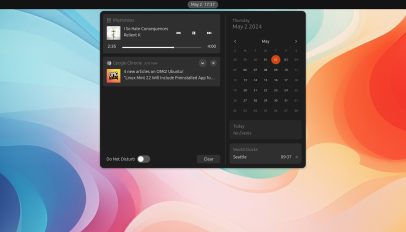 Media Progress is a new GNOME Shell extension that adds a real-time progress bar to the MPRIS notification/sound control doohickey that shows in the notification area. This extension doesn’t do else bar (heh) that, but as simple enhancements go it’s a nifty one. More than a mere indicator, the progress bar the extension adds is interactive and seekable. Click anywhere in the progress bar to jump to that position (which is handy if listening to something long, like a podcast or audiobook). As of writing the Media Progress extension supports GNOME 46. To use it you will need to be […]
You're reading Add a Progress Bar to GNOME Shell Media Control Applet, a blog post from OMG! Ubuntu. Do not reproduce elsewhere without permission.
 A big update to Extension Manager, a popular 3rd-party tool to browse, install, and manage GNOME Shell extensions without the need for a web browser, has been released. If you’re into customising Ubuntu, be it changing the look and layout, adding animated effects, patching in new features and capabilities, or modifying underlying behaviour, you’ll know that GNOME Shell extensions are essential — as is this terrific, user-friendly tool. Extension Manager 0.5 is described as a “Performance & Polish” release by its developer Matt Wakeman, and with an update to libadwaita 1.5, smarter adaptive behaviour, (much needed) search fixes, and other […]
 A new GNOME Shell extension lets you turn any app in to a picture-in-picture window on Ubuntu. You’re probably familiar with picture-in-picture mode (PiP) in web browsers as Mozilla Firefox and Google Chrome both let you to “pop-out” videos from websites like YouTube. This lets you view them in a thumbnail-size window that’s outside of the browser, floating over/on top. For online video PiP is useful. It means I can switch to a different tab but keep watching a YouTube video (or media from any supported site) or follow an online video tutorial, e.g., ‘how to do cool thing in […]
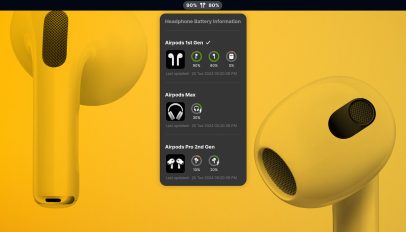 Do you use Apple AirPods or Beats wireless headphones with Ubuntu (or any Linux distribution using GNOME Shell) and want to be able to check battery levels on your desktop? Well, now you can! The new Airpod Battery Monitor GNOME Shell extension makes it easy to check the battery levels of your AirPods or Beats bluetooth headsets. Don’t See AirPods Battery Levels in Ubuntu? Apple’s wireless audio devices (including Beats, an Apple subsidiary) work “out of the box” in Ubuntu and other Linux distros) using the regular Bluetooth stack you won’t see any indication of their battery level. Not seeing […]