Le FabLab UtoPi est installé dans les locaux de l’IUT du Creusot. L’IUT dispose bien entendu d’un réseau informatique efficace mais ultra protégé. Ils nous ont autorisé un PC (identifié par son adresse MAC) sur une seule prise murale ! On comprend les règles que la sécurité impose, mais d’un autre côté, quand les membres […]
At the world’s leading industrial trade fair, companies from the mechanical engineering, electrical engineering and digital industries as well as the energy sector will come together to present solutions for a high-performance, but also sustainable industry at Hannover Messe. This year, Qualcomm brought its DX Summit to Hannover Messe, putting together business and technology leaders to discuss digital transformation solutions and experiences that are moving enterprise forward today, from manufacturing to logistics, transportation, energy and more.
Canonical will join the Qualcomm DX Summit at Hannover Messe on April 23rd , 2024, where industry experts will delve into the cutting-edge technologies that are driving Industry 4.0 forward. We’re looking forward to meeting our partners and customers on-site to discuss the latest in open-source innovation, and solutions on edge AI. Fill in the form and get a free ticket for Qualcomm DX Summit and Hannover Messe from Canonical.
Secure and scale your smart edge AI deployments with Ubuntu
During the event, Canonical will present a talk using a real-world case-study to showcase our joint offering with Qualcomm and illustrate how Canonical solutions benefit enterprise IoT customers to bring digital transformation and AI to their latest IoT projects.
Presenter: Aniket Ponkshe, Director of Silicon Alliances, Canonical
Date and time: 2:20 pm – 2:40 pm, April 23rd, 2024
The collaboration will bring Ubuntu and Ubuntu Core to devices powered by Qualcomm® processors
Today Canonical, the publisher of Ubuntu, announced a collaboration with Qualcomm Technologies, Inc., the latest major System-on-Chip manufacturer and designer to join Canonical’s silicon partner program.
Through the partner program, Qualcomm Technologies will have access to a secure, open source operating system, and optimised flavour of Ubuntu for Qualcomm Technologies’ software. In addition, optimised Ubuntu and Ubuntu Core images will be available for Qualcomm SoCs, enabling enterprises to meet their regulatory, compliance and security demands for AI at the edge and the broader IoT market with a secure operating system that is supported for 10 years.
Security-first and AI ready
The massive growth in AI and edge computing is exciting for device manufacturers. However, it also brings considerable challenges due to cybersecurity regulations which place increased security demands on embedded devices. On top of this, devices have to be easy to adopt and use by developers, and need to remain performant.
To help meet these challenges, Qualcomm Technologies chose to partner with Canonical to create an optimised Ubuntu for Qualcomm IoT chipsets, giving developers an easy path to create safe, compliant, security-focused, and high-performing applications for multiple industries including industrial, robotics and edge automation.
“The combination of Qualcomm Technologies’ processors with the popularity of Ubuntu among AI and IoT developers is a game changer for the industry,” commented Dev Singh, Vice President, Business Development and Head of Building, Enterprise & Industrial Automation, Qualcomm Technologies, Inc. “The collaboration was a natural fit, with Qualcomm Technologies’s Product Longevity program complementing the 10-year enterprise security and support commitments made by Canonical.”
Ideal to speed up time to market
Canonical and Ubuntu offer Qualcomm Technologies the tools and peace of mind to meet new IoT, AI and edge computing market challenges head on.
By placing Ubuntu and Ubuntu Core at the centre of its devices and products, Qualcomm Technologies is creating a generation of devices that will be easy for developers to use and adopt.
The collaboration between Qualcomm Technologies and Canonical will provide options to the industry to accelerate time to market and reduce development costs. Developers and enterprises can benefit from the Ubuntu Certified Hardware program, which features a growing list of certified ODM boards and devices based on Qualcomm SoCs. These certified devices deliver an optimised Ubuntu experience out-of-the-box, enabling developers to focus on developing applications and bringing products to market.
“Canonical’s partner programs, in conjunction with Canonical’s expertise in guiding customers navigate their AI and IoT journey, help set the industry bar for performance with robustness, security and compliance. The work to integrate and optimise Qualcomm Technologies’ software with Ubuntu will enable channel partners and manufacturers to bring Ubuntu and Ubuntu Core platforms to a wide range of devices“, said Olivier Philippe, VP for Devices Engineering at Canonical.
Join Canonical and Qualcomm at Embedded World
The collaboration between Canonical and Qualcomm Technologies kicks off at the Embedded World conference, held at the exhibition centre in Nuremberg, Germany, on 9 to 11 April 2024.
Visit Canonical booth at [4-354]
Visit Qualcomm booth at [5-161]
To find out more about Canonical’s partnership and optimised services for IoT, edge and AI products, stop by Canonical’s booth , or visit https://ubuntu.com/internet-of-things
About Canonical
Canonical, the publisher of Ubuntu, provides open source security, support and services. Our portfolio covers critical systems, from the smallest devices to the largest clouds, from the kernel to containers, from databases to AI. With customers that include top tech brands, emerging startups, governments and home users, Canonical delivers trusted open source for everyone. Learn more at https://canonical.com/
Qualcomm branded products are products of Qualcomm Technologies, Inc. and/or its subsidiaries. Qualcomm patented technologies are licensed by Qualcomm Incorporated.
Qualcomm is a trademark or registered trademark of Qualcomm Incorporated.
New subscription for IoT deployments brings security and long term compliance to the most advanced open source stack
Nuremberg, Germany. 9 April 2024. Today, Canonical, the publisher of Ubuntu, announced the launch of Ubuntu Pro for Devices – a comprehensive offering that simplifies security and compliance for IoT device deployments. Ubuntu Pro for Devices provides 10 years of security maintenance for Ubuntu and thousands of open source packages, such as Python, Docker, OpenJDK, OpenCV, MQTT, OpenSSL, Go, and Robot Operating System (ROS). The subscription also provides device management capabilities through Landscape, Canonical’s systems management tool, and access to Real-time Ubuntu for latency-critical use cases. Ubuntu Pro for Devices is available directly from Canonical, and from a wide range of original device manufacturers (ODMs) in Canonical’s partner ecosystem, including ADLINK, AAEON, Advantech and DFI.
With this launch, Canonical is expanding its collaboration with ODMs as demand for open source security and compliance grows in the embedded space. Ubuntu Pro for Devices can be combined with Canonical’s existing Ubuntu Certified Hardware programme to offer a best in class Ubuntu experience on devices out-of-the-box and for up to 10 years.
A secure open source supply chain
Today, most application stacks contain open source software, but companies don’t always have the in-house expertise to secure and support their full stack. Canonical patches over 1,000 CVEs each year and provides a 10 year security maintenance commitment for popular toolchains like Python and Go, as well as commonly-used IoT software frameworks like ROS.Companies can consume secure and maintained open source with the same set of guarantees from the same vendor.
“As new legislation is introduced for IoT embedded devices, it is crucial that our customers have a means to securely maintain the operating system along with commonly used applications and dependencies”, said Ethan Chen, General Manager of the Edge Computing Platforms BU at ADLINK. “Ubuntu Pro ensures that IoT devices receive reliable security patches from a trusted source”.
Streamlined compliance
The regulatory landscape is evolving, with the EU Cyber Resilience Act and the U.S. Cyber Trust Mark resulting in a growing need for reliable, long-term access to software security fixes. Ubuntu Pro provides access to critical vulnerability fixes for most of the open source packages enterprises use, providing security coverage for developers and peace of mind for CISOs.
“Many of our customers from across different sectors are using computer vision software that requires regulatory approval. In particular, the latest US regulation makes it important to provide timely CVE fixes for all of the components used in our products. Thanks to Ubuntu Pro for Devices, this is now covered”, said Jason Huang, Director of AAEON’s UP Division.
Ubuntu Pro for Devices offers more than security patching. It also provides certified modules and hardening profiles that enable organisations to achieve compliance with standards such as FIPS, HIPAA, PCI-DSS and others.
“Ubuntu is the most popular Linux distribution. Many of our public sector customers in the US need FIPS compliance, and Ubuntu Pro for Devices is a perfect solution for them”, said Joe Chen, Director at Advantech.
Cost-effective and convenient fleet management
Remote device management is critical for IoT, as a lot of devices are physically inaccessible. Ubuntu Pro for Devices includes device management with Landscape, which automates security patching and audits across Ubuntu estates. Landscape allows administrators to manage their Ubuntu instances from a single portal. They can securely authenticate and add new devices to their IoT fleet, manage software versions and configurations, and monitor device performance and compliance. By grouping multiple devices together, administrators can perform these operations on numerous devices simultaneously, saving both time and effort.
“DFI leverages virtualisation technology to introduce a robust Workload Consolidation platform integrated with our embedded solutions for EV charging stations and other cutting-edge industrial applications. With the ability to use Landscape to manage devices built with DFI boards, we can now provide more reliable solutions to our customers with 10 years of security updates and streamlined fleet maintenance”, said Jarry Chang, DFI Product Center General Manager.
Learn more
Download our datasheet to learn about the capabilities offered in Ubuntu Pro for Devices.
To discuss your use case, contact Canonical or stop by our booth [4-354, Hall 4] at Embedded World in Nuremberg this week.
Embedded World is almost here. With 930+ exhibitors, 200 nonstop hours of knowledge sharing, and an exciting programme structured along 9 tracks with 60+ sessions and 18 classes, Embedded World is the must-attend global event for the embedded community.
Join us at Booth 4-354 in Hall 4 to find out how Canonical, the publisher of Ubuntu, can support your technology stack from cloud to device with unrivalled security. Meet the Canonical team on-site to pick our technical experts’ brains about your embedded Linux business.
Raising the bar for embedded Linux with Ubuntu Core 24
At Canonical we are committed to supporting device manufacturers and IoT pioneers across their deployment journeys by providing a best-in-class experience for embedded Linux in production with Ubuntu Core.
Building on 20 years of innovation within Canonical, Ubuntu Core is a proven embedded Linux OS for Internet of Things (IoT), devices and edge systems. At Embedded World, you’ll connect with manufacturers engaging in large-scale, mass-deployments of Linux boards. Those innovators are pushing the envelope of digital infrastructure with the help of Ubuntu Core, the most popular Linux-based operating system (OS) purposefully designed for the embedded world. By relying on an enterprise-grade Linux distribution supported over 10+ years, they empower their enterprise customers to focus on what drives their business, shortening time-to-market.
Meet our experts at Booth 4-354 in Hall 4 to learn about Ubuntu Core 24, see industry demos, and hear customer stories about running Ubuntu Core. In this release, Core 24 leaps forward in production build and installation, fleet management, graphics operations and cloud integration.
What to expect at our booth
At Embedded World, we will also showcase how we are setting the stage for the future of digitisation in manufacturing and accelerating industrial transformation. We’re eagerly looking forward to presenting our automotive and IoT offerings, showing you how you can integrate security into your technology stack from cloud to device.
In our booth you’ll find demos spotlighting how our customers and partners are using Ubuntu in their devices. Read more about our demos below:
Meet the Husarion Panther
Since its inception in 2013, Husarion has been pioneering the commercialization of ROS in the robotics industry. As an autonomous mobile robot (AMR) manufacturer and innovator, Husarion’s commitment lies in making robotics efficient and accessible for all.
Panther is Husarion’s new professional-grade AMR. Engineered for robustness, with independent BLDC motors for each of its four wheels, Panther is a testament to adaptability – flourishing in diverse landscapes from agriculture to construction.
With their decision to use Ubuntu Core, Husarion has upgraded their software deployment for AMR. Snaps provide a solution for consistent software deployment on robots, by bundling ROS applications with their necessary dependencies.
Together with our partners DFI we are presenting our EV charging station solution. DFI is a global leading provider of high-performance computing technology across multiple embedded industries. With its innovative design and premium quality management system, DFI’s industrial-grade solutions enable customers to optimize their equipment and ensure high reliability, long-term life cycle, and 24/7 durability in a breadth of markets including factory automation, medical, gaming, transportation, smart energy, mission-critical, and intelligent retail.
Their EV charging solution is based on x86 architecture, running on Intel’s Virtualization of Graphic Card (SR-IOV) and Intel Neural Mistral 7B AI model, leveraging advanced connectivity (TSN) and Out-Of-Band Management from the Intel technologies.
At our booth you will find the Bosch Eyes indoor and outdoor security cameras. Part of the Bosch Smart Home ecosystem, these camera’s marry award-winning design with technical excellence built with security in mind using Ubuntu Core.
The second generation Bosch Eyes Outdoor camera comes with person detection, real-time notifications and an integrated alarm system. Its DualRadar technology with two cutting-edge radar sensors enables the camera to detect movements with an exceptionally wide 180° detection range. It can also determine exactly how far away the suspicious movement occurred as well as the exact direction – for twice the security.
At this year’s Embedded World we are showcasing our world-leading ecosystem of partners. Canonical partners with silicon vendors, board manufacturers and ODMs to shorten enterprises’ time-to-market. At the Canonical booth you will find demo boards which are certified on Ubuntu from AMD, Ampere, Mediatek, Nvidia, Qualcomm, Advantech, Aaeon, Adlink, DFI, IEI, ASRock, and Eurotech. Come and ask us about certified hardware on our booth or our partners booths!
Ubuntu Core – the operating system for embedded devices
Our devices field engineering team will be showcasing a set of applications running on Ubuntu Core.
These demos run on multiple platforms which are all enabled and optimised for Ubuntu Core such as: Intel NUC, Mediatek i1200, AMD Kria KV260, Raspberry Pi and even the RISC-V Si-Five board.
The demos will showcase some of Ubuntu Core’s key features including over-the-air (OTA) updates, secure boot and full disk encryption. We’ll also demonstrate how you might use Ubuntu Core as your operating system for smart home, robotics and automotive devices.
Let’s keep in touch
Your learning journey doesn’t end at Embedded World. Discover more about defining your software stack for embedded devices in our latest whitepaper.
Which embedded Linux distribution should you choose? In this whitepaper, we discuss how Yocto and Ubuntu Core solve the most pressing challenges facing any developer working on an embedded device: board bring-up, maintenance, updates, security, and many more to help you decide whether you should make or buy your operating system.
Les nouveautés de Reolink pour ce printemps comportent une caméra Argus Track aux caractéristiques intéressantes. Elle offre des possibilités de PTZ (panoramique et zoom hybride 6x) en 4K, vision nocturne en couleur, et WiFi 5GHz et 2,4GHz. Chose non négligeable, elle est munie d’une batterie qui lui assure une bonne autonomie, et un panneau solaire […]
Earlier this month/week, we announced that you can now benefit from the combined power of Ubuntu Core and Azure IoT Edge to bring the computation, storage, and AI capabilities of the cloud closer to the edge of the network. Azure IoT Edge is a device-focused runtime that enables you to deploy, run, and monitor containerised Linux workloads. Ubuntu Core is a version of Ubuntu that has been specially optimised for IoT and embedded systems. The combination of the two is ideal for those looking for reduced latency, lower bandwidth, and more efficient data processing.
This tutorial helps you get started using an Ubuntu Core device and managing it from the Azure IoT Hub. Azure IoT Hub is the cloud platform which allows you to connect to, configure and deploy Edge workloads directly to your device.
Setting up Ubuntu Core
Ubuntu Core is a minimal, immutable version of Ubuntu focused on providing a reliable and secure platform for connected devices.
Create an Ubuntu SSO Account
Before you can create an Ubuntu Core device, you need to ensure you can connect to it after initial configuration. This will require an Ubuntu SSO account and an SSH keypair.
You can skip this step if you already have an account. If you do not have an SSO account, you can sign up for one here:
In order to authenticate yourself when trying to connect to your Ubuntu Core device, you will need to upload a public SSH key to your SSO account. This will then be automatically downloaded to the Core device during initial configuration.
To generate and upload an SSH key pair, please follow the steps detailed in the link below:
You may also want to come back to this information once you have configured your Core device in the next stage.
Obtaining and configuring an Ubuntu Core Device
For the next stage in the process you will need an IoT device running Ubuntu Core. This can either be a physical device, such as a raspberry pi, or a virtual device on your desktop.
Independently of which option you chose, you should now have a fully working Ubuntu Core device that you can connect to via SSH. You are now ready to provision it for Microsoft Azure.
Installing Azure IoT Edge Snaps
Having created and connected to your Ubuntu Core device, the next step is to install the Azure snaps.
Microsoft provides four snaps for your Ubuntu Core device:
The Identity snap authenticates your device with the Azure cloud.
The Device Agent snap ensures your device is up-to-date.
The Edge snap manages your cloud-deployed workloads on the device.
The Delivery Optimization agent manages downloads of payloads from the Azure cloud.
In addition, Azure’s workloads are distributed as Docker containers and you therefore need to install the Docker Snap to run these.
All five snaps can be installed from your SSH terminal using the following commands:
Note: if you are being asked to use sudo to run snap install, you may need to authenticate yourself with the snap store using sudo snap login <email address>. This will then allow you to perform all snap commands without root privileges.
Wiring up slots and plugs
By default, snaps are dependency-free, untrusted, and strictly confined hence they must be connected to other snaps and system resources once installed using interfaces. Each snap has a selection of plugs and slots that either request or provide certain access. For production deployments, they can be configured to automatically connect to reduce the provisioning workload but to get started you may need to manually configure some of them to ensure they have all the permissions they need.
If installing the snaps from the global snap store, most interfaces will already be connected for you, however there are a few you may need to manually configure.
From an SSH terminal, you can check which interfaces are already connected using the following commands for each snap:
For each snap you will be presented with a list of the interfaces. If the slot is empty, it may need connecting. For example, if you get the following response from snap connections azure-iot-identity:
We can see that some interfaces have been connected but the identity snap can not access hostname information, log information, mount information, system information or the tpm. We need to manually connect them which we can do from our terminal:
The format of this command is snap connect <plug> <slot> but as we are connecting to snapd system slots we do not need to specify them.
IoT Edge
For the IoT Edge agent, we can go through a similar process but this time we also want to connect from one snap (Edge agent) to another (Docker). The following commands should cover all unconnected interfaces.
# Connect to logging and grant permission to query system info

snap connect azure-iot-edge:log-observe

snap connect azure-iot-edge:mount-observe

snap connect azure-iot-edge:system-observe

snap connect azure-iot-edge:hostname-control

# Connect IoT Edge to Docker

snap connect azure-iot-edge:docker docker:docker-daemon
IoT Device agent
undefined

# Connect to logging and grant permission to query system info

snap connect deviceupdate-agent:account-control

snap connect deviceupdate-agent:hardware-observe

#Connect to SnapD

snap connect deviceupdate-agent:snapd-control

#Connect to other Azure Snaps

snap connect deviceupdate-agent:identity-service azure-iot-identity:identity-service
With all the interfaces now connected, we are ready to move onto the connecting to the cloud.
Setting up your Azure IoT Edge account
For the next step, you need to move to the cloud and the Azure IoT Edge portal. If you already have an Azure account, you can sign in here:
You will be given the option to either create a free account (which includes a time-limited, preview credit) or a paid account with access to premium services. Both Azure IoT Hub and Azure IoT Edge are free services that can be used without charge provided you stay within Azure’s usage limitations. More information can be found on this here.
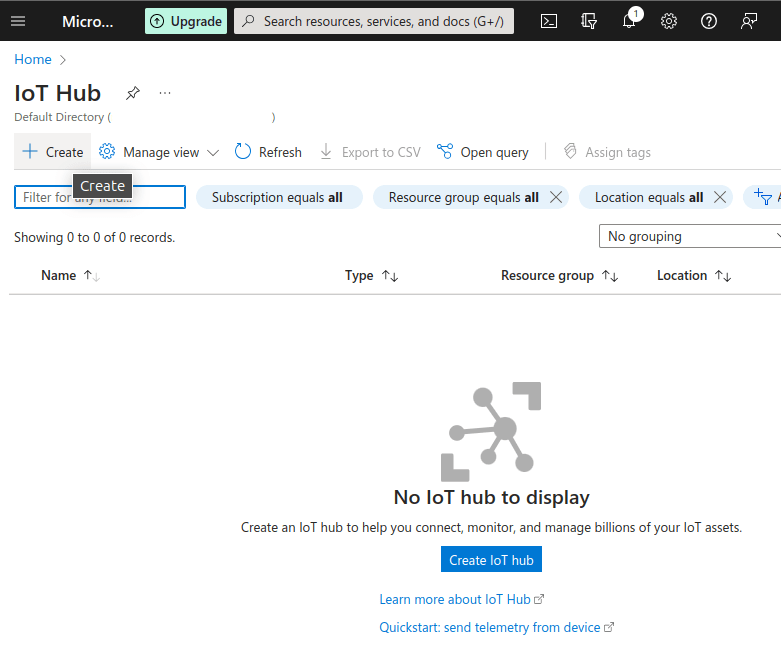
Once you have access to your Azure account and the Azure Portal, you will need to create your IoT Hub. From the Azure services section of the portal, click “More services” and select “IoT Hub” from the “Internet of Things” section.
Once in your IoT Hub, you need to create a Hub. Click the Create button and fill in the details. Once happy, click the ‘Create’ button.
After a brief pause, your Hub will have been deployed and we can now see it in the IoT Hub portal.
Select your Hub and, from the menu on the right hand side of the screen, select Devices.
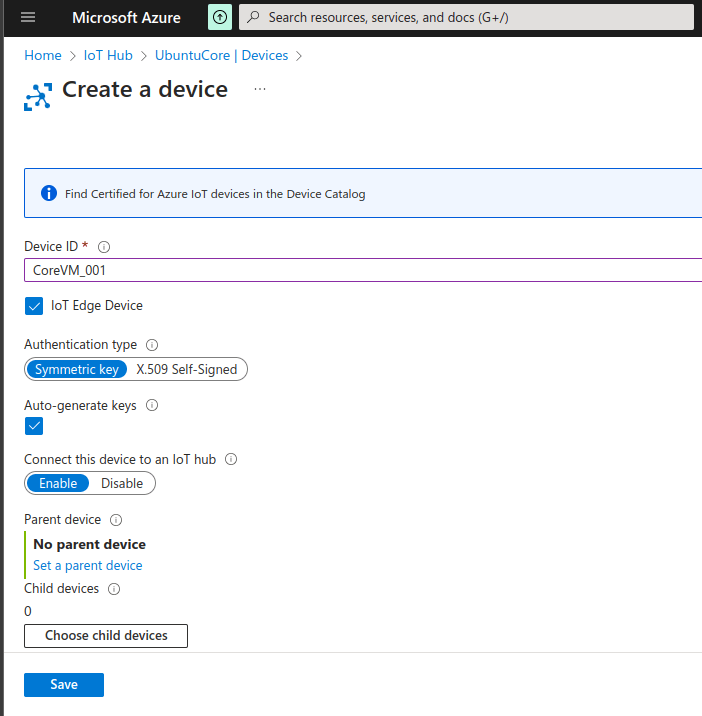
Click “Add Device”, choose a name for your device and select the “IoT Edge Device” checkbox. Choose any other settings you desire and click “Save”.
Again after a slight pause, your device will have been created and added to your Hub.
Select your device from your Hub and you will be presented with the various options and information. For the moment, we are just interested in the “Primary connection string” as we will need this to provision the actual device.
You can view the connection string by clicking on the small eye icon or copy it to your clipboard by clicking the icon to the right.
Provisioning your Device
In order for your Core device to connect to your newly created IoT Hub, it needs to be
configured with the connection string we have just obtained.
Returning to the SSH terminal of your Core device, create a file called config.toml.
At this point it may be useful to install a text editor onto your Core device. Follow the steps below to install the nano strictly confined snap and connect it to your home directory. Then open the config.toml file to edit
Apply that configuration file to your Azure Snap using the following command:
sudo snap set azure-iot-edge raw-config="$(cat config.toml)"
It is also possible to authenticate your device to the Azure IoT Hub using X.509 certificates. For information on how to use that method, please refer to this documentation from Microsoft.
Your Device in Azure IoT Hub
Once configured, your device will download some containers to allow it to run Azure IoT Edge workloads. This may take some time depending on your network connection speed but once complete your device will be visible from your Azure portal and you can configure it with additional workloads from there as well as explore all the offerings Azure has for your device.
You should now have a fully working and configured Ubuntu Core device which can be remotely managed with the Azure IoT Hub. From here you can explore the features Azure IoT has to offer.
If you want to try and deploy your first module to your Edge device, this tutorial from Microsoft shows you how you can deploy a sensing module that will send simulated telemetry data from your device to the cloud. It is the perfect place to get started with your Ubuntu Core Azure IoT Edge device.
For more information on what you can do with Azure IoT, please refer to the Microsoft documentation.
London, 20 March 2024. Canonical has announced that Ubuntu Core, its operating system optimised for the Internet of Things (IoT) and edge, has received Microsoft Azure IoT Edge Tier 1 supported platform status from Microsoft. This collaboration brings computation, storage, and artificial intelligence (AI) capabilities in the cloud closer to the edge of the network.
The power of the cloud on the edge
Azure IoT Edge enables businesses to remotely and securely deploy and manage cloud-native workloads directly on their IoT devices, at scale, and with robust observability.
With the ability to deploy and manage containerised applications on devices, teams can process data, run machine learning models, perform analytics, and carry out other tasks right at the edge of the network. This approach helps reduce latency, conserve bandwidth, and it provides more immediate insights from data near to where it is generated. It is especially useful in scenarios where real-time decision-making is crucial, where network connectivity might be unreliable, or where data privacy and security concerns demand local data processing.
The security of Ubuntu Core
Ubuntu Core is an operating system designed specifically for the IoT and embedded devices. Its range of features make it ideal for secure, reliable, and scalable deployments. Built on the power of Snaps, Ubuntu Core provides a minimal core with support for multiple architectures and types of devices. Security is baked-in with secure boot and full disk encryption, and over-the-air (OTA) transactional updates to ensure that devices are always up to date. Coupled with Canonical’s Long Term Support, which offers up to 10 years of maintenance and security updates, Ubuntu Core provides long-term peace of mind for IoT implementations.
With the introduction of the Azure IoT Edge Snaps suite, the process of deploying edge workloads to the extensive array of devices and architectures supported by Ubuntu Core has become a streamlined, seamless, experience. Combined with the ability to remotely manage and configure both the processing and system components of fleets of devices directly from Azure, teams benefit from robust security and optimised performance.
“With Microsoft committing their support for Ubuntu Core with the release of the Microsoft Azure IoT Edge Snaps we see another example of the industry’s enthusiasm to adopt the operating system to fulfil all of their IoT needs. We look forward to growing this relationship further with Microsoft in the future”. – Michael Croft-White, Engineering Director.
“In collaboration with Canonical, we are making it simpler to reliably connect devices to Microsoft Azure IoT services. Snap support in Azure IoT Edge helps ensure consistent performance, enhanced security, and efficient updates across Linux distributions that support Snaps.”
Kam VedBrat, GM, Azure IoT
Further reading
More information on Ubuntu Core can be found at ubuntu.com/core. Our “Intro to Ubuntu Core 22” webinar is a comprehensive resource for everything you need to know about Ubuntu Core.
If you are not already familiar with Microsoft’s Azure IoT Edge, more information can be found here.
Are you interested in running Ubuntu Core with Azure IoT on your devices and are working on a commercial project?
Canonical, the publisher of Ubuntu, provides open-source security, support and services. Our portfolio covers critical systems, from the smallest devices to the largest clouds, from the kernel to containers, from databases to AI. With customers that include top tech brands, emerging startups, governments and home users, Canonical delivers trusted open source for everyone.
As Canonical approaches its 20th anniversary, we have proven our proficiency in managing a resilient software supply chain. But in the pursuit of excellence, we are always looking to set new standards in software development and embrace cutting-edge quality management practices. This enables us to meet current technological landscape needs. It also paves the way for future innovation, motivating us (as ever) to make open source a key driving force across all industries. In this article I will explore how combining the openness and transparency inherent in open source principles with the right quality management frameworks enables us to lay new foundations for the software-defined industries of tomorrow.
Open source adoption is growing and with it, regulation
The presence of open source software components in regulated industries has accelerated dramatically in the past couple of years and can be found everywhere, from the smallest industrial component to the largest ship in the world. Such a broad application domain brings additional complexity and heightened expectations that we address the evolving need for quality requirements. While language-specific standards were ways to address guidelines in a relatively simple world, this is not enough anymore. Instead, we need to adopt quality models that are not just a compliance requirement, but effectively a way to evaluate the produced engineering components.
While these types of models are often developed in the context of regulated domains in specific industries, they can provide insights that are impactful across a broad range of applications. For instance, ISO 25010, a quality model that is the cornerstone of a product quality evaluation system, is a great framework to help engineers understand the strengths and weaknesses of specific artefacts using static code analysis. By using an objective, reproducible and independent quality model that follows ISO 25010 standard, Canonical can meet the expectations of a broad spectrum of industries and enable the opportunities that open source software brings.
Adding independent quality indicators
TIOBE is supporting Canonical in getting an independent overview of its code quality by checking the reliability, security and maintainability of its software sources. The measurements are based on ISO 25010 and follow a strict procedure defined by TIOBE’s Quality Indicator (TQI). TIOBE provides real-time data integrated in programming environments and separate dashboards and makes use of best-in-class third party code checkers for Canonical.
Paul Jansen, CEO of TIOBE states: “We are thrilled to contribute to the success of Canonical. After having checked the code quality of a lot of Canonical’s projects in our independent and regulated way, it is clear that Canonical is scoring far above the average of the 8,000+ commercial projects we measure every day”.
At Canonical, we believe that Quality Management (QM) is an essential pillar in the development of open source software. That is why we added TQI as one additional control point across our software development lifecycle process. In most industries, the expectations towards innovation but also quality attributes, including the ones highlighted by TIOBE Quality Indicator, are very high. The integration of open source software with industry-recognised quality models marks a paramount step towards achieving excellence and leading to the production of superior software solutions.
Addressing quality management requirements in automotive
A prime example of the advantages of independent quality indicators can be seen in the automotive industry. This sector, with its high demands for safety and technological innovation, presents unique challenges that require impeccable quality and robust software solutions. As vehicles become increasingly software-defined, integrating open source software with industry-recognised quality models becomes not just beneficial but essential. Quality management works as a driving force – not just ensuring the reliability and safety of vehicles – but also the key building block for generating trust in open source within the automotive industry.
As Canonical’s Automotive Sector Lead, Bertrand Boisseau, explains: “The results of the collaboration with TIOBE are crucial, especially in the realm of Software Defined Vehicles (SDVs), where the abstraction and decoupling of software and hardware development cycles is key. The TIOBE TiCS framework supports our R&D efforts related to automotive, enabling us to go beyond the expectations of this demanding ecosystem”.
Conclusion
Our approach is designed to address the inherent complexity of modern software stacks, which are by nature heterogeneous. We make use of quality models like ISO 25010 as accelerators to enhance our quality management processes. At Canonical, these models are instrumental in enriching our continuous improvement practices with measurable data, while also aligning with the expectations of the broader enterprise landscape, particularly when combined with the openness and transparency open source software provides.
If you have embarked on a similar journey to measure quality management in your organisation, I would love to hear about your experience. If you’re eager to join our mission in advancing precision engineering, please explore our openings starting with the Technical Manager Automotive and Industrial as well as our Lead Development Lifecycle Engineer positions. Stay tuned to follow our journey towards engineering excellence and connect with me on LinkedIn.
Canonical recently released the Landscape Client snap which, along with the new snap management features in the Landscape web portal, allows for device management of Ubuntu Core devices. In this blog we will look at how this can be deployed at scale by building a custom Ubuntu Core image that includes the Landscape Client snap and how to configure the image to automatically enrol the device after its first boot.
As we are following the tutorial we will have already set up our Ubuntu One account and now we are ready to create our model assertion. This is the recipe that describes all the components that comprise our image and will therefore need the Landscape Client to be added into the mix.
We will base this example on a Raspberry Pi running Ubuntu Core 22, and so we will start with the reference model file we can download with:
Having gotten our base image definition we want to add the Landscape Client by adding this stanza to the snaps list. As the Landscape Client is currently in beta and doesn’t have a stable release yet, we will specify that with the default-channel parameter. The id parameter is unique to each snap with the value shown below belonging to the client. If you need to find the id of any other snap, you can use the snap info <snap-name> command in your terminal and look for the snap-id.
Now we have our model assertion, we could sign this and build an image and we would have the Landscape Client. However, it would only have a default configuration that wouldn’t do much, leaving us having to manually configure the client. This works perfectly well, but what if we don’t want to have to access each device and do this? Can we pre-configure the client when we build our image? Also, can we make the client automatically enrol without any external intervention?
Of course, the answer to these questions is yes. Yes, we can. We just need to create our own gadget snap.
The gadget snap is a special type of snap that contains device specific support code and data. You can read more about them here in the snapcraft documentation.
This example is based on the official Ubuntu Core 22 gadget snap for the Pi. Fork this repository to your local environment and we can configure it for our needs.
Essentially, all we need to do is append the following configuration at the bottom of the gadget.yaml file that defines the gadget snap:
Don’t forget to replace the placeholder values like <landscape-url> with the relevant config values.
Automatic Registration
The first part of the configuration defines the details of the Landscape server instance we’ll be using and will be the same for all devices that run this image. After this we want to configure the automatic registration component so that the device will register itself with the server shortly after being started up for the first time.
We have three parameters in this example. The first one enables the auto-registration on first boot. The second one, computer-title-pattern, allows us to define the computer title for this specific device.
The pattern uses the bash shell parameter expansion format to manipulate the available parameters. In this example the computer title will be set to the string “test-” followed by the device model starting from the 8th character (see our model assertion) and then the first 8 characters of the device serial number taken from its serial assertion.
For example, in this case it would something like: test-core-22-pi-arm64-f6ec1539
The fields available are listed below. The final parameter though, wait-for-serial-as, tells the auto registration function to wait until the device has been able to obtain its serial assertion from a serial vault before trying to create the title and perform the registration. This is necessary as a completely fresh device will not initially have a serial assertion.
Parameter
Description
serial
Serial from device’s serial assertion
model
model id from device’s serial assertion
brand
brand-id from device’s serial assertion
hostname
device’s network hostname
ip
device’s IP address of primary NIC
mac
device’s MAC address of primary NIC
prodiden
Product identifier
serialno
Serial Number
datetime
date/time of auto-enrolment
Build the Gadget and Updating our Model Assertion
Now we have our configuration for Landscape all set up, we just need to build the gadget snap. This simply requires the following command to be run in the base folder of your local gadget snap repository:
$ snapcraft
After some whirring, you will have your snap and this is the one we want to include in our model assertion.
With our current model assertion, when we build our image, we will go off to the Snap Store and download the listed snaps and include them in the image, including the reference gadget snap. Now we have our own gadget snap, we want to use this one instead.
If you have your own brand store, you can publish your custom gadget snap there. Then change the name and id of the gadget snap in your model assertion and all will be well. If you do not have your own brand store, the process is a little more manual. It is not permitted to upload custom gadget snaps to the global snap store so we will have to use our local .snap file.
The first step is to set the grade of the snap to “dangerous”. This is because your custom gadget snap will not have been signed by the global snap store or a brand store and its provenance can not be verified except by yourself.
Next, remove the snap-id and default-channel values as these are related to downloading from a store. Finally, update the name to that of your snap filename.
Signing the Model Assertion
If you don’t have a signing key yet, run the following command to create one:
Finally, we’ll build the custom Ubuntu Core image from the signed model using the ubuntu-image tool. If you do not have this already it can be installed using the snap install ubuntu-image command.
Ubuntu-image will take our signed model assertion, download all the required snaps and compile them all together into an image file. As we want to use a local snap, we will have to tell it where to find that snap file so we will need the –snap flag. In this case let’s assume the snap file is in the same directory as our signed model assertion.
This will produce the image pi.img which is ready to be written to an sd card and inserted into our Raspberry Pi.
There are various tools for writing this image to an sd card, the quickest is probably to use the startup image creator that is included with most Ubuntu variants and can be found in your app drawer (if not, it is available from the snap store). Select your img file and your target sd card and click “Make Startup Disk”.
Booting up your device
Take your freshly written SD card with the image and put it into your Raspberry Pi. Turn the device on and after a short delay your device should appear fully registered with your Landscape Server.
Conclusion
By following this process we can quickly and easily create an Ubuntu Core device that only needs a power cable and a network cable plugged into it for it to automatically get itself into a state where it can be remotely managed and maintained. This functionality is essential if attempting to deploy a large fleet or installing devices in inaccessible areas.
Learn more
For more information on the power and capabilities of Ubuntu Core check out: Ubuntu Core.
For more information on the features and functionality of Landscape check out: Landscape | Ubuntu.
Are you interested in running Ubuntu Core with Landscape management on your devices and are working on a commercial project? Get in touch with our team today.
As a key technology partner with NVIDIA, Canonical is proud to showcase our joint solutions at NVIDIA GTC again. Join us in person at NVIDIA GTC on March 18-21, 2024 to explore what’s next in AI and accelerated computing. We will be at booth 1601 in the MLOps & LLMOps Pavilion, demonstrating how open source AI solutions can take your models to production, from edge to cloud.
As the world becomes more connected, there is a growing need to extend data processing beyond the data centre to edge devices in the field. As we all know, cloud computing provides numerous resources for AI adoption, processing, storage, and analysis, but it cannot support every use case. Deploying models to edge devices can expand the scope of AI devices by enabling you to process some of the data locally and achieve real-time insights without relying exclusively on the centralised data centre or cloud. This is especially relevant when AI applications would be impractical or impossible to deploy in a centralised cloud or enterprise data centre due to issues related to latency, bandwidth and privacy.
Therefore, a solution that enables scalability, reproducibility, and portability is the ideal choice for a production-grade project. Canonical delivers a comprehensive AI stack with the open source software which your organisation might need for your AI projects from cloud to edge, giving you:
The same experience on edge devices and on any cloud, whether private or public or hybrid
Low-ops, streamlined lifecycle management
A modular and open source suite for reusable deployments
To put our AI stack to the test, during NVIDIA GTC 2024, we will present how our Kubernetes-based AI infrastructure solutions can help create a blueprint for smart cities, leveraging best-in-class NVIDIA hardware capabilities. We will cover both training in the cloud and data centres, and showcase the solution deployed at the edge on Jetson Orin based devices. Please check out the details below and meet our expert on-site.
Artificial intelligence is no longer confined to data centres; it has expanded to operate at the edge. Some models require low latency, necessitating execution close to end-users. This is where edge computing, optimised for AI, becomes essential. In the most popular use cases for modern smart cities, many envision city-wide assistants deployed as “point-of-contact” devices that are available on bus stops, subways, etc. They interact with backend infrastructure to take care of changing conditions while users travel around the city. That creates a need to process local data gathered from infrastructure like internet-of-things gateways, smart cameras, or buses. Thanks to NVIDIA Jetson modules, these data can be processed locally for fast, low-latency AI-driven insights. Then, as device-local computational capabilities are limited, data processing should be offloaded to the edge or backend infrastructure. With the power of Tegra SoC, data can first be aggregated at the edge devices to be later sent to the cloud for further processing. Open-source deployment mechanisms enable such complex setups through automated management, Day 2 operations, and security. Canonical, working alongside NVIDIA, has developed an open-source software infrastructure that simplifies the deployment of multiple Kubernetes clusters at the edge with access to GPU. We’ll go over those mechanisms, and how they orchestrate the deployment of Kubernetes-based AI/machine learning infrastructure across the smart cities blueprint to profit from NVIDIA hardware capabilities, both on devices and cloud instances.
Presenter: Gustavo Sanchez, AI Solutions Architect, Canonical
Build and scale your AI projects with Canonical and NVIDIA
Starting a deep learning pilot within an enterprise has its set of challenges, but scaling projects to production-grade deployments brings a host of additional difficulties. These chiefly relate to the increased hardware, software, and operational requirements that come with larger and more complex initiatives.
Canonical and NVIDIA offer an integrated end-to-end solution – from a hardware optimised Ubuntu to application orchestration and MLOps. We enable organisations to develop, optimise and scale ML workloads.
Canonical will showcase 3 demos to walk you through our joint solutions with NVIDIA on AI/ML:
Accelerate smart city Edge AI deployments with open-source cloud-native infrastructure – Striving for an architecture to solve Edge AI challenges like software efficiency, security, monitoring and day 2 operations. Canonical, working alongside with NVIDIA, has developed an open-source software infrastructure that simplifies training on private and public clouds as well deployments and operations of AI models on clusters at the edge with access to NVIDIA GPU capabilities.
End-to-end MLOps with Hybrid Cloud capable Open-Source tooling – Cost optimization, data privacy, and HPC performance on GPUs are some of the reasons companies have to consider private cloud, hybrid cloud and multi cloud solutions for their Data and AI infrastructure. Open-source cloud agnostic infrastructure for Machine Learning Operations gives companies flexibility to expand beyond public cloud vendor lock-ins, alignment with restricted data compliance constraints and capabilities to take full advantage of their hardware resources, while automating day to day operations.
LLM and RAG open-source infrastructure – This demo shows an implementation of an end-to-end solution from data collection and cleaning to training and inference usage of an open-source large language model integrated using the retrieval augmented generation technique on an open-source vector database. It shows how to scrape information out of your publicly available company website to be embedded into the vector database and to be consumed by the LLM model.
Visit our Canonical booth 1601 at GTC to check them out.
Come and meet us at NVIDIA GTC 2024
If you are interested in building or scaling your AI projects with open source solutions, we are here to help you. Visit ubuntu.com/nvidia to explore our joint data centre offerings.
Edge AI is transforming the way that devices interact with data centres, challenging organisations to stay up to speed with the latest innovations. From AI-powered healthcare instruments to autonomous vehicles, there are plenty of use cases that benefit from artificial intelligence on edge computing. This blog will dive into the topic, capturing key considerations when starting an edge AI project, main benefits, challenges and how open source fits into the picture.
What is Edge AI?
AI at the edge, or Edge AI, refers to the combination of artificial intelligence and edge computing. It aims to execute machine learning models on interconnected edge devices. It enables devices to make smarter decisions, without always connecting to the cloud to process the data. It is called edge, because the machine learning model runs near the user rather than in a data centre.
Edge AI is growing in popularity as industries identify new use cases and opportunities to optimise their workflows, automate business processes or unlock new chances to innovate. Self-driving cars, wearable devices, security cameras, and smart home appliances are among the technologies that take advantage of edge AI capabilities to deliver information to users in real-time when it is most essential.
Benefits of edge AI
Nowadays, algorithms are capable of understanding different tasks such as text, sound or images. They are particularly useful in places occupied by end users with real-world problems. These AI applications would be impractical or even impossible to deploy in a centralised cloud or enterprise data centre due to issues related to latency, bandwidth and privacy.
Some of the most important benefits of edge AI are:
Real time insights: Since data is analysed real time, close to the user, edge AI enables real time processing and reduces the time needed to complete activities and derive insight.
Cost savings: Depending on the use case, some data can often be processed at the edge where it is collected, so it doesn’t all have to be sent to the data centre for training the machine learning algorithms. This reduces the cost of storing the data, as well as training the model. At the same time, organisations often utilise edge AI to reduce the power consumption of the edge devices, by optimising the time they are on and off, which again leads to cost reduction.
High availability: Having a decentralised way of training and running the model enables organisations to ensure that their edge devices benefit from the model even if there is a problem within the data centre.
Privacy: Edge AI can analyse data in real time without exposing it to humans, increasing the privacy of appearance, voice or identity of the objects involved. For example, surveillance cameras do not need someone to look at them, but rather have machine learning models that send alerts depending on the use case or need.
Sustainability: Using edge AI to reduce the power consumption of edge devices doesn’t just minimise costs, it also enables organisations to become more sustainable. With edge AI, enterprises can avoid utilising their devices unless they are needed.
Use cases in the industrial sector
Across verticals, enterprises are quickly developing and deploying edge AI models to address a wide variety of use cases. To get a better sense of the value that edge AI can deliver, let’s take a closer look at how it is being used in the industrial sector.
Industrial manufacturers struggle with large facilities that often use a significant number of devices. A survey fielded in the spring of 2023 by Arm found that edge computing and machine learning were among the top five technologies that will have the most impact on manufacturing in the coming years. Edge AI use cases are often tied to the modernisation of existing manufacturing factories. They include production scheduling, quality inspection, and asset maintenance – but applications go beyond that. Their main objective is to improve the efficiency and speed of automation tasks like product assembly and quality control.
Some of the most prominent use cases of Edge AI in manufacturing include:
Real-time detection of defects as part of quality inspection processes that use deep neural networks for analysing product images. Often, this also enables predictive maintenance, helping manufacturers minimise the need to reactively fix their components by instead addressing potential issues preemptively.
Execution of real-time production assembly tasks based on low-latency operations of industrial robots.
Remote support of technicians on field tasks based on augmented reality (AR) and mixed reality (MR) devices;
Low latency is the primary driver of edge AI in the industrial sector. However, some use cases also benefit from improved security and privacy. For example, 3D printers3d printers can use edge AI to protect intellectual property through a centralised cloud infrastructure.
Best practices for edge AI
Compared to other kinds of AI projects, running AI at the edge comes with a unique set of challenges. To maximise the value of edge AI and avoid common pitfalls, we recommend following these best practices:
Edge device: At the heart of Edge AI are the devices which end up running the models. They all have different architectures, features and dependencies. Ensure that the capabilities of your hardware align with the requirements of your AI model, and ensure that the software – such as the operating system – is certified on the edge device..
Security: Both in the data centres and on the edge devices there are artefacts that could compromise the security of an organisation. Whether we talk about the data used for training, the ML infrastructure used for developing or deploying the ML model, or the operating system of the edge device, organisations need to protect all these artefacts. Take advantage of the appropriate security capabilities to safeguard these components, such as secure packages, secure boot of the OS from the edge device, or full-disk encryption on the device.
Machine learning size: Depending on the use case, the size of the machine learning model is different. It needs to fit on the end device that it is intended to run, so developers need to optimise the model size dictate the chances to successfully deploying it.
Network connection: The machine learning lifecycle is an iterative process, so models need to be periodically updated. Therefore, the network connection influences both the data collection process as well as the model deployment capabilities. Organisations need to check and ensure there is a reliable network connection before building deploying models or building an AI strategy.
Latency: Organisations often use edge AI for real-time processing, so the latency needs to be minimal. For example, retailers need instant alerts when fraud is detected and cannot ask customers to wait at the cashiers for minutes before confirming payment. Depending on the use case, latency needs to be assessed and considered when choosing the tooling and model update cadence.
Scalability: Scale is often limited to the cloud bandwidth to move and process information. It leads to high costs. To ensure a broader range of scalability, the data collection and part of the data processing should happen at the edge.
Remote management: Organisations often have multiple devices or multiple remote locations, so scaling to all of them brings new challenges related to their management. To address these challenges, ensure that you have mechanisms in place for easy, remote provisioning and automated updates.
Edge AI with open source
Open source is at the centre of the artificial intelligence revolution, and open source solutions can provide an effective path to addressing many of the best practices described above. When it comes to edge devices, open source technology can be used to ensure the security, robustness and reliability of both the device and machine learning model. It gives organisations the flexibility to choose from a wide spectrum of tools and technologies, benefit from community support and quickly get started without a huge investment. Open source tooling is available across all layers of the stack, from the operating system that runs on the edge device, to the MLOps platform used for training, to the frameworks used to deploy the machine learning model.
Edge AI with Canonical
Canonical delivers a comprehensive AI stack with all the open source software organisations need for their edge AI projects.
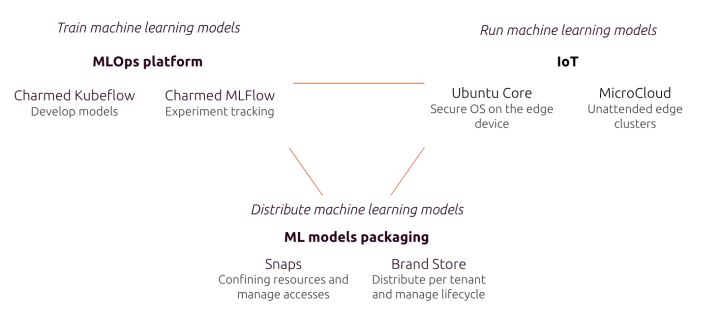
Canonical offers an end-to-end MLOps solution that enables you to train your models. Charmed Kubeflow is the foundation of the solution, and it is seamlessly integrated with leading open source tooling such as MLflow for model registry or Spark for data streaming. It gives organisations flexibility to develop their models on any cloud platform and any Kubernetes distribution, offering capabilities such as user management, security maintenance of the used packages or managed services.
The operating system that the device runs plays an important role. Ubuntu Core is the distribution of the open source Ubuntu operating system dedicated to IoT devices. It has capabilities such as secure boot and full disk encryption to ensure the security of the device. For certain use cases, running a small cloud, such as Microcloud enables unattended edge clusters to leverage machine learning.
Packaging models as snaps makes them easy to maintain and update in production. Snaps offer a variety of benefits including OTA updates, auto rollback in case of failure and no touch deployment. At the same time, for managing the lifecycle of the machine learning of the model and the remote management, brand stores are an ideal solution..
To learn more about Canonical’s edge AI solutions, get in touch.
A la demande d’un membre du FabLab UtoPi, je me suis penché sur la mise en œuvre de l’ESP32 (version chinoise avec un CH340/CH341 pour l’USB) sur un PC portable sous Linux Mint. Plusieurs problèmes se sont posés à ALain, et j’ai essayé de mon mieux de les résoudre. Dans cet article je note ce […]
Je vous ai présenté dans un premier article la carte LSM100A de SNOC pour le Raspberry Pi. J’ai également testé la carte embarquant le même module LSM100A, cette fois pour le Raspberry Pi PICO. J’ai programmé le premier module en Python, celui-ci sera programmé en microPython. Les deux cartes envoient les données vers TTN (The […]
Landscape has been a member of the Canonical product list for almost as long as Canonical has existed. Landscape allows administrators to manage their desktop and server instances from a single centralised portal. With the latest release of Landscape Server (23.10), we’ve introduced the ability to manage snap packages from Landscape – and with a beta release of the Landscape Client snap package now available from our Snap Store, you can also add Ubuntu Core-based devices to your Landscape estate.
Landscape provides remote fleet management services across your entire Ubuntu estate. It allows you to manage software versions and configurations, control security patching, monitor your devices performance and compliance, access management and auditing.
This blog will help you get started using Landscape to manage Ubuntu for IoT devices. We will show you how to install the Landscape Client snap on an Ubuntu Core device, how to configure it and then see the device in your Landscape web portal. Further blogs in this series will address Landscape’s snap management features, larger scale deployments and how to include the snap with your base Ubuntu Core device image.
Why manage your IoT devices with Landscape?
Before we explore configuring your device for management with Landscape, we should address the question of why you should manage your IoT device with Landscape. What benefits do you get and how will it make your life easier?
With a lot of IoT Devices being physically inaccessible, remote device management allows you to interact with your device from anywhere in the world. You can monitor its health, check it is running the latest versions of snaps, reconfigure its settings or just give it a good old reboot – all without leaving your desk. In addition, by grouping multiple devices together, you can perform these operations on numerous devices simultaneously, saving you both time and effort.
Requirements
To follow along with this blog, you will need a suitable account on a Landscape server instance. In order to manage the installed snaps on the device, you will need a self-hosted Landscape server running either the beta or 23.10 version. The functionality to manage snaps will be added to our Landscape SaaS versions shortly although you can still already register and monitor these devices.
Install the Landscape Client snap
First, your need to connect to your Ubuntu Core device using SSH and your Ubuntu One account credentials. You will be required to generate an SSH key pair and upload the public SSH key to your account. During the configuration of Core, you were asked to provide your SSO login credentials to download this public key to your device and allow you to connect. For more information, see how to connect to Ubuntu Core with SSH.
Once you’ve connected to the device, we can install the Landscape Client snap from the snap store. As the snap is currently in beta, we will need to specify that we want the beta channel.
> snap install landscape-client –channel=beta
The installation of the snap will also connect all the necessary interfaces for the client to the device, granting it permission to manage your configuration and installed snaps.
Configure the client
Once you’ve installed the client, we need to configure it to talk to your Landscape Server instance. For this exercise, we will use the Landscape Configuration Wizard. As we will see at the end of this section, you can specify all the necessary settings directly from the command line, but by walking through the wizard, we can see the process more clearly.
Before we start this process, we need to ensure we have some information available.
Computer Title
This is the name that will appear in Landscape when you have completed enrollment. It does not need to be unique but it should help you identify your device when working in the Landscape web portal.
Account Name
As the Landscape server is multi-tenanted, you will need the account to which you would like to enrol your device. For self-hosted Landscape accounts, the account name defaults to “standalone”.
Landscape Domain
The Fully Qualified Domain Name (FQDN) of your Landscape Server. This must be accessible from your device.
Registration Key
The registration key configured for your Landscape account. This is optional but without it you will need to manually confirm all new device additions to your account. If you specify a registration key, you have the option to automatically accept the device provided the keys match. For more information on registration keys and enabling auto-registration, see how to auto-register new computers.
HTTP/HTTPS Proxy URL
These are only required if your network needs a proxy to connect to the Landscape server.
Once this information is collated, run the configuration wizard using the following command:
This completes the registration and enrols your device with the Landscape server.
Accept the registration
If you didn’t specify a registration key and enable auto-registration in the previous steps, you’ll need to accept the registration in your Landscape account.
To accept the registration(s), log in to your Landscape account. You should see a notification telling you a computer needs authorising.
Click on this message, check that the device attempting to enrol is your device and then click accept. If this device has previously existed in Landscape (i.e. if you are reinstalling a device) you can select it during this stage of the registration if you want to reuse the instance.
Your device will then appear in the Computers list and after a few minutes will start populating.
Manage your device
That’s it – with your device enrolled, you can start managing it from the Landscape Server. Start by trying to install a new snap or fixing its version to prevent update? Maybe setup some graphs to monitor how your devices are performing or perhaps set up an automatic alert to email you if one of your devices stops responding? All from the comfort of your own desktop.
Learn more
For more information on the power and capabilities of Ubuntu Core check out: Ubuntu Core.
For more information on the features and functionality of Landscape check out: Landscape | Ubuntu.
Are you interested in running Ubuntu Core with Landscape management on your devices and are working on a commercial project? Get in touch with our team today.
Après l’essai de la passerelle LoRaWan publié il y a quelques jours, la Société Nationale des Objets Connectés (SNOC) m’a proposé de tester deux de ses produits qui permettent de déployer des solutions de Nodes LoRaWAN et Sigfox pour la famille classique Raspberry Pi (1 à 5) et pour le Raspberry Pi PICO. J’ai accepté […]
En début d’année 2023, Sunfounder m’avait fait parvenir une première version de PiDog, leur chien robot. Vous avez pu le voir en action sur différents salons : sur le Fest’Inc de Loos en Gohelle, Nantes Maker Campus 2023, la Maker Faire Eindhoven 2023 ou encore le salon Robotik d’Orchies en fin d’année. Il a également […]
Après un article sur la mise en service de l’imprimante Kingroon KLP1, je suis passé aux premiers essais, assez spectaculaires pour une imprimante de ce prix. Cet article vous montre ces premiers tests. Kingroon KLP1- Les premiers essais de l’imprimante 3D avec Klipper intégré Montage des additifs Dans le précédent article j’avais signalé le problème […]
Elecrow a sorti toute une gamme d’écrans tactiles à base d’ESP32. Ils existent en plusieurs dimensions. J’ai choisi de tester le modèle 2,4 pouces (le moins cher) qui a toutes les caractéristiques des autres modèles. L’écran peut être commandé avec un boîtier en acrylique noir. Pour ma part comme il va intégrer un projet, je […]

 Connexion