Vue lecture

Il y a de nouveaux articles disponibles, cliquez pour rafraîchir la page.

A deep dive into Kubeflow pipelines 

Widely adopted by both developers and organisations, Kubeflow is an MLOps platform that runs on Kubernetes and automates machine learning (ML) workloads. It covers the entire ML lifecycle, enabling data scientists and machine learning engineers to develop and deploy ML models. Kubeflow is designed as a suite of leading open source projects that enable different capabilities such as model serving, training or hypertuning optimisations.

At Canonical, we deliver Charmed Kubeflow – an official distribution of the upstream solution with additional security maintenance, tool integrations, and enterprise support and managed services – so we know a thing or two about the project. In our experience, one of the most  important concepts to understand with respect to both Kubeflow itself and the broader ML lifecycle is machine learning pipelines. Taking advantage of pipelines is the best way to effectively deploy models at scale in production, so let’s break down this critical component in the MLOps landscape.

What is an ML pipeline?

A machine learning pipeline is an important component of ML systems, ensuring simplified experimentation and capability to take models to production. They are a series of steps that automate how ML models are created, in order to streamline the workflow,development and deployment. ML pipelines simplify the complexity of the end-to-end ML lifecycle, helping professionals to develop and deploy models. Amongst their benefits, ML pipelines ensure scalability thanks to their ability to handle large volumes of data while supporting collaboration and reproducibility.

A core value of MLOps platforms such as Kubeflow  is that they enable professionals to build and maintain ML pipelines.

What is Kubeflow Pipelines?

Kubeflow Pipelines or KFP is the heart of Kubeflow. It is a Kubeflow component that enables the creation of ML pipelines. It is used to help you build and deploy container-based ML workflows that are portable and scalable. The main goals of Kubeflow Pipelines are to simplify the following processes:

  • Orchestration of the end-to-end ML pipelines
  • Experimentation with various ideas and techniques
  • Experiment management 
  • Reuse of components and pipelines to enable users to quickly put together end-to-end solutions without having to re-build each time

Components of Kubeflow Pipelines

Kubeflow Pipelines is part of the Kubeflow project. It can be used as part of the project or as an independent tool. It is made of 3 main components:

  • User interface (UI) for managing and tracking experiments, jobs, and runs
  • Engine for scheduling multi-step ML workflows
  • SDK for defining and manipulating pipelines and components

Kubeflow Pipelines use cases

Kubeflow Pipelines is typically most useful for advanced users of Kubeflow or professionals who already have experience with machine learning. You don’t necessarily need KFP in the experimentation phase of the ML journey, but it becomes useful when you want to take yourmodels to production. The main use cases for KFP include:

  • Workflow automation: Data scientists and machine learning engineers often perform a lot of the initial experimentation phase manually to better understand optimisation possibilities and quickly iterate. But once they have defined their workflow, they can use KFP to automate the process and save time.
  • Model deployment to production: Models are usually compiled in a binary file. Traditionally, for the model to be loaded to a server where the requirements for inference are met, this file would be manually copied to  the machine that hosts the application. KFP simplifies this process by enabling you to build automated pipelines to multiple applications or servers.
  • Model maintenance and updates: The ML lifecycle is an iterative process and models need to be updated periodically. KFP helps users run updates and rollbacks across multiple applications or servers. Once the model is updated in one place and the update transaction is complete, KFP ensures the update is quickly applied to all client applications.  
  • Multi-tenant ML environment: Organisations often have large data and ML teams that need to share their resources. KFP enables simple and effective sharing of the environment, where each collaborator gets an isolated environment. It is then utilised by the K8s cluster and tools such as Volcano to schedule resources or manage containers.  This helps professionals isolate workflows and keep track of pending and running jobs for each collaborator. 

Benefits of KFP

Among machine learning specialists, Kubeflow Pipelines is widely adopted for a number of reasons. The most important benefits of KFP include:

  • Streamlined workflow automation: Kubeflow Pipelines allows users to define the machine learning pipelines as a sequence of steps, each with its input, output, and dependencies. This leads to streamlining the machine learning workflows, and reduces the overhead and complexity of managing and executing your pipelines.
  • Improved collaboration: Kubeflow Pipelines provides a central and shared platform for data scientists, machine learning engineers, and IT operations teams to collaborate on machine learning projects. It allows them to share pipelines and artifacts with others, and enables the tracking and monitoring of the pipelines across the entire organisation.
  • Enhanced performance and scalability: Kubeflow Pipelines runs on Kubernetes, which provides a scalable and flexible infrastructure for running machine learning pipelines and models. This allows you to easily scale up and down the pipelines, and ensure that your pipelines are performant and reliable.
  • Resource optimisation: KFP is a cloud native application, so it can leverage the resource schedulers that Kubernetes platforms provide. This leads to optimised usage of the existing resources and faster project delivery.
  • Extensive support for popular machine learning frameworks: KFP provides built-in support for popular machine learning frameworks like TensorFlow, PyTorch, and XGBoost, as well as a rich ecosystem of integrations and plugins for other tools and services. Charmed Kubeflow goes a step further and enables additional integrations with tools and frameworks such as NVIDIA NGC Containers, Triton Inference Server and MLflow.

Whereas Kubeflow Pipelines is a feature-rich tool, it still raises some challenges for beginners. It comes with a steep learning curve and there is limited documentation available. Since it is a fully open source tool, there is a big community that can help beginners, but it can be frustrating at times. You can alleviate these challenges by taking advantage of enterprise support or managed services from organisations which distribute Kubeflow.

Architecture of Kubeflow Pipelines

Kubeflow Pipelines is a complex component with capabilities that unblock users and enable them to automate their workflows and reduce their time spent on manual tasks. The following architecture depicts these capabilities:  

source: Kubeflow community

As the diagram illustrates, users can interact with KFP either through the user interface or through development tools such as Notebooks. Initially, users create components or specify a pipeline using the Kubeflow Pipelines domain-specific language (DSL). Once defined, the compiler transforms the Python code into a YAML static configuration. Then, the Pipeline Service creates a pipeline run from the static configuration. It calls the server of Kubernetes API for creating the necessary Kubernetes resources (CRDs) to run the pipeline. If you have a resource scheduler integrated, you can use it to run the pipeline when resources are available or at a desired time. To complete the pipeline, the containers are executed within the Kubernetes pods, using orchestration controllers.

Two types of data can be stored. The first type is metadata, which includes experiments, jobs, pipeline runs, and single scalar metrics. The second type is artefacts, which includes pipeline packages, views, and large-scale metrics (time series). Metadata is stored in a MySQL database, whereas artefacts are stored within MinIO.  Storing them in an external component also enables portability, so artefacts can be migrated to different clusters or environments.

Kubernetes resources created by the Pipeline Service are monitored by the Persistence Agent. To enable reproducibility, the input and output of the containers are recorded. It enables professionals to use the configurations and replicates different tasks, also being able to check if the results match. They consist of parameters or data artefact URIs and are seen as metadata.

The Pipeline web server enables users to get a visual understanding of the steps from the Kubeflow Pipelines. It presents various information, including list of pipelines currently running, history of pipeline execution, data artefacts and logs for debugging.

Get started with Kubeflow Pipelines

In order to access Kubefow Pipelines, users can either deploy them independently or as part of the Kubeflow project. For simplified deployment, we recommend using Charmed Kubeflow.

  1. Deploy Charmed Kubeflow following the tutorial. You can do it on any environment, including public cloud or on-prem. Ensure that you have enough resources available, so you do not bump into problems along the way
  2. Access the Kubeflow dashboard. In case you are accessing it from a VM or from a public cloud, please ensure that you change the SOCKs proxy settings. There you will have different options, including to upload an existing pipeline or create a new one.
  3. Clone this repository from Github which contains a simple example of how to use some of the components of Kubeflow 
  4. Access the examples from the Notebook. There are several pipelines created which you can run, edit or play with. Of course, they are just examples. In order to build your own pipeline, check the official documentation of the Kubeflow project.
Further reading

Kubeflow vs MLflow

Launch NGC containers with Kubeflow

MLOps pipelines with Kubefow, MLflow and Seldon

Large Language Models (LLMs) Retrieval Augmented Generation (RAG) using Charmed OpenSearch

Improving the relevance of your LLM application by leveraging Charmed Opensearch’s vector database

Large Language Models (LLMs) fall under the category of Generative AI (GenAI), an artificial intelligence type that produces content based on user-defined context. These models undergo training using an extensive dataset composed of trillions of combinations of words from natural language, enabling them to empower interactive and conversational applications across various scenarios.

Renowned LLMs like GPT, BERT, PaLM, and LLaMa can experience performance improvements by gaining access to additional structured and unstructured data. This additional data may include public or internal documents, websites, and various text forms and content. This methodology, termed retrieval-augmented generation (RAG), ensures that your conversational application generates accurate results with contextual relevance and domain-specific knowledge, even in areas where the pertinent facts were not part of the initial training dataset.

RAG can drastically improve the accuracy of an LLM’s responses. See the example below:

“What is PRO?” response without RAG

Pro is a subscription-based service that offers additional features and functionality to users. For example, Pro users can access exclusive content, receive priority customer support, and more. To become a Pro user, you can sign up for a Pro subscription on our website. Once you have signed up, you can access all of the Pro features and benefits.

“What is PRO?” response with RAG

Ubuntu Pro is an additional stream of security updates and packages that meet compliance requirements, such as FIPS or HIPAA, on top of an Ubuntu LTS. It provides an SLA for security fixes for the entire distribution (‘main and universe’ packages) for ten years, with extensions for industrial use cases. Ubuntu Pro is free for personal use, offering the full suite of Ubuntu Pro capabilities on up to 5 machines.

This article guides you on leveraging Charmed OpenSearch to maintain a relevant and up-to-date LLM application.

What is OpenSearch?

OpenSearch is an open-source search and analytics engine. Users can extend the functionality of OpenSearch with a selection of plugins that enhance search, security, performance analysis, machine learning, and more. This previous article we wrote provides additional details on the comprehensive features of OpenSearch. We discussed the capability of enabling enterprise-grade solutions through Charmed OpenSearch. This blog will emphasise a specific feature pertinent to RAG: utilising OpenSearch as a vector database.

What is a vector database?

Vector databases allow you to store and index, for example, text documents, rich media, audio, geospatial coordinates, tables, and graphs into vectors. These vectors represent points in N-dimensional spaces, effectively encapsulating the context of an asset. Search tools can look into these spaces using low-latency queries to find similar assets in neighbouring data points. These search tools typically do this by exploiting the efficiency of different methods for obtaining, for example, the k-nearest neighbours (k-NN) from an index of vectors.

In particular, OpenSearch enables this feature with the k-NN plugin and augments this functionality by providing your conversational applications with other essential features, such as fault tolerance, resource access controls, and a powerful query engine.

Using the OpenSearch k-NN plugin for RAG

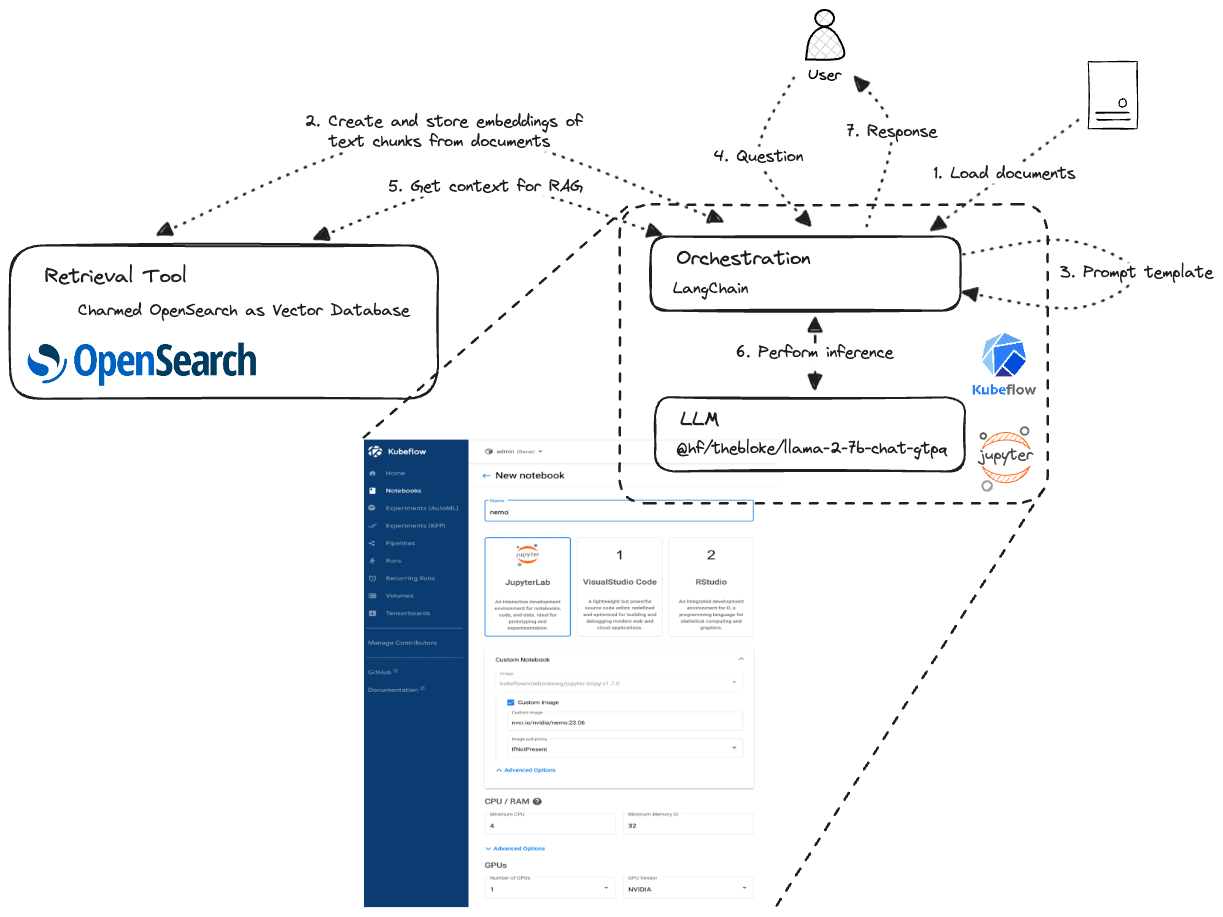
IIn this section, we provide a practical example of using Charmed OpenSearch in the RAG process as a retrieval tool with an experiment using a Jupyter notebook on top of Charmed Kubeflow to infer an LLM.

1. Deploy Charmed OpenSearch and enable the k-NN plugin. Follow the Charmed OpenSearch tutorial, which is a good starting point. At the end, verify if the plugin is enabled, which is enabled by default:

$ juju config opensearch plugin_opensearch_knn
true

2. Get your credentials. The easiest way to create and retrieve your first administrator credentials is to add a relation between Charmed Opensearch and the Data Integrator Charm, which is also part of the tutorial.

3. Create a vector index for your k-NN index.  Now, we can create a vector index for your additional documents encoded into the knn_vectors data type. For simplicity, we will use the opensearch-py client.

from opensearchpy import OpenSearch

os_host = 10.56.118.209
os_port = 9200
os_url = "https://10.56.118.209:9200"
os_auth = ("opensearch-client_7","sqlKjlEK7ldsBxqsOHNcFoSXayDudf30")

os_client = OpenSearch(
    hosts = [{'host': os_host, 'port': os_port}],
    http_compress = True, 
    http_auth = os_auth,
    use_ssl = True,
    verify_certs = False,
    ssl_assert_hostname = False,
    ssl_show_warn = False
)

os_index_name = "rag-index"

settings = {
    "settings": {
        "index": {
            "knn": True,
            "knn.space_type": "cosinesimil"
        }
    }
}

opensearch_client.indices.create(index=os_index_name, body=settings)

properties={
    "properties": {
        "vector_field": {
            "type": "knn_vector",
            "dimension": 384
        },
        "text": {
            "type": "keyword"
        }
    }
}

opensearch_client.indices.put_mapping(index=os_index_name, body=properties)

4. Aggregate source documents. In this example, we will select a list of web content that we want our application to use as relevant information to provide accurate answers:

content_links = [
	https://discourse.ubuntu.com/t/ubuntu-pro-faq/34042
]

5. Load document contents into memory and split the content into chunks. It will allow us to create the embeddings from the selected documents and upload them to the index we created.

from langchain.document_loaders import WebBaseLoader

loader = WebBaseLoader(content_links)
htmls = loader.load()

from langchain.text_splitter import CharacterTextSplitter

text_splitter = CharacterTextSplitter(
    chunk_size=500, 
    chunk_overlap=0,
    separator="\n")
docs = text_splitter.split_documents(htmls)

6. Create embeddings for text chunks and store embeddings in the vector index. It will allow us to create the embeddings from the selected documents and upload them to the index we created.

from langchain.embeddings import HuggingFaceEmbeddings

embeddings = HuggingFaceEmbeddings(
            model_name="sentence-transformers/all-MiniLM-L12-v2",
            encode_kwargs={'normalize_embeddings': False})


from langchain.vectorstores import OpenSearchVectorSearch

docsearch = OpenSearchVectorSearch.from_documents(docs, embeddings,
                                    ef_construction=256,
                                    engine="faiss",
                                    space_type="innerproduct",
                                    m=48, opensearch_url=os_url,
                                    index_name=os_index_name,
                                    http_auth=os_auth,
                                    verify_certs=False)

7. Use the similarity search to retrieve the documents that provide context to your query. The search engine will perform the Approximate k-NN Search, for example,  using the cosine similarity formula, and return the relevant documents in the context of your question.

query = """
  What is Pro?
"""

similar_docs = docsearch.similarity_search(query, k=2, 
                                    raw_response=True, 
                                    search_type="approximate_search",
                                    space_type="cosinesimil")

8. Prepare you LLM. We used a simple example using a HugginFace pipeline to load an LLM.

from transformers import AutoTokenizer, AutoModelForCausalLM, pipeline
from langchain.llms import HuggingFacePipeline

model_name="TheBloke/Llama-2-7B-Chat-GPTQ"


model = AutoModelForCausalLM.from_pretrained(
            model_name,
            cache_dir="model",
            device_map='auto'
        )

tokenizer = AutoTokenizer.from_pretrained(model_name,cache_dir="llm/tokenizer")

pl = pipeline(
            "text-generation",
            model=model,
            tokenizer=tokenizer,
            max_length = 2048.
        )

llm = HuggingFacePipeline(pipeline=pl)

9. Create a prompt template. It will define the expectations of the response and specify that we will provide context for an accurate answer.

from langchain import PromptTemplate

question_prompt_template = """
    You are a friendly chatbot assistant that responds in a conversational manner to user's questions. 
    Respond in short but complete answers unless specifically asked by the user to elaborate on something. 
    Use History and Context to inform your answers.

Context:
---------
{context}
---------
Question: {question}
Helpful Answer:"""

QUESTION_PROMPT = PromptTemplate(
    template=question_prompt_template, input_variables=["context", "question"]
)

10. Infer the LLM to answer your question using the context documents retrieved from OpenSearch.

from langchain.chains.question_answering import load_qa_chain

question = "What is Pro?"

chain = load_qa_chain(llm, chain_type="stuff", prompt=QUESTION_PROMPT)
chain.run(input_documents=similar_docs, question=query)

Conclusion

Retrieval-augmented generation (RAG) is a method that enables users to converse with data repositories. It’s a tool that can revolutionise how you access and utilise data, as we showed in our tutorial. With RAG, you can improve data retrieval, enhance knowledge sharing, and enrich the results of your LLMs to give more contextually relevant, insightful responses that better reflect the most up-to-date information in your organisation.

The benefits of better LLMs that can access your knowledge base are as obvious as they are alluring: you gain better customer support, employee training and developer productivity. On top of that, you ensure that your teams get LLM answers and results that reflect accurate, up-to-date policy and information rather than generalised or even outright useless answers.

As we showed, Charmed OpenSearch is a simple and robust technology that can enable RAG capabilities. With it (and our helpful tutorial), any business can leverage RAG to transform their technical or policy manuals and logs into comprehensive knowledge bases.

Enterprise-grade and fully supported OpenSearch solution

Charmed OpenSearch is available for the open-source community. Canonical’s team of experts can help you get started with it as the vector database to leverage the power of the k-NN search for your LLM applications at any scale. Contact Canonical if you have questions. 

Watch the webinar: Future-proof AI applications with OpenSearch as a vector database

Edge AI: what, why and how with open source

Edge AI is transforming the way that devices interact with data centres, challenging organisations to stay up to speed with the latest innovations. From AI-powered healthcare instruments to autonomous vehicles, there are plenty of use cases that benefit from artificial intelligence on edge computing. This blog will dive into the topic, capturing key considerations when starting an edge AI project, main benefits, challenges and how open source fits into the picture.

What is Edge AI?

AI at the edge, or Edge AI, refers to the combination of artificial intelligence and edge computing. It aims to execute machine learning models on interconnected edge devices. It enables devices to make smarter decisions, without always connecting to the cloud to process the data. It is called edge, because the machine learning model runs near the user rather than in a data centre.

Edge AI is growing in popularity as industries identify new use cases and opportunities to optimise their workflows, automate business processes or unlock new chances to innovate. Self-driving cars, wearable devices, security cameras, and smart home appliances are among the technologies that take advantage of edge AI capabilities to deliver information to users in real-time when it is most essential. 

Benefits of edge AI

Nowadays, algorithms are capable of understanding different tasks such as text, sound or images. They are particularly useful in places occupied by end users with real-world problems. These AI applications would be impractical or even impossible to deploy in a centralised cloud or enterprise data centre due to issues related to latency, bandwidth and privacy.

Some of the most important benefits of edge AI are:

  • Real time insights: Since data is analysed real time, close to the user, edge AI enables real time processing and reduces the time needed to complete activities and derive insight.
  • Cost savings: Depending on the use case, some data can often be processed at the edge where it is collected, so it doesn’t all have to be sent to the data centre for training the machine learning algorithms. This reduces the cost of storing the data, as well as training the model. At the same time, organisations often utilise edge AI to reduce the power consumption of the edge devices, by optimising the time they are on and off, which again leads to cost reduction.
  • High availability: Having a decentralised way of training and running the model enables organisations to ensure that their edge devices benefit from the model even if there is a problem within the data centre.
  • Privacy: Edge AI can analyse data in real time without exposing it to humans, increasing the privacy of appearance, voice or identity of the objects involved. For example, surveillance cameras do not need someone to look at them, but rather have machine learning models that send alerts depending on the use case or need.
  • Sustainability: Using edge AI to reduce the power consumption of edge devices doesn’t just minimise costs, it also enables organisations to become more sustainable. With edge AI, enterprises can avoid utilising their devices unless they are needed.

Use cases in the industrial sector

Across verticals, enterprises are quickly developing and deploying edge AI models to address a wide variety of use cases. To get a better sense of the value that edge AI can deliver, let’s take a closer look at how it is being used in the industrial sector.

Industrial manufacturers struggle with large facilities that often use a significant number of devices. A survey fielded in the spring of 2023 by Arm found that edge computing and machine learning were among the top five technologies that will have the most impact on manufacturing in the coming years. Edge AI use cases are often tied to the modernisation of existing manufacturing factories.  They include production scheduling, quality inspection, and asset maintenance – but applications go beyond that. Their main objective is to improve the efficiency and speed of automation tasks like product assembly and quality control.

Some of the most prominent use cases of Edge AI in manufacturing include:

  • Real-time detection of defects as part of quality inspection processes that use deep neural networks for analysing product images. Often, this also enables predictive maintenance, helping manufacturers minimise the need to reactively fix their components by instead addressing potential issues preemptively. 
  • Execution of real-time production assembly tasks based on low-latency operations of industrial robots. 
  • Remote support of technicians on field tasks based on augmented reality (AR) and mixed reality (MR) devices; 

Low latency is the primary driver of edge AI in the industrial sector. However, some use cases also benefit from improved security and privacy. For example, 3D printers3d printers can use edge AI to protect intellectual property through a centralised cloud infrastructure.

Best practices for edge AI

Compared to other kinds of AI projects, running AI at the edge comes with a unique set of challenges. To maximise the value of edge AI and avoid common pitfalls, we recommend following these best practices:

  • Edge device: At the heart of Edge AI are the devices which end up running the models. They all have different architectures, features and dependencies. Ensure that the capabilities of your hardware align with the requirements of your AI model, and ensure that the software – such as the operating system – is certified on the edge device.. 
  • Security: Both in the data centres and on the edge devices there are artefacts that could compromise the security of an organisation. Whether we talk about the data used for training, the ML infrastructure used for developing or deploying the ML model, or the operating system of the edge device, organisations need to protect all these artefacts. Take advantage of the appropriate security capabilities to safeguard these components, such as secure packages, secure boot of the OS from the edge device, or full-disk encryption on the device.
  • Machine learning size: Depending on the use case, the size of the machine learning model is different. It needs to fit on the end device that it is intended to run, so developers need to optimise the model size dictate the chances to successfully deploying it.
  • Network connection: The machine learning lifecycle is an iterative process, so models need to be periodically updated. Therefore, the network connection influences both the data collection process as well as the model deployment capabilities. Organisations need to check and ensure there is a reliable network connection before building deploying models or building an AI strategy.
  • Latency: Organisations often use edge AI for real-time processing, so the latency needs to be minimal. For example, retailers need instant alerts when fraud is detected and cannot ask customers to wait at the cashiers for minutes before confirming payment. Depending on the use case, latency needs to be assessed and considered when choosing the tooling and model update cadence.
  • Scalability:  Scale is often limited to the cloud bandwidth to move and process information. It leads to high costs. To ensure a broader range of scalability, the data collection and part of the data processing should happen at the edge. 
  • Remote management: Organisations often have multiple devices or multiple remote locations, so scaling to all of them brings new challenges related to their management. To address these challenges, ensure that you have mechanisms in place for easy, remote provisioning and automated updates.

Edge AI with open source

Open source is at the centre of the artificial intelligence revolution, and open source solutions can provide an effective path to addressing many of the best practices described above. When it comes to edge devices, open source technology can be used to ensure the security, robustness and reliability of both the device and machine learning model. It gives organisations the flexibility to choose from a wide spectrum of tools and technologies, benefit from community support and quickly get started without a huge investment. Open source tooling is available across all layers of the stack, from the operating system that runs on the edge device, to the MLOps platform used for training, to the frameworks used to deploy the machine learning model.

Edge AI with Canonical

Canonical delivers a comprehensive AI stack with all the open source software organisations need for their edge AI projects.

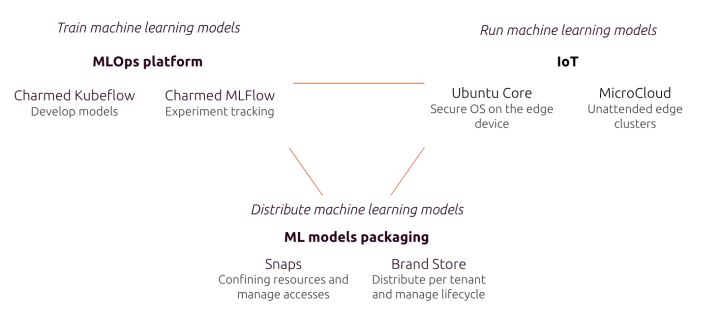
Canonical offers an end-to-end MLOps solution that enables you to train your models. Charmed Kubeflow is the foundation of the solution, and it is seamlessly integrated with leading open source tooling such as MLflow for model registry or Spark for data streaming. It gives organisations flexibility to develop their models on any cloud platform and any Kubernetes distribution, offering capabilities such as user management, security maintenance of the used packages or managed services.

The operating system that the device runs plays an important role. Ubuntu Core is the distribution of the open source Ubuntu operating system dedicated to IoT devices. It has capabilities such as secure boot and full disk encryption to ensure the security of the device.  For certain use cases, running a small cloud, such as Microcloud enables unattended edge clusters to leverage machine learning.

Packaging models as snaps makes them easy to maintain and update in production. Snaps offer a variety of benefits including OTA updates, auto rollback in case of failure and no touch deployment. At the same time, for managing the lifecycle of the machine learning of the model and the remote management, brand stores are an ideal solution..

To learn more about Canonical’s edge AI solutions, get in touch.

Further reading

5 Edge Computing Examples You Should Know

How a real-time kernel reduces latency in telco edge clouds

MLOps Toolkit Explained

❌