Connexion
OpenStack with Sunbeam as an on-prem extension of the OpenStack public cloud
One of the biggest challenges that cloud service providers (CSPs) face these days is to deliver an extension of the public cloud they host to a small-scale piece of infrastructure that runs on customers’ premises. While the world’s tech giants, such as Amazon or Azure, have developed their own solutions for this purpose, many smaller, regional CSPs rely on open source projects like OpenStack instead. However, while OpenStack is fully suitable for powering large pools of compute and storage, shrinking it down to a small box that runs on-prem, replicating the delivery process across hundreds or thousands of customers’ sites, and operating them effectively might pose an interesting challenge.
Fortunately, there are now ways to minimise OpenStack’s footprint and accelerate its delivery. In this short blog we will showcase how you can use project Sunbeam to seamlessly deploy a small-scale OpenStack cloud and plug it in as an on-prem extension of the OpenStack public cloud you host, ensuring full API compatibility and an integration with leading Cloud Platform Management (CPM) tools.
More in this series
This blog post is part of a larger series demonstrating various use cases for project Sunbeam and OpenStack. By using practical examples, we showcase how these two technologies can be used to address real-life challenges.
Other blogs in this series:
Before we start
Before we start, let’s briefly clarify some terms that we’ll be using in this blog.
What is Sunbeam?
Sunbeam is an upstream project under the governance of the OpenInfra Foundation (OIF) created to lower the barrier to entry for OpenStack, simplify its adoption process, and set the foundation for an autonomous private cloud. Sunbeam uses cloud-native architecture and total bottom-up automation to make OpenStack more accessible to newcomers and to help users get to grips with the platform immediately.
What is MicroStack?
MicroStack (based on Sunbeam) is an OpenStack distribution designed for small-scale cloud environments. While it is available with full commercial support from Canonical, it can also be self-deployed with no friction, effectively eliminating the need for a paid consulting engagement. MicroStack currently includes core OpenStack services only but is expected to evolve quickly to ensure full feature parity with Canonical’s Charmed OpenStack soon.

OpenStack with Sunbeam as an on-prem extension of the OpenStack public cloud
Many organisations who embrace a public-cloud-only approach face a need for an on-prem infrastructure sooner rather than later. This usually stems from cost optimisation and FinOps practices, privacy concerns, or a requirement to guarantee the desired level of performance. As a result, leading public cloud providers have been already offering their own solutions in this space for years. If you are a CSP, you’ve likely heard about AWS Outposts or Azure Stack. However, finding a reasonable equivalent to those proprietary solutions in the open source space has always been a challenge.
The challenge
Most of the CSPs who offer public cloud services run OpenStack underneath them. According to the recent report by the OpenInfra Foundation, OpenStack powers more than 300 data centres that act as a regional public cloud infrastructure. This results from its unparalleled maturity, enterprise-grade stability and versatility; fourteen years after its initial release OpenStack continues to be the open source cloud platform of choice.
However, while OpenStack is fully suitable for powering those large data centres, putting it on customers’ premises might be challenging without using proper tools. This is because OpenStack is designed to deal with big clusters, rather than running on a single machine with limited hardware resources. At the same time, customers usually don’t want to over-invest: they want to start small and grow their on-prem infrastructure as they go.
Another interesting challenge is with on-going operations. OpenStack is known to be inheritably complex. Therefore, operating it in production creates significant overhead for the cloud operations team. And this is what happens when you manage just one cloud; what about if you now have to manage hundreds or thousands of clouds? The overall cost associated with running those on-prem extensions results in an ever inflating total cost of ownership (TCO).
Fortunately, dedicated tools exist to help you bypass all of these challenges.
Take a “cloud in a box” approach
With project Sunbeam CSPs can accelerate the delivery process of those on-prem extensions by taking a “cloud in a box” approach. This means shipping hardware with a super straightforward deployment procedure, or even shipping it with OpenStack pre-installed. By using cloud-native architecture underneath and running all OpenStack services inside of containers and snaps, Sunbeam effectively shrinks down the footprint of OpenStack, making it a first-class citizen on “non-beefy” machines.

The absolute minimum is just one physical node. Just note that such configuration does not ensure high availability (HA). Anyway, simply running five commands enables you to get a fully functional OpenStack up and running. This is so easy that even your non-technical customers can do it with no friction. But this is not the end! By using full automation and rich lifecycle management capabilities, Sunbeam enables the OpenStack cloud to scale out very quickly. This way your customers can always start small and grow according to their needs.
Plugging it in to your OpenStack public cloud
One of the biggest advantages of using OpenStack everywhere is that it enables you to use exactly the same cloud management software for public cloud infrastructure as well as all those extensions running on your customers’ premises. Sunbeam-based OpenStack installations rely on the pure upstream code and ensure API compatibility. Thanks to that your customers won’t see a difference when using your public cloud services or their on-prem infrastructure you provide. Exactly in the same way as Amazon customers, for example.
What’s more, you can now easily plug all those on-prem clouds to the CMP software that you use. This way you can view all the environments you manage from a single pane of glass (SPOG) dashboard. You can monitor them, check their health status, or even provision some administrative workloads centrally. This is especially useful for ongoing performance optimisation, for example, when you have to benchmark the performance of all those distributed environments.
The final challenge to address are these on-prem environments’ ongoing operations. Let’s not forget that at the end of the day those are still OpenStack clouds. As mentioned earlier, OpenStack is inheritably complex and its operations might pose a real challenge. However, project Sunbeam uses full automation: contrary to other OpenStack distributions, all typical post-deployment operations are fully automated, not just not the initial delivery phase of the project. This extensive automation also covers procedures, such as upgrades, which were historically very complicated. All of that to make OpenStack suitable for the scale we’re talking about.
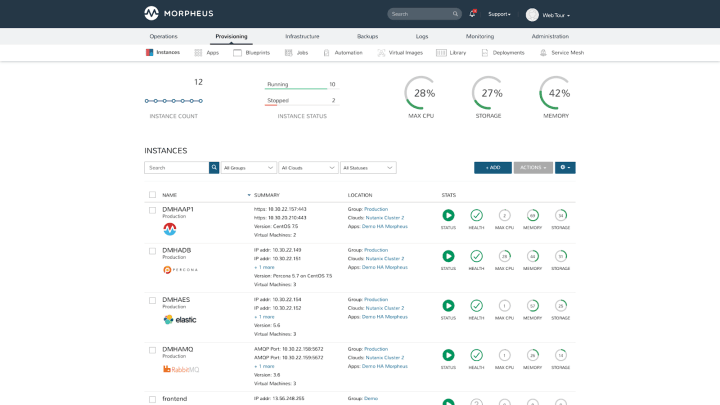
Sample CPM dashboard
Conclusions
OpenStack’s architecture has always made the challenges of mass deploying it on-prem a distant bad dream. However, with project Sunbeam CSPs can finally break down these barriers. Its minimal footprint shrinks down OpenStack to a piece of software that can run inside of a single box. By ensuring full API compatibility OpenStack clouds deployed with project Sunbeam can be seamlessly plugged into the broader cloud ecosystem of the CSP. Finally, full automation used both during the initial installation and its post-deployment phase guarantees smooth delivery and frictionless operations.
Learn more about Sunbeam
Now that you’ve got a basic understanding of project Sunbeam and how it can be used for various use cases, you might be wondering where to find more information about it. If that’s the case, we have prepared some interesting follow-up materials for you:
- Visit our website to learn more about Sunbeam and MicroStack
- Learn OpenStack through a series of tutorials for beginners
- Refer to our OpenStack deployment guide for exact information on bootstrapping a production-grade cloud
Get in touch with Canonical to discuss your project plans