Veuillez passer à une nouvelle version afin de préserver la sécurité de vos données !
Si vous utilisez Nextcloud Hub 6 ou 7, nous vous recommandons fortement de mettre à jour vers la version 27.1.9 ou 28.0.5 respectivement. Les mises à jour de maintenance comprennent d’importantes corrections de bugs, ainsi que des mises à niveau de la stabilité et de la sécurité. C’est un procédé rapide et sûr, comme toujours !
À propos de cette mise à jour
Les mises à jour comprennent plusieurs corrections de bugs, des améliorations dans la gestion des fichiers, l’optimisation des performances et d’autres améliorations dans toutes les versions prises en charge de Nextcloud Hub. Vous pouvez consulter la liste complète des modifications sur notre site web.
Tirez le meilleur parti de votre plateforme avec Nextcloud Hub 8
Encore plus automatisé et optimisé, Nextcloud Hub 8 est là pour vous aider à reprendre le contrôle de votre temps. Passez à la version la plus récente pour bénéficier des nombreuses nouvelles fonctionnalités de votre plateforme préférée :
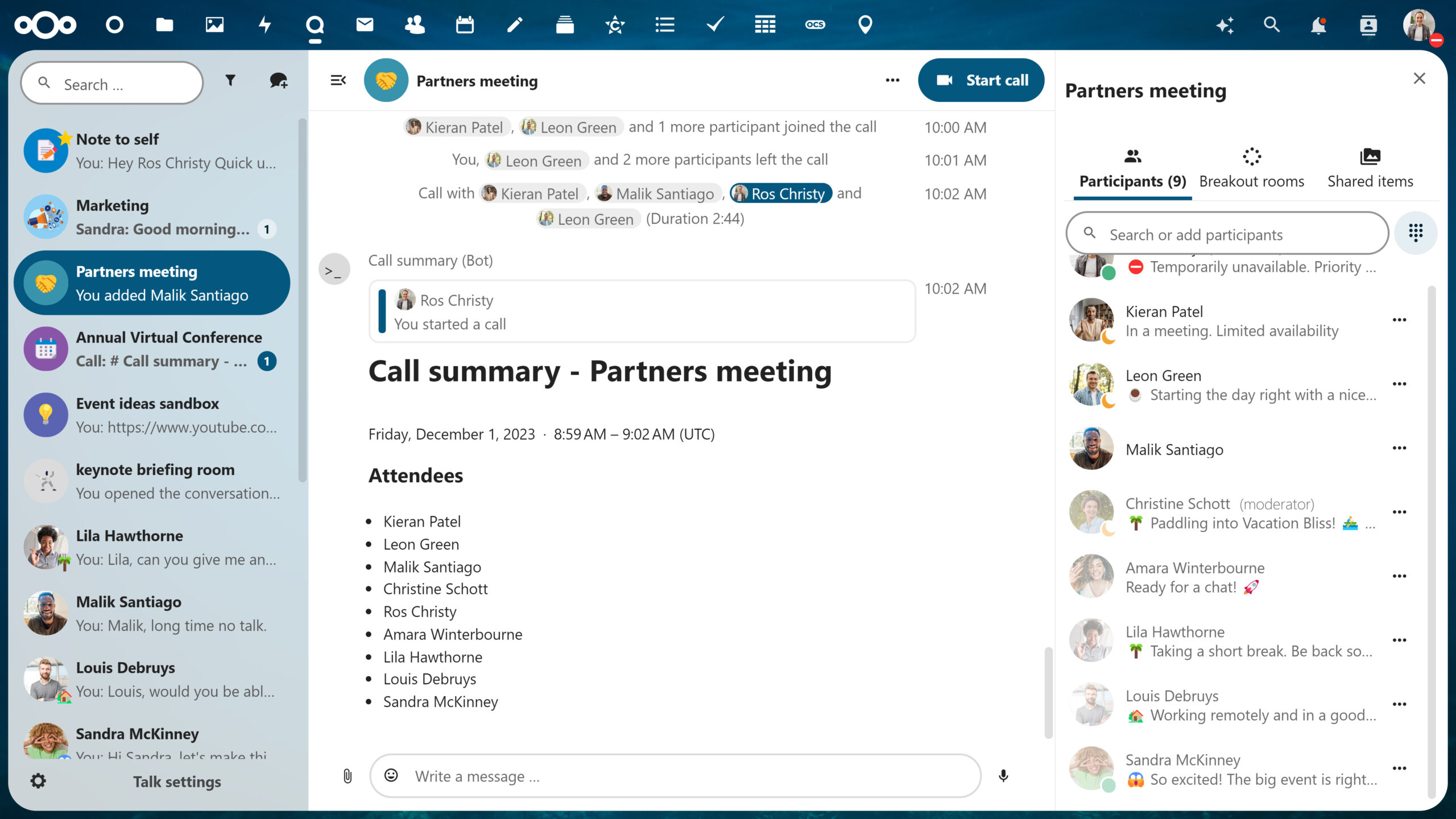
Assistant Nextcloud : résumés des tchats, suggestions de réponses à un courrier électronique dans Nextcloud Mail, réponses basées sur vos données, et bien plus encore !
Prévisualisation interactive des fichiers, dossiers, tableaux et événements
Tchat fédéré et édition de messages dans Talk
Mini-applications basées sur Tables
Partage de Collectifs publics, prévisualisations et QR-codes
Gérez les ressources de votre équipe comme un pro avec Nextcloud Teams
Formulaires : synchronisation automatique avec une feuille de calcul
Et bien plus encore
Obtenir Nextcloud Hub 8
Téléchargez Nextcloud Hub 8 ici et procédez à son installation
Les versions mineures de Nextcloud se concentrent principalement sur la correction des vulnérabilités de sécurité et des bugs de fonctionnalité, en évitant les révisions majeures du système qui pourraient mettre en péril les données des utilisateurs. Il est essentiel de maintenir votre serveur à jour. Notre approche des tests et de la validation garantit que la mise à niveau vers des versions mineures se fait généralement en douceur et de manière fiable.
Pour les systèmes Nextcloud stratégiques dans les entreprises, envisagez de passer à Nextcloud Enterprise. Ce service vous assure un déploiement en toute confiance : accès direct à l’équipe d’ingénieurs de Nextcloud, assistance complète tout au long du déploiement et de l’intégration, et tranquillité d’esprit pour les administrateurs de système. Si vous êtes responsable de la maintenance de Nextcloud dans votre établissement, cette option peut être la solution idéale pour vous.
Please update to a new version to keep your data safe!
If you are using Nextcloud Hub 6 or 7, we strongly recommend you to update to version 27.1.9 or 28.0.5 respectively. Maintenance updates include important bug fixes, stability and security upgrades. It is a quick and safe process, as always!
About this update
The updates include several bug fixes, enhancements in file handling, performance optimization, and other improvements in all supported versions of Nextcloud Hub. You can find the full changelog on our website.
Make the most of your platform with Nextcloud Hub 8
Even more automated and optimized all around, Nextcloud Hub 8 is here to give you back control over your time. Upgrade today to unlock multiple new features in your favourite platform:
Nextcloud Assistant: Chat summaries, Nextcloud Mail reply suggestions, answers based on your data, and more!
Interactive previews for files, folders, boards and events
Federated chat and message editing in Talk
Mini-apps based on Tables
Public Collectives sharing, previews and QR-codes
Manage your team resources like a pro with Nextcloud Teams
Nextcloud’s minor releases primarily focus on addressing security vulnerabilities and functionality bugs, avoiding major system overhauls that could jeopardize user data. Keeping your server up to date is vital, and our approach to testing and validation ensures that upgrading to minor releases is generally smooth and reliable.
For mission-critical Nextcloud systems in enterprise settings, consider switching to Nextcloud Enterprise. The tier provides you with ultimate deployment confidence: direct access to the Nextcloud engineering team, full assistance throughout deployment and integration, and peace of mind for system administrators. If you’re responsible for maintaining Nextcloud in your setting, this option may be the ideal solution for you.
OVHcloud is a returning sponsor of Nextcloud Enterprise Day – Nextcloud’s annual enterprise event for like-minded industry professionals and decision-makers to get the most out of their Content Collaboration Platform.
By supporting Nextcloud Enterprise Day, OVHcloud reinforces its position as a cloud provider that values privacy, security, and open-source standards, offering solutions that empower organizations to maintain control over their data while leveraging the benefits of cloud technology.
At last year’s Enterprise Day 2023, OVHcloud’s CEO, Michel Paulin, underlined this ambition in his virtual speech:
“For 20 years, OVHcloud has been dedicated to building an open and trusted cloud, upholding fundamental values centered on trust, data protection and innovation. Our commitment extends to partnering with entities that reflect our principles. We take immense pride in our strong partnership with Nextcloud. Sharing similar values allows us to collaboratively propose innovative solutions.”
– Michel Paulin, CEO OVHcloud
About OVHcloud
OVHcloud, a global cloud computing service provider, offers scalable and flexible web hosting, server, private and public cloud solutions for businesses, developers and individuals. With a commitment to data autonomy and transparency, OVHcloud enables efficient IT infrastructure management while advocating for privacy and innovation.
A powerful partnership
Grounded by a strong and solid technology partnership, Nextcloud and OVHcloud work on interesting joint cooperations. Nextcloud users can easily integrate dedicated AI services from OVHcloud in Hub 6 and 7 and OVHcloud clients have very simple access to install cloud services from Nextcloud on their OVHcloud infrastructure.
Since their founding, Nextcloud and OVHcloud share a plethora of shared values and the following aligned principles:
Open-source philosophy
Nextcloud is built on open-source software, allowing for transparency, flexibility, and community collaboration. Similarly, OVHcloud supports open-source initiatives, as seen in the five core values of their SMART cloud, and contributes to various open-source projects. This shared commitment to open-source values fosters innovation and empowers users and developers alike.
Data sovereignty pioneers
Both Nextcloud and OVHcloud are at the forefront of the data sovereignty vision, advocating for a world where the public sector, businesses and individuals alike have access to all their data with a high level of data security. While Nextcloud emphasizes self-hosting options, giving users more control over their data and enabling them to comply with regulations like GDPR, OVHcloud implements robust security measures across its infrastructure and data centers, ensuring the safety and privacy of customer data. We envision a world where users won’t have to worry about the interference of any extraterritorial laws like the U.S. Cloud Act that pose substantial risks to European’s personal data.
Further demonstrating our dedication to this vision, in 2021 Nextcloud filed an antitrust complaint with the European Commission about Microsoft’s anti-competitive, bundling behavior. Later that year, together with a coalition of some 30 NGOs and other European tech companies, we publicly called on the EU to take action and we haven’t stopped there.
OVHcloud also takes a firm stance on data rights, with their CEO Michel Paulin stating, “EU policymakers should have the courage and intellectual honesty to establish a sovereign cloud as well as to regulate American cloud service providers under the EU’s antitrust Digital Markets Act regulation.”
Our powerful partnership has the potential to enact change in establishing a level playing field for cloud service providers and a data-sovereign cloud for all.
GDPR compliancy
Ensuring GDPR compliance is paramount for both Nextcloud and OVHcloud as we both prioritize data security and privacy in the EU. With a strong commitment to adhering to local laws and regulations, both of our companies go the extra mile to safeguard user data within the EU.
OVHcloud’s local data centers are a testament to their dedication to compliance with GDPR requirements.
Scalability and Flexibility
Nextcloud and OVHcloud both offer scalable solutions tailored to the needs of businesses and individuals. Nextcloud can be deployed on-premises or in the cloud, accommodating various use cases and organizational sizes. OVHcloud provides scalable cloud infrastructure with options for custom configurations, enabling users to adapt their resources as their requirements evolve.
A history of alliance
While Nextcloud and OVHcloud operate in different niches within the cloud computing landscape, our shared values of data security, privacy, openness, scalability, customer focus, and innovation unite us in our mission to provide reliable and user-centric cloud solutions.
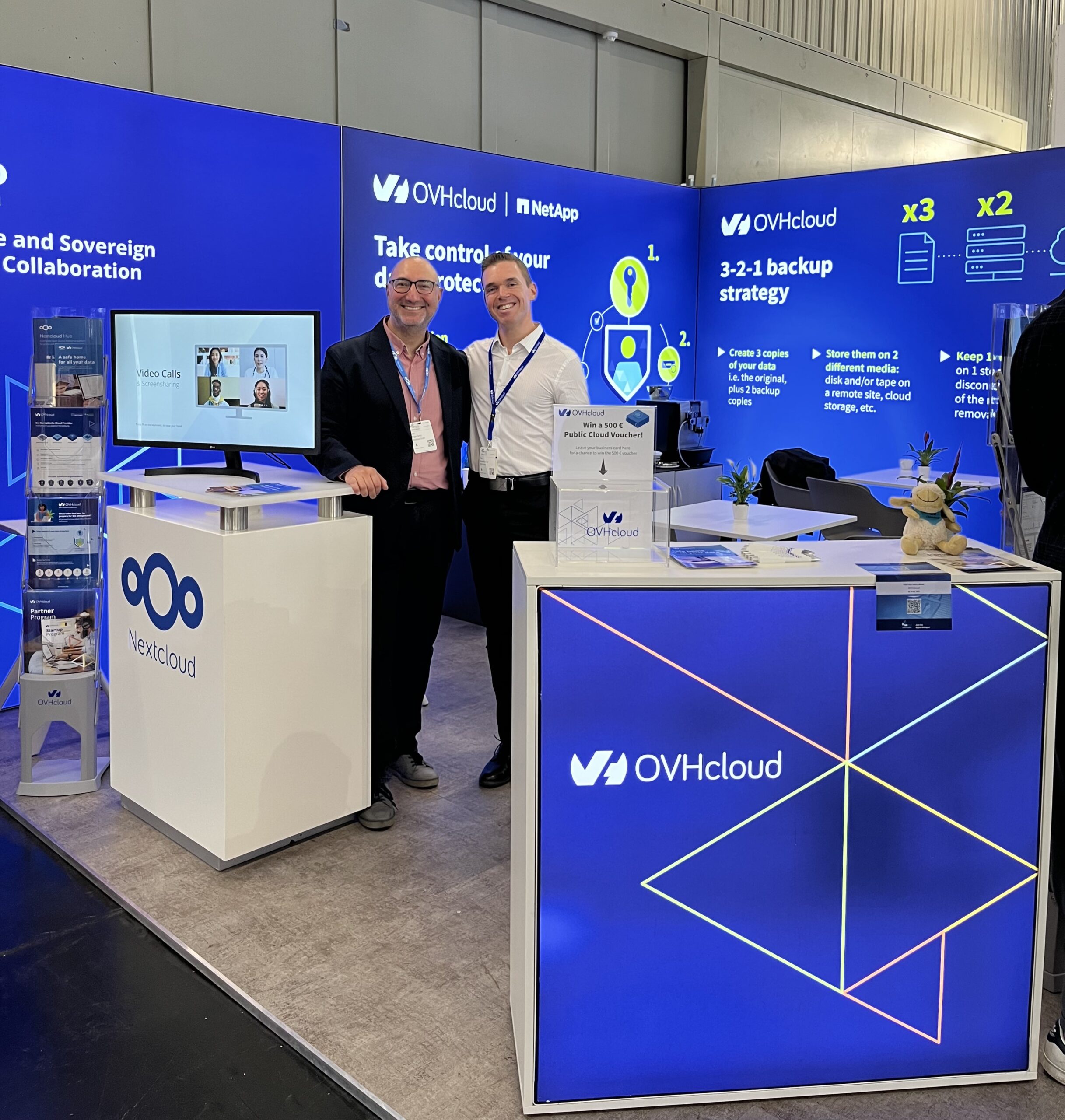
Accordingly, we partner at major events and tech conferences together like at the leading IT security event, it-sa in Nuremberg, Germany. It-sa provided us the platform to talk about our secure and sovereign cloud collaboration in a large audience of IT leaders and participants from around the world.
The Open Trusted Cloud (OTC) initiative
The Open Trusted Cloud, or OTC, program aims to build vibrant ecosystems of software publishers – SaaS and PaaS companies around an open, reversible, secure, transparent and trusted cloud. Started by OVHcloud and joined by Nextcloud in 2022, we share common values about compliance with local data regulations and data sovereignty.
“The Open Trusted Cloud is an ecosystem of European software manufacturers and puts the European offer effectively in the spotlight – a structure with a common voice that conveys our messages clearly. To strengthen their position, software manufacturers should work with other European players together. By acting together, we can increase the impact and share costs.”
– Khaled Allab, director of the Open Trusted Cloud
We’re also both members of the CISPE (Cloud Infrastructure Services Providers in Europe) association, with OVHcloud being a founding member, that aims to standardize the rules for personal data protection throughout Europe. In addition, we’re both members of the German GAIA-X project, a European initiative for developing an efficient, competitive, secure and trusted data infrastructure for the European Union.
OVHcloud representing our shared vision at Enterprise Day 2024
This year, OVHcloud’s Vincent Le Fort, Sales Director Tech DACH Market, will be giving a short talk about our common vision and commitment to our customers at Nextcloud Enterprise Day.
This is a unique opportunity to learn more about our collaboration at our upcoming event and meet the OVHcloud team.
We are looking forward to sharing this day with you and celebrate our shared values.
Join Nextcloud Enterprise Day!
There’s still time to register and be part of our largest enterprise event of the year.
Ongoing public concerns over real-time video scams has been the spur to gain global attention as we witness new major incidents taking place increasingly more. Take a Hong Kong MNC recently falling prey to a scammer in a colossal $25.6 million heist — the deepfake technology has already evolved enough to bring on a whole new brand of fraud.
What remains is a call to action. Are there ways to protect yourself and your organization against con men posing as your boss, your business partner, or even your own mother? Let’s find out!
First things first, let us start with the definition.
What is a deepfake?
In case the definition of a deepfake is still unclear to some, a deepfake is content generated using deep learning techniques that is intended to look real, but is in fact fabricated. Artificial intelligence (AI) used to generate deepfakes typically employs generative models, for example, Generative Adversarial Networks (GANs) or auto-encoders.
Deepfakes are used not only in video content, but also in audio recordings and images. The purpose of a deepfake is often to depict an individual or a group saying or doing something that they never did in reality. To produce content that appears convincing, the AI must use large datasets in its training. It allows the model to recognize and reproduce natural patterns present in content it is designed to mimic.
While deepfake technology is a breakthrough with great potential in the film industry and game development, as well as a rising social media trend, it also opens dangerous opportunities for illegal use. The examples are numerous and include identity theft, evidence forging, disinformation, slander and biometric security bypass. In all cases, fraudsters typically leverage the depicted person’s authority over the targeted individuals or personal connection to them, depending on the setting.
Secure your calls with Nextcloud Hub
Watch back our webinar on secure conferencing in Talk. learn how to set up reliable access control, prevent leaks and track back all suspicious activity.
Deepfakes are used to produce video, audio or image content, as a recorded media or a real-time stream. It can be a YouTube video, a ‘leaked’ recording in a social post, a phone call or a video conference – the opportunities are practically unlimited.
Depending on the purpose, the format is picked accordingly. For example, political disinformation works best where mass engagement is possible, meaning that spreading it publicly via social media is the best tactic. Whereas seeking a private gain from a company or or individual requires a more intimate setting and often a personal conversation.
When it comes to threats to your personal life, finance or security, we can narrow down the most dangerous deepfake scenarios to encounters with people you care about, trust , or report to. This can be a family member, a friend, or an authority figure at work such as your boss or a company executive.
The setting will most likely be private: whether over a phone call or a video meeting. Personal meetings are much easier to execute and give the faker much more control over the situation. The conversation, whatever the background is, will lead you to an action under a sense of urgency or fear – most likely to transfer a sum of money. The tactic is to deceive your logic and common sense using fear, compassion or even ambition.
As generative AI development drives a huge interest and investment, we are entering a dangerous zone: real-time video, the most sophisticated and convincing deepfake use case yet, still has a very little awareness.
Deepfakes in real-time video
Real-time video deepfakes generate manipulated video content in real-time for immediate application during live streams and video calls. Voice cloning and face swapping are the most frequently used techniques to compose a complete faked environment.
Face swapping
Face swapping is a common application of deepfakes, allowing the software to replace facial features of a target person with fake features, most often those of another person. With facial landmark detection and manipulation techniques, the blending appears seamless and hard to spot when caught unaware.
Voice cloning
In addition to looking convincing, a faker also needs to sound convincing. For this part, voice cloning is used. In voice cloning, the AI replicates the voice of the individual. A significant amount of high-quality audio data is required to train a voice cloning model, usually obtained from recordings of the target person speaking in various contexts and using different intonations.
Curiosity time: how does a deepfake setup actually work?
Deepfake technology is capable of impersonating real-life individuals and doing it in a real-time setting, making the result even more convincing (and terrifying!). But how does the software work in a way that we encounter deepfakes using familiar meeting platforms?
Deepfake generation software can be integrated with streaming platforms and video conferencing tools in many ways:
It could function as a separate application that captures the video feed, processes it in real-time, and then sends the manipulated feed to the video conferencing software.
Alternatively, it might be integrated directly into the video conferencing software as an optional feature or plugin.
Another way, even more sophisticated and hard to detect is camera input, namely a virtual camera. Virtual camera intercepts the video feed from the physical camera of the faker. It then outputs the manipulated feed to the video conferencing software. The faker just picks the virtual camera as their camera input and voilà! (not funny, we know).
How to protect yourself against deepfakes?
Finally, to the most important part. How do you protect yourself against a deepfake, or at least get prepared to spot a fake boss making a sketchy request over video?
Privacy-first videoconferencing software is a key to safe meetings. Meet Nextcloud Talk, a powerful chatting and meeting platform that lets you regain control.
AI face swapping technology maybe advanced, but it’s not perfect. There are red flags you can spot, or at least learn to look out for when something seems off or unnatural:
Unrealistic facial expressions or movements, including unnatural eye movements, inappropriate blinking, and/or weird lip sync.
Inconsistencies in lighting and shadows that don’t match the surroundings.
Unnatural head or body movements, as well as visible blurring or pixelation around the face or neck.
Inconsistent quality in audio and video and mismatch between the picture and the sound.
Suspicious? Be proactive
There are methods to help you fish out the red flags that generally won’t make the conversation awkward if the person is in fact real.
First, there’s nothing more natural than a casual conversation. Engage in small talk: ask about their day, routine, questions about people you both know, etc. A complete stranger will struggle to be spontaneous and maintain the same personal connection. It’s also easier to catch one off guard when they lose a sense of control.
You can also use other video conferencing features: ask the person to share their screen and show you something related to your common tasks. This will be very difficult to replicate without access.
Finally, once they make a suspicious request, you have more freedom to be alert openly — politely ask them to confirm their identity by providing some exclusive information or send you a confirmation message via a different channel.
Set up a passphrase
One more way to ensure confidence when it comes to sensitive topics is setting up a password or passphrase. This is an easy way to confirm the identity of the people you know, both at work and between family members, and it is equally effective via voice, video and text communication.
Verify identity outside of the meeting
If a faker poses as a person you know well, chances are you have more than one communication channel to reach out with. Use email, a messenger or a personal phone number to contact them and raise a question — the reason is valid.
Don’t let them harvest your data
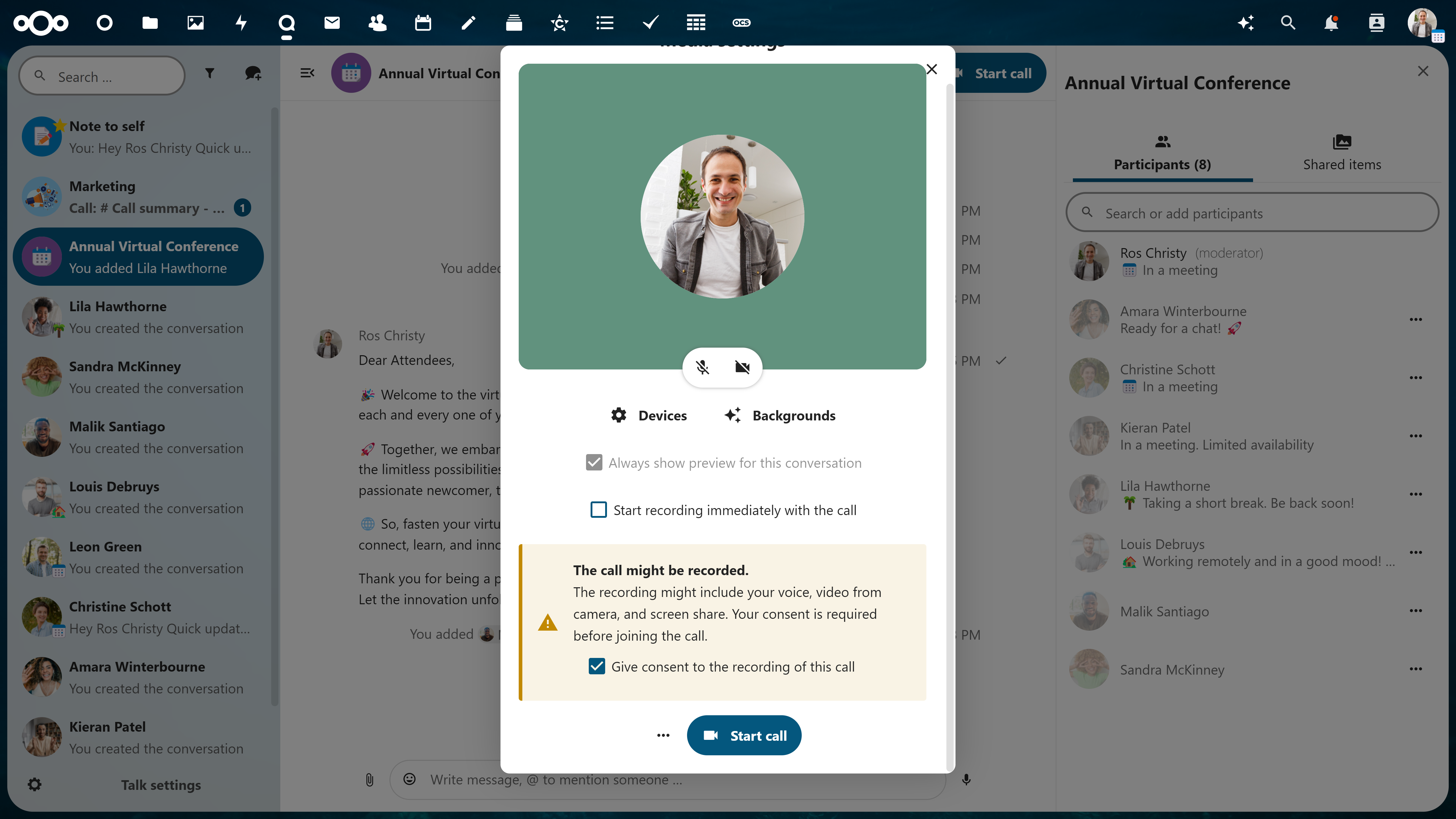
To replicate and manipulate a person’s voice or image, AI needs a massive amount of data. This data is often gathered beforehand, during online calls and meetings. Features like Recording Consent in Nextcloud Talk may help you protect yourself and others from such a data haul.
Use company software
It’s unlikely for your real boss to set up a meeting via a platform you never use for work. And if they do, they must have a good reason! Don’t be afraid to stand up to suspicious activity.
Using company software means better control over the data and compliance with privacy regulations. Even better — if you run it on-premises! Should an incident happen, the company IT team can run an audit to retrieve the relevant data and investigate.
Ensure secure access to your videoconferencing platform with settings like 2FA, strong passwords, data encryption, activity monitoring, and login restrictions. This applies to your personal settings and administrative controls.
Nextcloud Talk: video and chat with privacy in mind
Using a privacy-oriented, unified workspace with admin control in all apps makes sure your security protocols are in place to detect and prevent breaches. Nextcloud Hub provides a user friendly videoconferencing platform that keeps users happy to stay within company IT.
https://vimeo.com/576684156
How Nextcloud Talk protects your data:
AI-powered suspicious login detection
Multi-layered encryption with end-to-end encrypted communication
Brute-force protection
Fully on-premises, 100% open source
Nextcloud is an open-source project backed by a strong community with proactive approach to vulnerability research and patching. It is designed to let you stay compliant with GDPR, CCPA, and the upcoming EU ePrivacy Regulation.
In our final round of sponsor announcements for the Nextcloud Enterprise Day, we are delighted to highlight plusserver as one of our sponsors!
plusserver stands as a prime example of cloud innovation “Made in Germany.” In partnership with Nextcloud and HKN, they provide open-source workplace solutions that align with the strictest data protection standards, ensuring data security and autonomy.
Their most recent innovation, plusAI, is a dedicated platform for sovereign and secure AI, highlighting the importance of data sovereignty across their solutions. In cooperation with HKN, plusserver will be showcasing the advantages of their data sovereign cloud platform pluscloud open as a base for your Nextcloud installation and dive into the possibilities that future integrations and add ons will provide.
Circle April 24 in your calendar and register today to learn more about the innovation developed by plusserver and HKN at Nextcloud Enterprise Day.
Register for Nextcloud Enterprise Day today to secure your spot!
plusserver is recognized for its commitment to data sovereignty and digital autonomy, establishing itself as a cornerstone in the German cloud services market. With a history rich in innovation and security, plusserver offers GDPR-compliant cloud solutions, offering customers complete control and security of their data. As a founding member of Gaia-X, which aims to create a secure and reliable data infrastructure for Europe, plusserver champions open-source technologies and digital sovereignty.
Their sponsorship of Nextcloud Enterprise Day reflects their dedication to fostering a secure, open, and self-reliant digital ecosystem, alongside sovereign workplace solutions.
About Nextcloud Enterprise Day
Nextcloud Enterprise Day brings together the leaders and decision makers in the enterprise IT landscape. For one day, it provides a platform to foster innovation, exchange experience, and present unique stories behind Nextcloud implementation in various industries.
The agenda encompasses exclusive talks and workshops. Topics include digital sovereignty, the future of AI in business, building a secure and resilient cloud infrastructure, and more.
The April 2024 edition comes to Munich, a city in the heart of Bavaria famous for it’s unique mix of urban ambition, modernity and historical legacy.
Register for Nextcloud Enterprise Day today to secure your spot!
As part of a trend of “malicious compliance” by big tech firms, news has emerged of an attempt by Microsoft to avoid antitrust fines. The video chat application Teams will be sold separate from the Microsoft 365 offering. However, there are no indications that Microsoft will stop bundling Teams in Microsoft Windows, nor separate its on-premises version of Office from its cloud offering, or separate OneDrive from its office bundle or desktop operating system. In short, it’s a very, very minimal move in the right direction by the industry giant, only aiming to placate the regulators and likely delay any enforcement activities in lieu of ‘negotiations’.
Nextcloud calls upon the regulators to look through this charade and not be deterred in their efforts to reign in the anti-competitive behavior of Microsoft.
Antitrust cases against Microsoft
There is a series of antitrust cases against Microsoft. The case by Slack resulted, 3 years after filing, in an investigation and is behind Microsoft making a minor concession here, following similar approaches by Apple as it tries to comply in the most minimal way with new EU regulations.
Early 2021, Nextcloud filed an antitrust complaint and, later that year, together with a coalition of some 30 NGO’s and other European tech companies, called publicly on the EU to take action. But, while it also has been well over 3 years, unfortunately there has not been any progress. It is unclear whether that is because the complaint came from a number of smaller companies, due to delay tactics by Microsoft or simply slow bureaucracy.
What it is definitely clear is that the regulators are not able to keep up with the pace at which technology moves and big tech firms abuse their power.
Nextcloud Enterprise Day is coming in one month’s time and we are excited to share the next speaker in our impressive lineup: Lars Karrock, Head of Organization and Information Technology Department at the Protestant Church in Hesse and Nassau.
From a wide variety of industries and backgrounds, our speakers will provide insightful talks on their experiences with Nextcloud. Read below to discover the Protestant Church in Hesse and Nassau and discover the unique use case Lars is bringing to the stage.
About the Protestant Church in Hesse and Nassau (EKHN)
The Protestant Church in Hesse and Nassau (EKHN) is a member church of the Protestant Church in Germany (EKD) with around 1.2 million members and around 1,000 parishes. With around 19,000 full-time employees and 57,000 volunteers, the EKHN is also a large employer in the Hesse and Nassau region.
Lars’ topic: How EKHN uses Nextcloud as a centralized service
EKHN chose Nextcloud so they could have one place that enables everyone to use all of their distributed services. Nextcloud’s all-in-one platform combines file storage, sharing capabilities, office, calendar and so much more making it simple to collaborate and condense work flow.
Currently, around 10,000 users are on their Nextcloud instance working with Files and other apps efficiently.
In Lars’s upcoming talk at Nextcloud Enterprise Day, he will talk about how a heterogeneous organization can provide different services in one place that is both easy to access and use.
About Nextcloud Enterprise Day
Nextcloud Enterprise Day is our top event of the year for business leaders, decision-makers, and project managers to achieve their goals with Nextcloud.
From customer presentations and success stories to networking opportunities and access to management, sales, marketing, and engineering teams, you’re bound to walk away with new information, techniques, and inspiration.
The April 24th edition takes place at the fabulous Marriott hotel in Munich, Germany. Early Bird tickets are available until March 23rd.
Join the conversation in Munich!
Explore the full program, location and registration information on our dedicated page
With a track record extending over three decades, SpaceNet is now a leading provider in Germany for today’s demand for private, sovereign infrastructure solutions. As a Nextcloud Gold Partner, SpaceNet delivers a comprehensive range of Nextcloud hosting solutions. These services meet many business demands, from highly standardized cloud services ready for immediate use, to customized installations uniquely tailored to individual client requirements.
Positioned in the heart of Munich, Germany, SpaceNet’s data centers are at the forefront of managed Nextcloud offerings. This strategic location not only aligns with the stringent European data protection standards but also reinforces the commitment to providing robust security, supreme efficiency, and complete control over your data.
The event is taking place in Munich, Germany, on April 24. Register for the Nextcloud Enterprise Day today to secure your spot!
Register for Nextcloud Enterprise Day today to secure your spot!
SpaceNet is a Munich-based provider of managed services and data center solutions that prioritizes security and performance while strongly aligning with GDPR standards and principles. In acknowledgment of the distinct challenges each business faces, SpaceNet offers customized solutions tailored to the unique needs of their clients. SpaceNet has earned the trust of industry leaders such as MVV, Utopia.de, and Antenne Bayern, a testament to the commitment to excellence and innovation in IT solutions.
Providing secure hosting in Germany, SpaceNet contributes to the initiative to build a digitally sovereign European IT. A Gold Partner of Nextcloud, SpaceNet expands its offering with powerful capabilities of Nextcloud. Nextcloud is also a part of Zamadama, the self-service collaboration platform by SpaceNet. Managed Nextcloud is offered both as an immediately available standardised cloud solution and as a customised installation to fit individual requirements.
About Nextcloud Enterprise Day
Nextcloud Enterprise Day brings together the leaders and decision makers in the enterprise IT landscape. For one day, it provides a platform to foster innovation, exchange experience, and present unique stories behind Nextcloud implementation in various industries.
The agenda encompasses exclusive talks and workshops. Topics include digital sovereignty, the future of AI in business, building a secure and resilient cloud infrastructure, and more.
The April 2024 edition comes to Munich, a city in the heart of Bavaria famous for it’s unique mix of urban ambition, modernity and historical legacy.
Register for Nextcloud Enterprise Day today to secure your spot!
UPDATE 3/19: We have released Windows 10 22H2 Build 19045.4235 (KB5035941) to the Release Preview Channel for those Insiders who are on Windows 10, version 22H2. This update is just a re-release with the same changes documented below on 3/14.
Hello Windows Insiders, today we are releasing Windows 10 22H2 Build 19045.4233 (KB5035941) to the Release Preview Channel for those Insiders who are on Windows 10, version 22H2.
This update includes the following features and improvements:
New! This update adds Windows Spotlight to your desktop background. This feature displays new images as your desktop wallpaper. If you want to know more about an image, click or tap the LearnMore button, which takes you to Bing. To turn on this feature, go to Settings > Personalization > Background > Personalize your background. Choose Windows spotlight. Note this feature might not be available to all users because it will roll out gradually.
New! This update adds more content to your lock screen. In addition to weather, sports, traffic, and finance content will appear. To turn on this feature, go to Settings > Personalization > Lockscreen. Note this feature might not be available to all users because it will roll out gradually.
New! This update affects Windows Hello for Business. IT admins can now use mobile device management (MDM) to turn off the prompt that appears when users sign in to an Entra-joined machine. To do this, they can turn on the “DisablePostLogonProvisioning” policy setting. After a user signs in, provisioning is off for Windows 10 and Windows 11 devices.
When you sign in, you might see a message that invites you to upgrade to Windows 11. This message only appears if your device is eligible for an upgrade. Note this feature might not be available to all users because it will roll out gradually.
This update changes the English name of the former Republic of Turkey. The new, official name is the Republic of Türkiye.
This update addresses an issue that affects the COM+ component. Some applications that depend on it stop responding.
This update addresses an issue that stops some apps and features from being available. This occurs after you upgrade to Windows 11.
This update addresses a deadlock issue in CloudAP. It occurs when different users sign in and sign out at the same time on virtual machines.
This update addresses an issue that affects a network resource. You cannot access it from a Remote Desktop session. This occurs when you turn on the Remote Credential Guard feature and the client is Windows 11, version 22H2 or higher.
This update addresses an issue that affects Microsoft Edge. It fails to open on Surface Hub (Team OS).
This update affects the Antimalware Scan Interface (AMSI) AmsiUtil class. It helps to detect the bypass of the AMSI scan. This update also addresses some long-term issues that expose your device to threats.
This update addresses an issue that affects the time service. You can configure it using mobile device management (MDM) or a Group Policy Object (GPO). But the Windows Settings app does not match what you have configured.
This update addresses an issue that affects the touch keyboard. It does not open sometimes.
This update addresses an issue that occurs when you use LoadImage() to load a top-down bitmap. If the bitmap has a negative height, the image does not load and the function returns NULL.
This update addresses an issue that affects scanners. They stop responding when you connect to them using eSCL over USB.
This update makes Country and Operator Settings Asset (COSA) profiles up to date for some mobile operators.
This update addresses an issue that affects the existing AppLocker rule collection enforcement mode. It is not overwritten when rules merge with a collection that has no rules. This occurs when the enforcement mode is set to “Not Configured.”
This update addresses an issue that affects the Group Policy service. It fails after you use LGPO.exe to apply an audit policy to the system.
This update addresses a reliability issue. It affects a Virtual Remote App product when you use a custom shell to open it.
Finding the right video conferencing software can be a challenge.
You ask yourself, what features do I need?
Can it scale up and still be reliable for my whole company?
In today’s world, we demand only the highest caliber online communication tools to meet our needs.
They need to bring you to the next level and break barriers.
That’s why in this blog, you’ll discover why individuals and businesses alike are turning to Nextcloud Talk for its unmatched features, security and seamless collaboration.
A collaborative video conferencing tool
Nextcloud Talk is an open-source video conferencing and chat application. Designed to keep all your online conversations private, whether by video or chat, all data is kept on your own servers and no data – not even metadata – can be leaked.
The features you need for your meetings:
Video conferencing in Nextcloud offers essential and purposeful features to make video calls optimal.
Screen sharing with profile view
Let others in the call see you while you share your screen to foster a more personal encounter.
Easy recording
Record your video conferences for record keeping or later use. Before anyone joins the call, a popup to consent for recording is delivered to ensure full transparency to participants. Download and save your recording in your Nextcloud.
Support for large group conferencing
Lots of participants? No problem. Large groups are well-managed and you won’t be able to tell the difference.
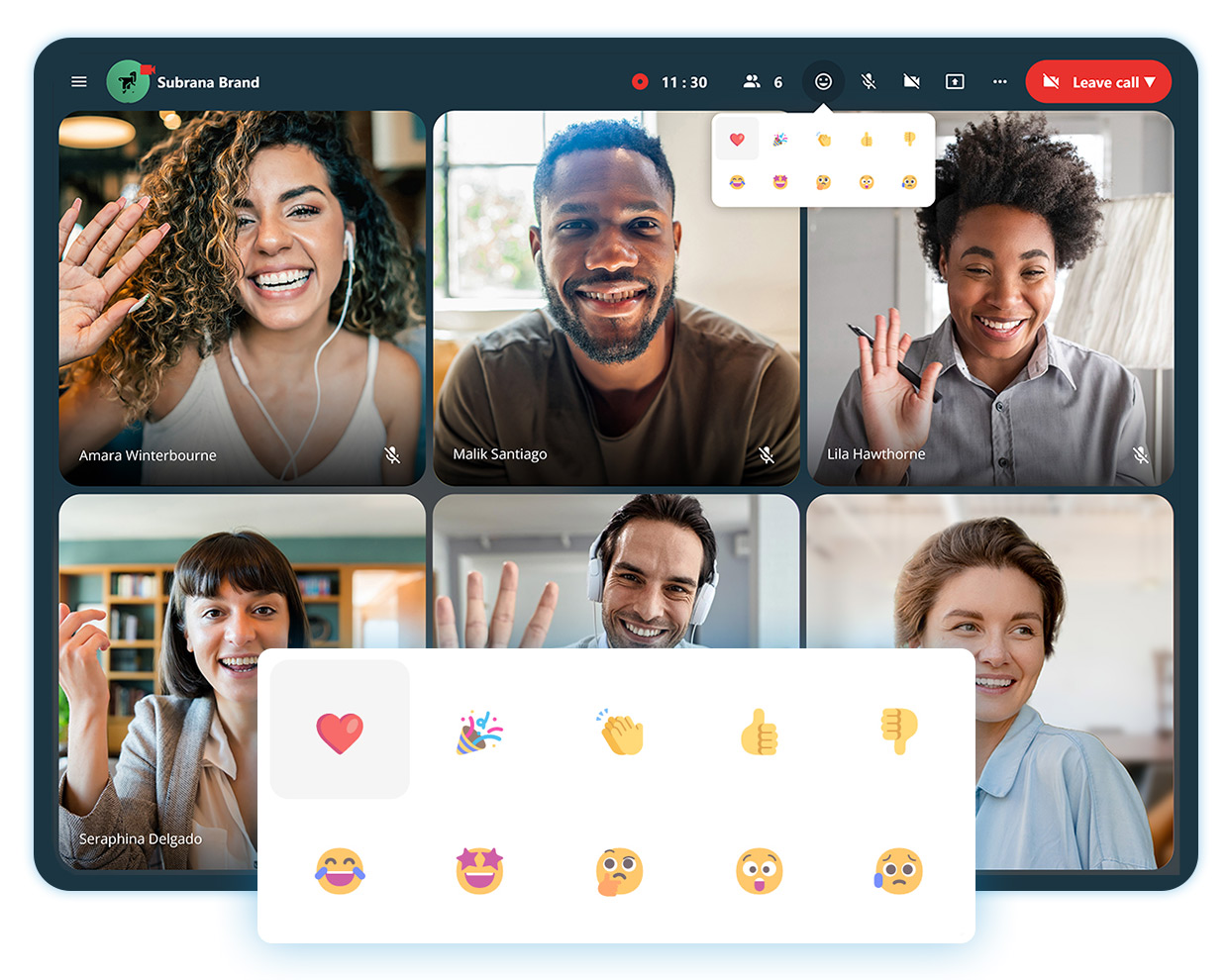
Reactions in calls
Express your feelings in a call to acknowledge someone’s statement, but not go as far as disrupting.
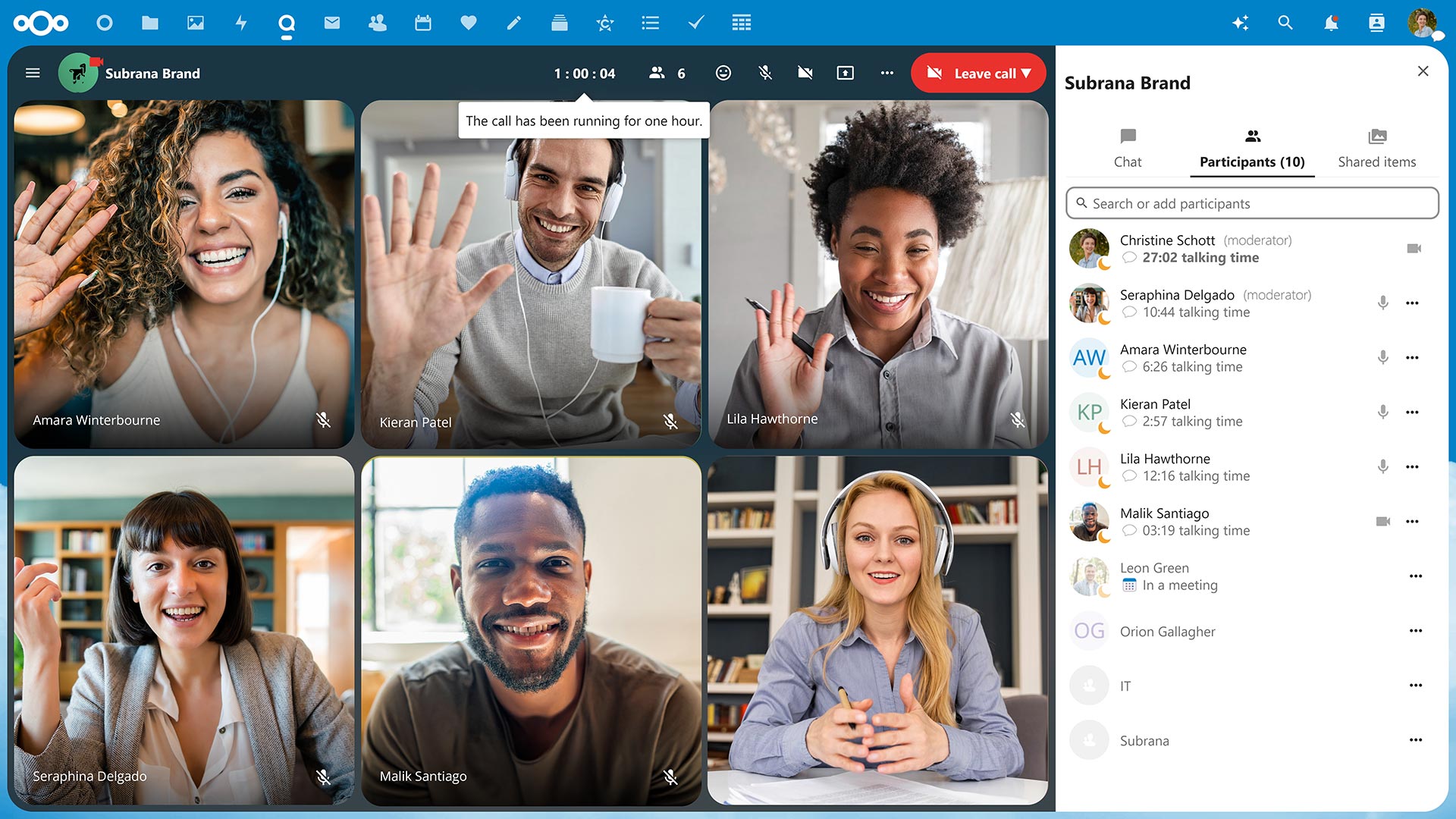
Track call duration and speaker talking times
After one hour, you’ll get a notification that you’ve hit the hour mark so you can stay aware of your time and others’. You’ll also never have to guess how long you’ve been talking, as speaker talking times will be tracked and noted at the end of the call.
Available on web and mobile devices
Take video conferencing from your office, home or on mobile with iOS and Android like never before.
Why it works: Integrated with your Nextcloud
Nextcloud is unique in the sense that everything is connected. You can explore incredible integration capabilities with the rest of your Content Collaboration Platform.
Not sure what that entails?
Nextcloud operates as a one-stop-shop platform integrating its own file storage, email, chat/video platforms and more so you can work efficiently and flexibly.
For example, if you’re in the middle of a call in Nextcloud Talk with a colleague and want to share a proposal your team has been working on, you can open the document directly from the chat sidebar. This is due to Files and Talk being integrated which saves you a lot of time and effort.
The astonishing advantages of Nextcloud operating as a single platform doesn’t stop here – enable hundreds, even thousands, of integration possibilities across all apps with Nextcloud as a Single Platform.
Watch the webinar recording
Prefer to listen? We hosted an entire webinar on the security features of Nextcloud Talk – check it out today!
Take it a step further with Nextcloud Talk’s High Performance Backend (HPB).
Designed for larger organizations, Nextcloud Talk’s High Performance Backend offers the capacity, reliability and features enterprises need to conduct their business privately, securely and efficiently.
Unbeatable convenience
Dial-in by a phone line to join a call with SIP bridge
Conduct large scale webinars, public broadcasting or video conferencing with lobby
As a HPB customer, you will notice improved connection speed and network efficiency after the implementation due to lowering the load from calls on the Nextcloud server.
With open-source technology, you have the opportunity to have full reign over your data. Whether you self-host on your own server or use a trusted hosting provider, your communications data happens and remains on your server, unlike popular alternatives like Microsoft Teams or Slack.
This unique protection extends further with our encrypted technologies by even keeping metadata at bay.
Nextcloud Talk chat and video was designed with your privacy in mind
Get in touch
We’re ready to show you what video conferencing can really be like. Try out Nextcloud Talk’s open source software.
At a time when people are questioning democracy, we want to publicly state our support for democratic values, diversity, openness, and fairness. The recent events in Potsdam, which remind us of a difficult time in Germany’s past, make us even more determined to encourage public participation and conversations to protect democracy.
Our commitment to democratic values
Nextcloud is committed to democracy, pluralism, and a humane society, actively supporting public sector stakeholders to strengthen democratic institutions. We believe that addressing the underlying issues inherent in fascist ideologies requires meaningful engagement and constructive dialogue. We champion the cause of peaceful, respectful coexistence, and oppose any form of exclusion or racism.
The significance of diversity and inclusion
At Nextcloud, diversity is not just a reality but a valued asset. Our commitment to inclusivity is in line with the values championed by the demonstrators. Our diverse team, representing over 22 countries, collaborates as a community that embodies a global perspective reinforcing our support for the demonstrations against exclusionary and undemocratic ideologies. We stand in solidarity with those opposing the AfD, sharing their dedication to protecting democracy and combating hatred.
Looking forward
We urge other major players in the tech industry to break their silence and join us in taking a clear stance against exclusionary ideologies. Such a stand is not only vital for the health of German and European economies but also for our society as a whole. Let´s stand together for a brighter tomorrow: Nextcloud calls on you – our partners, customers, and the tech community at large! Together, we can build a society that values openness, respect, and diversity. Every action, no matter its size, plays a crucial role in this journey. Let’s make a lasting difference in the world.
Scaling file sync and share architectures from thousands to tens of thousands all the way to millions of users is a difficult task. Along the way, the dynamics of cost and performance change. Storage systems, database performance and data locality drain budget in different ways and at different scales.
Nextcloud Global Scale offers an architecture that lets you host a 9-figure number of users with minimal latency, locality of data and dramatically reduced costs. Working on independent yet interconnected nodes, it is designed to provide a seamless federated user experience.
Limitations of standard architecture
Nextcloud is easily scalable with standard LAMP stack horizontal scaling technologies. However, on installations that service between tens and hundreds of thousands of users, some components eventually become bottlenecks that limit further scalability. In particular, large storage and database systems become exponentially expensive.
Moreover, for compliance or performance reasons, there might be a desire to keep data in specific locations or closer to users.
Scalability limits
When aiming at over a million users, components like load balancers, databases, storage and cache, and datacenter uplink sooner or later won’t be able to serve the required number of users and files.
High storage costs
60 % to 80 % of the cost of running a file sync and share service is caused by the storage subsystem alone, while running one massive storage system is exponentially more expensive than several commodity systems.
Legal and administrative issues
With different regional or department-specific requirements for data locality, security provisions and administration, centralized instance location is not an option.
Poor global performance
Another reason to run a distributed instance is connectivity and bandwidth which may be a problem for a company with distant teams located in far proximity to the datacenter.
Scale more, pay less
Nextcloud Global Scale is aimed at tackling the limitations posed by the standard architecture. There are no central database, storage or caching instances, while the nodes are located independently and don’t require fast connection between one another.
Free from the bottlenecks of the database and the file system, Global Scale delivers ultimately scalable and cost-efficient architecture:
Housing hundreds of millions of users and their files
Commodity hardware instead of expensive petabyte servers
Low maintenance costs
No significant license costs besides Nextcloud Enterprise
Local data under local jurisdiction
Ability to isolate assets between locations within a single instance
Achieving these goals is possible through reducing complexity and enabling administrators to fully control data location. Global Scale relies on a lightweight, stable architecture governed by Global Site Selector, Lookup Server and Balancer.
Independent, resilient nodes
Nodes consist of two or more machines and act as independent logical Nextcloud instances. The machines share a cluster file system, a database and a common cache guarantee availability of the node should the downtime occur on one of the machines.
Single login point
Global Site Selector serves as a primary login instance for all global users. It redirects login to the node in the shortest proximity to user’s physical location, and all the following calls are performed within this node.
Automated user migration
Lookup Server keeps track of user’s physical location and stores additional policy data such as storage/quota settings, speed class, reliability class, etc. It also fetches and keeps track of Federated Sharing IDs.
High stability
Balancer operates as a dedicated machine, overseeing the storage usage, CPU and RAM loads, network usage, and uptime of every node. It has the capability to designate nodes as either online or offline and can trigger the relocation of user accounts to alternative nodes.
Global Scale is ready to host vast user infrastructures working with petabytes of data across continents. Leading telecom companies like AMX Contenido (Claro) and large research networks like RENATER deploy and test Global Scale to provide users with limitless federated collaboration.
Our mission at RENATER is enabling seamless collaboration between over a thousand research and education institutions in France in order to protect the security and confidentiality of data. We study and experiment deeply Nextcloud Global Scale for its highly scalability capacities and its reliability that fit the needs of our project.
Alexandre Salvat
Drive Project Manager – Pôle Projets Transverses et Innovation (P2TI)Read the story
Global Scale delivers autonomy with a single point of login that doesn’t require central user management. This lifts a major workload for the decentralized providers – clients stay in control of their users and data independently from the service administration.
For continuously growing setups scalability is not limited: you can double, triple, and indefinitely scale the instance with more servers while delivering the same performance and connectivity in every location.
Learn how it works for you
Get in touch with our team to discuss your setup and get a quote
With millions of Nextcloud users, there are a wide variety of needs and requirements for a private cloud server. Release channels allow you to pick a versioning strategy that fits you.
The release process
Check out this video that goes through how our release channels work!
We make new versions available incrementally to user installations in our Stable channel. When a major new version comes out, we wait about one week and only when no problems are found, we start the roll out in steps of about 20% of our user base per week.
That means if you maintain several servers, some get it sooner than others. For instance, sometimes an issue is found that was not caught during our pre-release testing, so we delay the roll-out until the fix is available.
As a result, a new release is typically only available in the Stable channel after the first minor release. Sometimes it can take even a bit longer. Users can always upgrade sooner by choosing the beta channel, which typically tracks stable releases immediately after publishing.
After upgrading to the new major release from the Beta channel, you can switch back to stable where you will be notified of minor releases as usual.
Release and maintenance schedule
You can find the release and maintenance schedule on GitHub
Whether you want the latest features, want to help with testing, or just want to wait until everything is perfectly ready to go, we’ve got options for you. We offer 4 release channels: Production, Stable, Beta and Daily. See the table below and compare to find what works best for you or your organization.
Release channel
Use case
Get it here
Production
This channel is used to deliver the Nextcloud Enterprise build to our customers.
Our customers have access to a special build of Nextcloud, giving them the reliable Enterprise solution they need for the best possible experience.
This channel delivers the latest feature releases ready for most users at minimal risk.
Note that Nextcloud does staged roll-outs, making releases incrementally available to the user base over time. We are very careful about new major releases, usually only making them available after the first minor bug fix release. To update sooner to the new version, use the Beta channel. Around big releases the Beta channel delivers the new major version.
Betas and release candidates are the versions of choice for testers in preparation for an Nextcloud release. They provide a short-term-stable point to report bugs against. Grab these to make sure the upcoming release works well on your infrastructure.
Automatically generated snapshot tarballs and betas track daily Nextcloud development. These are suitable to check if bugs are fixed but can break any time.
Daily
Daily builds are meant to reproduce bugs as well as to enable testers to follow the development of the next major version.
You can choose a release channel of your preference in the Administrator settings in your Nextcloud instance if you have installed Nextcloud from an archive.
How upgrading works
When upgrading, you can only upgrade to a newer version. Skipping major versions when upgrading and downgrading to older versions is not supported by Nextcloud. For example, if you went via ‘beta’ to 14.0.0rc4 and ‘stable’ is on 13.0.5, you’d have to wait until 14.0.0 or later is in ‘stable’ until a new update will become available.
Note: If you are looking to grab an archive of a specific version you can find links to them in our changelog.
How releases function
Normally, releases don’t show up in the updater app right away. We usually stagger releases out to watch the impact and hold off in case very serious problems pop up. In practice, most bugfix releases are available within a week, major releases to a proportion of the users on release day in the Stable channel; we will increase that percentage usually to 100% after the first bugfix release. Packages for the Release channels might be available in distributions, docker images, Snap and so on, this is up to the packagers and communities developing for those platforms.
To upgrade in the safest way possible, always update to the latest minor release before upgrading to a new version. As an extreme example, to upgrade from 9 all the way to 12.0.5, upgrade 9.0.x to 9.0.6, then upgrade to 10.0.6, 11.0.7, then 12.0.5. We try to set up our updater to do this automatically for you whenever possible.
Protecting data in schools, universities, and other educational institutions is paramount for the sake of organizations and their students. The security measures safeguarding personal information, external communication and collaborative work needs to be intact and transparent.
With Nextcloud Hub, educational institutions can easily protect their data stored on-premises to ensure utmost security. Let’s take a look at how Nextcloud functions for faculty, student’s and researchers.
Data privacy and compliance for educators
School administrators and educators are entrusted with the future of their students and their privacy. Student’s personal information must be safeguarded and kept on-premises at the school or university. Nextcloud ensures the utmost security so you can store, share and archive files with transparency and precision.
“We wanted to offer an alternative service to the Google or Microsoft office suites which would be compatible with our data sovereignty policy.”
Sorbonne University, case study
For many schools and universities, data privacy and compliance can be difficult to achieve when working with proprietary software. What schools can achieve with Nextcloud is local hosting of data on your own server and full control over the IT infrastructure.
Student remote learning and collaboration
Students learn best when the tech they use is reliable. They need to be able to easily collaborate with other students, work on homework and submit assignments and projects. Nextcloud offers an intuitive platform that students can use with ease and connect with from anywhere. When it comes to remote learning, Nextcloud provides:
Video calls with break out rooms
Real-time editing in documents
Secure chat with peers and teachers
File storage with administrator controls
Integrations with popular e-platforms
Access from web, mobile and desktop interfaces
And much more!
Whatever the needs of your school, university, or institution, they can be met with Nextcloud.
Benefits of Nextcloud Enterprise
Only Nextcloud Enterprise offers educational institutions the reliability, security and compliance they need to confidently deploy software in critical environments
University researchers and PhD students work with a cumbersome amount of data. Some data is easy to store like files and documents, whereas others like images and video, sound recordings and measurement data take on a lot of storage capacity. The Nextcloud platform can handle large amounts of data, scales easily and can be stored locally on your server.
Success stories in education
Sorbonne University
Nextcloud provided the University with a sovereign cloud solution for their researchers, students and staff.
Nextcloud offers schools and universities full control over their data, IT infrastructure and future with the Nextcloud Hub solution. With ease of use for student’s, seamless collaboration for educators and capacity for researchers, Nextcloud can fit the needs for all departments.
Nextcloud in Education
Nextcloud is a pioneer in leading educational institutions to a data sovereign future
Hello Windows Insiders,
The Photos app in Windows 11 lets you view, organize, and share photos from your PC, OneDrive, and iCloud. Today, we begin to roll out an update to the Photos app to Insiders in the Canary and Dev Channels. This update includes a broad set of new features, improvements, and fixes based on feedback.
With this update, we are introducing:
New Slideshow Experience
This was a top feature request we received from the community since launching the new Photos app in Windows 11 last Fall. You can now relive your memories and view photos in a slideshow format, complete with transitions, animations, and 25 original music soundtracks to choose from. Click on any photo to start the slideshow or choose multiple photos to watch them together.
[caption id="attachment_176239" align="alignnone" width="1024"] Create photo slideshows with music and animations.[/caption]
Timeline Scrollbar
This was another top feature request. We are re-introducing the timeline scrollbar to the All Photos, OneDrive, and iCloud Photos gallery views which groups photos by year and month. With the scrollbar, you can now easily jump to any point in time and find the photos you want.
[caption id="attachment_176240" align="alignnone" width="1024"] Scroll through the timeline to find the photos you need.[/caption]
Spot Fix
Use the Spot Fix feature to remove blemishes or unwanted areas in your photo.
[caption id="attachment_176241" align="alignnone" width="1024"] New Spot Fix feature to fix blemishes.[/caption]
Other Fixes and Improvements
Auto Enhance is now available for use without having to install the 93MB add-on.
When importing photos from external devices, you can now drag and drop to choose the photos you want and use the quick toggle to confirm the files that have been selected.
Hidden iCloud Photos will no longer display in the gallery.
Fixed an issue where audio on video files is muted by default. The app now plays the audio by default and persists user settings across videos.
Copying and pasting a photo from the Photos app into Outlook and Teams now inserts the image inline by default instead of adding an attachment.
Multi-select photos: hold down the SHIFT key while selecting photos in the gallery now selects multiple consecutive photos in a row; holding down the CTRL key selects multiple non-consecutive photos.
To get these new features and fixes, update your Photos app to version number 2023.11050.2013.0 or higher. As always, we look forward to hearing your thoughts, so please send in your feedback.
FEEDBACK: Please file feedback in Feedback Hub (WIN + F) under Apps > Photos.
Thanks,
Yvonne Hsieh, Principal PM Manager – Windows Photos
Hello Windows Insiders, today we’re releasing Windows 11 Build 22000.1757 (KB5023774) to Insiders in the Release Preview Channel on Windows 11 (original release).
This update includes the following improvements:
This update addresses an issue that affects the command line. It fails when you set the system locale to Japanese and cmd.exe is configured in legacy mode.
This update addresses an issue that affects the Notepad box in Settings. It fails to show all the available options.
This update addresses an issue that affects Microsoft PowerPoint. It stops responding. This occurs when you use accessibility tools.
The update addresses an issue that affects the Remote Procedure Call Service (rpcss.exe). The issue might cause a race condition between the Distributed Component Object Model (DCOM) and the Microsoft Remote Procedure Call (RPC) endpoint mapper.
This update affects the ms-appinstaller URI. It now works with the DesktopAppInstaller policy.
This update addresses an issue that affects Microsoft PowerPoint. It stops responding on the Azure Virtual Desktop. This occurs while you are using Think-Cell Features.
This update addresses an issue that affects Windows Search. Windows Search fails inside of Windows container images.
This update addresses an issue that affects the Microsoft HTML Application Host (HTA). This issue blocks code execution that uses Microsoft HTA. This occurs when you turn on Windows Defender Application Control (WDAC) User Mode Code Integrity (UMCI) enforced mode.
This update addresses an issue that affects Desired State Configuration. It loses its previously configured options. This occurs if metaconfig.mof is missing.
This update addresses compatibility issues that affect some printers. These printers use Windows Graphical Device Interface (GDI) printer drivers. These drivers do not completely adhere to GDI specifications.
This update addresses an issue that affects the Simple Certificate Enrollment Protocol (SCEP) certificate. The system reports some SCEP certificate installations as failed. Instead, the system should report them as pending.
This update addresses an issue that affects the new Windows Runtime (WinRT) API. This issue stops an application from querying for location information using MBIM2.0+.
This update addresses an issue that affects USB printers. The system classifies them as multimedia devices even though they are not.
This update addresses an issue that affects the Fast Identity Online 2.0 (FIDO2) PIN credential icon. It does not appear on the credentials screen of an external monitor. This occurs when that monitor is attached to a closed laptop.
This update affects the “Set a default associations configuration file” Group Policy Object (GPO). You can now use it to create an extension to specific applications.
This update addresses an issue that affects the SharedPC account manager. It cannot delete multiple accounts during cleanup.
This update addresses an issue that affects Xbox subscribers. If you purchase an Xbox subscription using the "Redeem code" option, the Xbox subscription card does not appear on the Settings Accounts page. This occurs when recurring billing is off.
This update addresses an issue that might affect lsass.exe. It might stop responding. This occurs when it sends a Lightweight Directory Access Protocol (LDAP) query to a domain controller that has a very large LDAP filter.
Hello Windows Insiders, today we are releasing Windows 11 Insider Preview Build 22621.1250 and Build 22623.1250 (KB5023008) to the Beta Channel.
Build 22623.1250 = New features rolling out.
Build 22621.1250 = New features off by default.
REMINDER: Insiders who were previously on Build 22622 will automatically get moved to Build 22623 via an enablement package. The enablement package artificially increments the build number for the update with new features getting rolled out and turned on to make it easier to differentiate from devices with the update with features off by default. This approach is being used for the Beta Channel only and is not indicative of any changes or plans for final feature rollouts.
Insiders who landed in the group with new features turned off by default (Build 22621.xxxx) can check for updates and choose to install the update that will have features rolling out (Build 22623.xxx).
Changes and Improvements in 22621.1250 & 22623.1250
[Search on the Taskbar]
We are adding a new policy for IT administrators to manage how the search box on the taskbar appears in their organizations. See this blog post for details.
Fixes in Build 22623.1250
[Task Manager]
Typing F in the search box should work again now.
Fixed an issue where Narrator wasn’t reading out some of the text in dialogs.
Dragging the window using the search box area should work now (like other areas of the title bar).
If you do a search and then press the down arrow, keyboard focus should now move from the search box into the results.
Fixed an issue where ending processes in the Details tab wasn’t showing a confirmation dialog.
Increasing the text scaling should no longer result in a “see more” button appearing with no contents.
Fixed an issue where focus might not get set properly to search, leading to Narrator not saying that focus was on the search box.
If you have a contrast theme enabled and select one of the rows in the Processes page, that row should now show that it’s selected.
[Search on the Taskbar]
Fixed an issue where the search box would randomly disappear sometimes when you clicked it (leaving a blank space on the taskbar).
Fixed an issue where the search box was shifting to the side slightly when you clicked it.
If you have the taskbar set to auto-hide and press the Windows key and start typing, the taskbar should no longer unexpectedly hide.
About the Beta Channel
The Beta Channel will be the place we preview experiences that are closer to what we will ship to our general customers. Because the Dev and Beta Channels represent parallel development paths from our engineers, there may be cases where features and experiences show up in the Beta Channel first. However, this does not mean every feature we try out in the Beta Channel will ship. We encourage Insiders to read this blog post that outlines the ways we’ll try things out with Insiders in both the Dev and Beta Channels.
Important Insider Links
Want to learn how we made Windows 11? Check out our Inside Windows 11 website to hear and meet our makers from Engineering, Design and Research to share their insights and unique perspectives throughout this journey.
Hello Windows Insiders, today we are releasing Windows 11 Insider Preview Build 22621.1037 and Build 22623.1037 (KB5021304) to the Beta Channel. This will be our last Beta Channel flight for the holidays. We’ll be back with new builds in January 2023!
Build 22623.1037= New features rolling out.
Build 22621.1037 = New features off by default.
REMINDER: Insiders who were previously on Build 22622 will automatically get moved to Build 22623 via an enablement package. The enablement package artificially increments the build number for the update with new features getting rolled out and turned on to make it easier to differentiate from devices with the update with features off by default. This approach is being used for the Beta Channel only and is not indicative of any changes or plans for final feature rollouts.
Insiders who landed in the group with new features turned off by default (Build 22621.xxxx) can check for updates and choose to install the update that will have features rolling out (Build 22623.xxx).
What’s new in Build 22623.1037
Voice Access Improvements
Voice access is now more flexible and supports interaction with UI controls having different names such as:
Names which contain numbers in them, for example the Calculator app where you can now directly say “Click 5”.
Names without any whitespaces between them, for example in Excel, under the Insert tab, you can interact with UI controls like “PivotTable” and “PivotChart” directly by saying “click pivot table” or “click pivot chart”.
Names with special characters in them, for example items like “Bluetooth & devices” or “Dial – up”. You can now say “click Bluetooth and devices” or “click dial hyphen up” and interact with these UI controls.
We have improved the horizontal scroll experience where we now support scrolling to the extreme left and right ends of a page, and you can do a continuous scroll left/right similar to what is already present in vertical scroll experience.
We have also added support for UI controls such as spin controls, thumb control and split buttons which enables you to interact with these controls with “click” command or by using number overlays. Commands that move the cursor in a text box now execute instantly and issues with snapping commands that snap a window left or right are fixed.
In addition, we have added support for the following commands:
FEEDBACK: Please file feedback in Feedback Hub (WIN + F) under Accessibility > Voice Access.
Changes and Improvements for BOTH Build 22621.1037 & 22623.1037
[Search on the Taskbar]
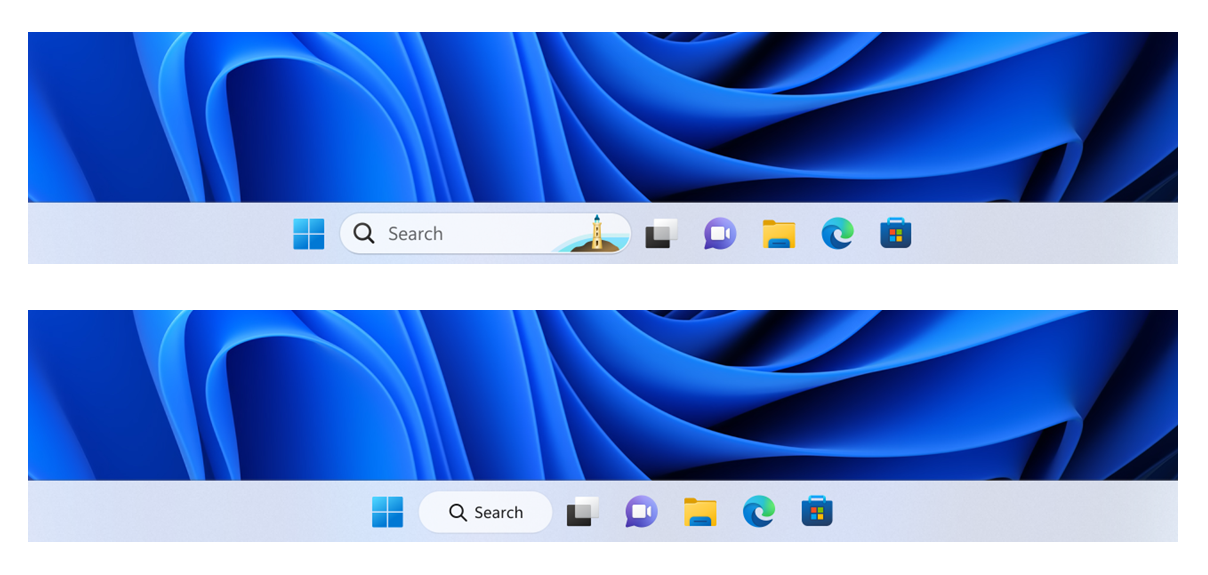
In this build, we are continuing to try out different treatments for how search looks on the taskbar. We are excited to learn from your feedback on this, so please let us know what you think via Feedback Hub if you see the different treatments on your PC. Insiders who get this experience will have the ability to change the treatment of search on taskbar in settings under Settings > Personalization > Taskbar > Taskbar Items.
[caption id="attachment_175997" align="alignnone" width="649"] Example of different treatments we are trying out for how search looks on the taskbar.[/caption]
Fixes in Build 22623.1037
[Taskbar & System Tray]
Updated the Quick Settings icons in the taskbar when using a screen reader so if you set focus to each of the icons it no longer includes the words system state and instead just says what the icon is (for example instead of “system volume state” it just says “volume”).
Fixed a few more explorer.exe crashes relating to recent taskbar changes.
[Task Manager]
We fixed the issue causing Task Manager to become unresponsive when using the search box at the top of Task Manager.
Fixes for BOTH Build 22621.1037 & Build 22623.1037
We fixed a known issue that might have affected Task Manager. It might have displayed certain elements in the user interface (UI) in unexpected colors. Some parts of the UI might not have been readable. This issue might have occurred if you had "Choose your mode" set to "Custom" in the Personalization > Colors section of Settings.
We fixed an issue that might have affected Data Protection Application Programming Interface (DPAPI) decryption. The decryption of a certificate private key might have failed. Because of that, virtual private network (VPN) and other 802.1 certificate-based authentication might have failed. This issue might have occurred when you encrypted the DPAPI master key with a wrong value.
Known issues
[Search on the Taskbar]
The following known issues only apply for Windows Insiders who received one of the different treatments for how search looks on the taskbar as mentioned above in this blog post:
You may see issues with the search box on taskbar not rendering correctly and displaying visual artifacts.
[Task Manager]
Filtering by publisher name does not match correctly on the Processes page.
Some services may not show in the Services page after filtering is applied.
If a new process is starting while a filter is set, then that process may appear for a split second in the filtered list.
Some dialogs may not render in the correct theme when applied from Task Manager Settings page.
The data content area of the Processes page may flash once when theme changes are applied in the Task Manager Settings page.
The Startup apps page in Task manager does not list any apps for some Insiders. If you are impacted, please use Settings > Apps > Startup for the time being.
About the Beta Channel
The Beta Channel will be the place we preview experiences that are closer to what we will ship to our general customers. Because the Dev and Beta Channels represent parallel development paths from our engineers, there may be cases where features and experiences show up in the Beta Channel first. However, this does not mean every feature we try out in the Beta Channel will ship. We encourage Insiders to read this blog post that outlines the ways we’ll try things out with Insiders in both the Dev and Beta Channels.
Important Insider Links
Want to learn how we made Windows 11? Check out our Inside Windows 11 website to hear and meet our makers from Engineering, Design and Research to share their insights and unique perspectives throughout this journey.
Tweet This blog post highlights the most popular knowledge base (KB) articles from June, including instructions on generating self-signed SSL certificates using the Java keytool command, troubleshooting LDAP user login errors, resolving Out of Memory issues in Java applications, configuring access log entries for Spring Boot apps, handling volume mounting errors in TAS for VMs, … Continued

 Connexion