Connexion
Paint update begins rolling out to Windows Insiders
13 mars 2024 à 17:16
UPDATE 3/21: The below update for Paint that introduces a new size slider for pencil, brushes, and eraser tools has begun rolling out to Windows Insiders in the Beta and Release Preview Channels.
Hello Windows Insiders, today we are beginning to roll out updates to Paint to Windows Insiders in the Canary and Dev Channels on Windows 11. Paint open with new size slider and size representation active.[/caption]
To get started, click on any of the pencil, brushes, or eraser tools, and a size slider will appear on the left side of the canvas. Click and drag along the slider to view different sizes and select the desired size to start drawing!
[We are beginning to roll out the new size slider mentioned above, so it may not be available to all Insiders in the Canary and Dev Channels just yet as we plan to monitor feedback and see how it lands before pushing it out to everyone.]
We are also improving layers by adding a new background option to the Layers panel. With this option, you can set the Background color for the canvas. Open the Layers panel and click the “Background” tile at the bottom or use Ctrl + Shift + B to try this out yourself. This will open the color picker dialog where you can set any color as the background. You can also use the “Hide background” option to make the background completely transparent or use the keyboard shortcut Ctrl + Shift + H to quickly show/hide the background.
We are also adding a new way to copy with “Copy visible layers”. This enables you to copy all visible content across layers. To use this option, select an area using the selection tool and invoke the context menu or use the Ctrl + Shift + C keyboard shortcut. “Copy” (Ctrl + C) will copy the visible content from the current layer only.
[caption id="attachment_176925" align="alignnone" width="1414"] Paint layers panel open showing new background option.[/caption]
FEEDBACK: Please file feedback in Feedback Hub (WIN + F) under Apps > Paint.
As always, we love getting feedback from the community and we will be looking out for your thoughts and suggestions on this update!
Thanks,
Dave Grochocki, Principal Product Manager Lead – Windows Inbox Apps
Paint open with new size slider and size representation active.[/caption]
To get started, click on any of the pencil, brushes, or eraser tools, and a size slider will appear on the left side of the canvas. Click and drag along the slider to view different sizes and select the desired size to start drawing!
[We are beginning to roll out the new size slider mentioned above, so it may not be available to all Insiders in the Canary and Dev Channels just yet as we plan to monitor feedback and see how it lands before pushing it out to everyone.]
We are also improving layers by adding a new background option to the Layers panel. With this option, you can set the Background color for the canvas. Open the Layers panel and click the “Background” tile at the bottom or use Ctrl + Shift + B to try this out yourself. This will open the color picker dialog where you can set any color as the background. You can also use the “Hide background” option to make the background completely transparent or use the keyboard shortcut Ctrl + Shift + H to quickly show/hide the background.
We are also adding a new way to copy with “Copy visible layers”. This enables you to copy all visible content across layers. To use this option, select an area using the selection tool and invoke the context menu or use the Ctrl + Shift + C keyboard shortcut. “Copy” (Ctrl + C) will copy the visible content from the current layer only.
[caption id="attachment_176925" align="alignnone" width="1414"] Paint layers panel open showing new background option.[/caption]
FEEDBACK: Please file feedback in Feedback Hub (WIN + F) under Apps > Paint.
As always, we love getting feedback from the community and we will be looking out for your thoughts and suggestions on this update!
Thanks,
Dave Grochocki, Principal Product Manager Lead – Windows Inbox Apps
Hello Windows Insiders, today we are beginning to roll out updates to Paint to Windows Insiders in the Canary and Dev Channels on Windows 11.
Paint (version 11.2402.32.0)
With this update to Paint, we are improving the brush size selection experience with a new size slider for pencil, brushes, and eraser tools. With the new size slider, you can choose from a wider range of size options and preview the selected size on the canvas as you drag the slider. [caption id="attachment_176924" align="alignnone" width="2200"]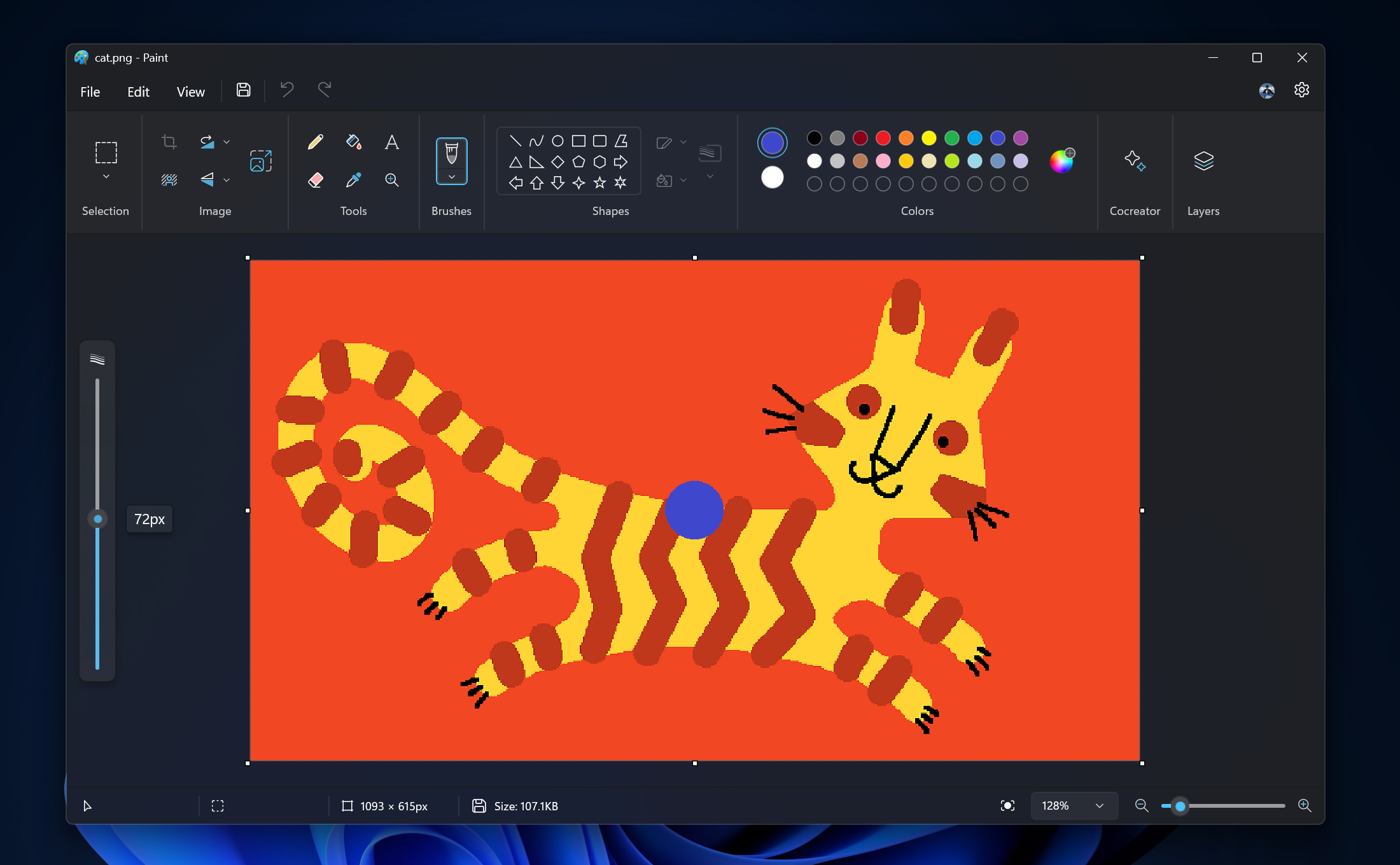 Paint open with new size slider and size representation active.[/caption]
To get started, click on any of the pencil, brushes, or eraser tools, and a size slider will appear on the left side of the canvas. Click and drag along the slider to view different sizes and select the desired size to start drawing!
[We are beginning to roll out the new size slider mentioned above, so it may not be available to all Insiders in the Canary and Dev Channels just yet as we plan to monitor feedback and see how it lands before pushing it out to everyone.]
We are also improving layers by adding a new background option to the Layers panel. With this option, you can set the Background color for the canvas. Open the Layers panel and click the “Background” tile at the bottom or use Ctrl + Shift + B to try this out yourself. This will open the color picker dialog where you can set any color as the background. You can also use the “Hide background” option to make the background completely transparent or use the keyboard shortcut Ctrl + Shift + H to quickly show/hide the background.
We are also adding a new way to copy with “Copy visible layers”. This enables you to copy all visible content across layers. To use this option, select an area using the selection tool and invoke the context menu or use the Ctrl + Shift + C keyboard shortcut. “Copy” (Ctrl + C) will copy the visible content from the current layer only.
[caption id="attachment_176925" align="alignnone" width="1414"]
Paint open with new size slider and size representation active.[/caption]
To get started, click on any of the pencil, brushes, or eraser tools, and a size slider will appear on the left side of the canvas. Click and drag along the slider to view different sizes and select the desired size to start drawing!
[We are beginning to roll out the new size slider mentioned above, so it may not be available to all Insiders in the Canary and Dev Channels just yet as we plan to monitor feedback and see how it lands before pushing it out to everyone.]
We are also improving layers by adding a new background option to the Layers panel. With this option, you can set the Background color for the canvas. Open the Layers panel and click the “Background” tile at the bottom or use Ctrl + Shift + B to try this out yourself. This will open the color picker dialog where you can set any color as the background. You can also use the “Hide background” option to make the background completely transparent or use the keyboard shortcut Ctrl + Shift + H to quickly show/hide the background.
We are also adding a new way to copy with “Copy visible layers”. This enables you to copy all visible content across layers. To use this option, select an area using the selection tool and invoke the context menu or use the Ctrl + Shift + C keyboard shortcut. “Copy” (Ctrl + C) will copy the visible content from the current layer only.
[caption id="attachment_176925" align="alignnone" width="1414"]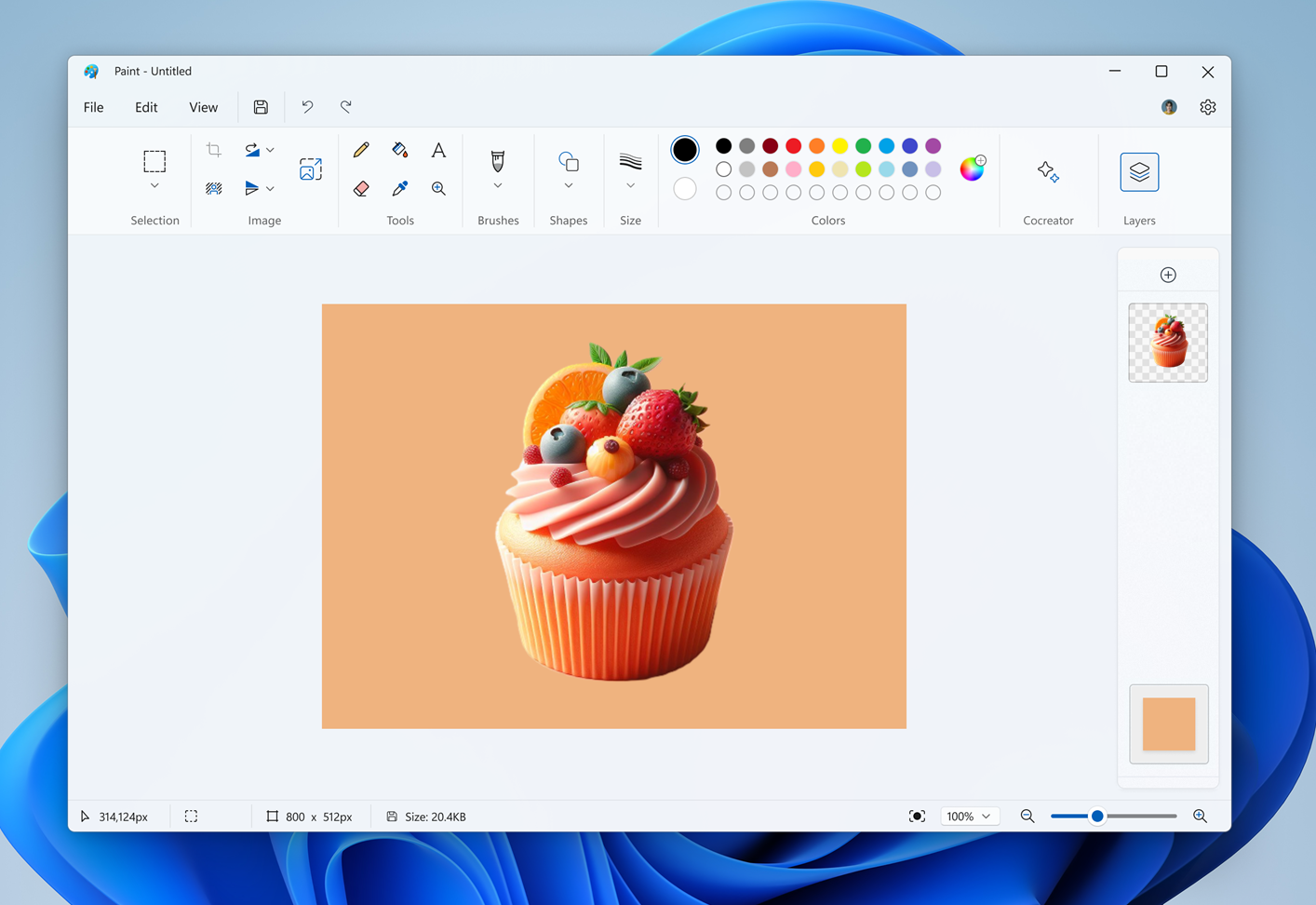 Paint layers panel open showing new background option.[/caption]
FEEDBACK: Please file feedback in Feedback Hub (WIN + F) under Apps > Paint.
As always, we love getting feedback from the community and we will be looking out for your thoughts and suggestions on this update!
Thanks,
Dave Grochocki, Principal Product Manager Lead – Windows Inbox Apps
Paint layers panel open showing new background option.[/caption]
FEEDBACK: Please file feedback in Feedback Hub (WIN + F) under Apps > Paint.
As always, we love getting feedback from the community and we will be looking out for your thoughts and suggestions on this update!
Thanks,
Dave Grochocki, Principal Product Manager Lead – Windows Inbox Apps