Présentation Dans ce tutoriel, je vais vous expliquer comment mettre en place des profils itinérants pour vos utilisateurs dans un environnement Active Directory. Quand j’ai commencé à travailler (il y a déjà quelques années), les profils itinérant étaient à la « mode ». Les profils itinérants stockent les données de l’utilisateur (profil) (C:\Users\<USERNAME>) dans un dossier partagé ...
Dans ce tutoriel, je vais vous montrer comment installer et configurer le rôle DHCP afin d’avoir un serveur DHCP fonctionnant sur Windows Serveur 2022. Si vous ne savez pas à quoi sert un serveur DHCP, je vais vous faire un petit rappel. Le rôle d’un serveur DHCP (Dynamic Host Configuration Protocol) est de fournir aux ...
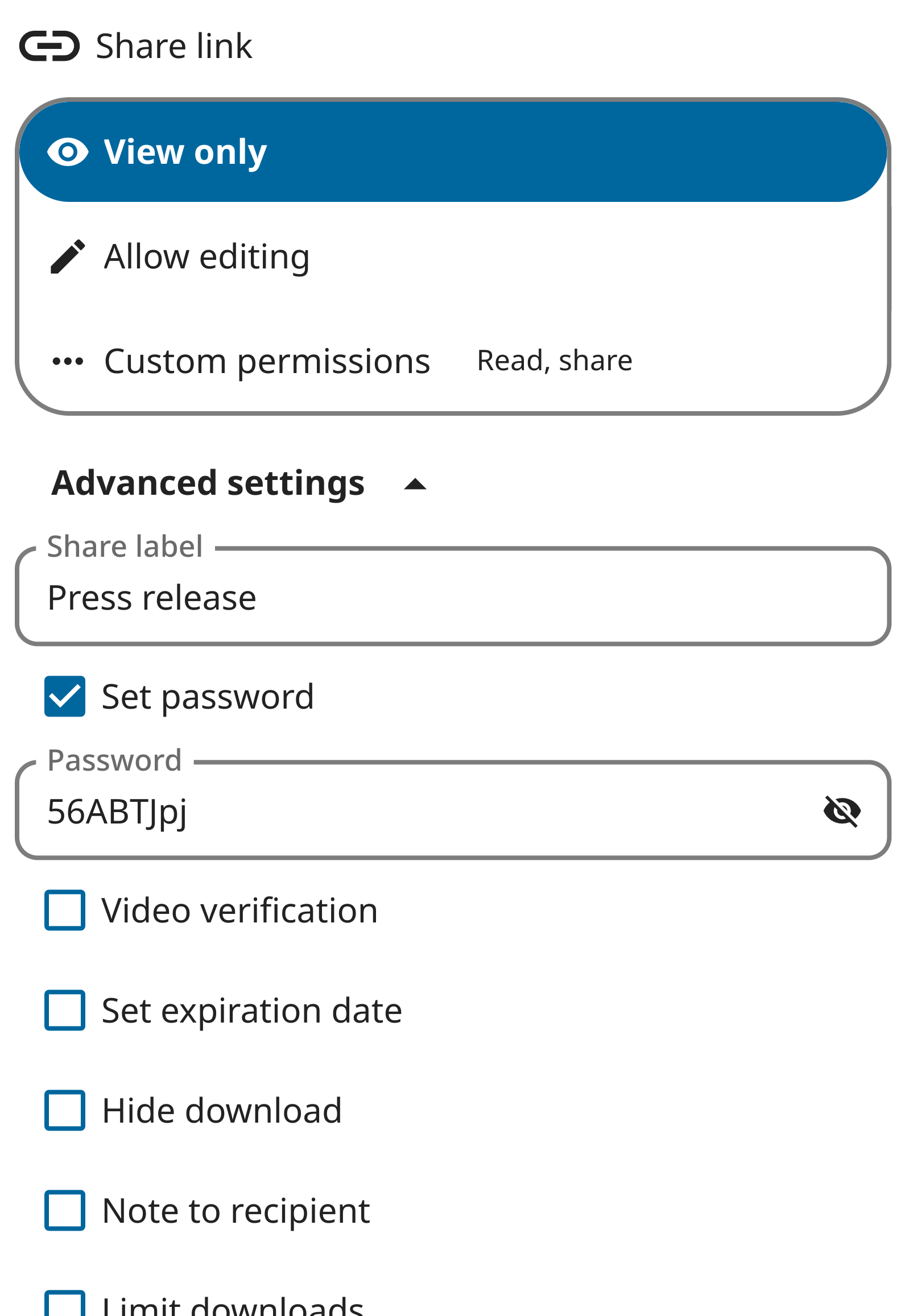
The German tabloid Bild featured an article covering the press release published by the German Ministry of Defence about the recent leaks of WebEX calls between army generals. The Bild noted that the password the Ministry of Defence used for the shared Nextcloud link was “1234”, assuming this was meant to ‘secure’ the link.
While a press release is obviously meant to be public, which is why the simple password was chosen, you might wonder why the ministry didn’t just use a completely password-less link for their Nextcloud share?
Secure sharing with Nextcloud
Nextcloud differentiates itself from public clouds like Microsoft 365, Dropbox or Google Drive with a focus on privacy and data sovereignty. Unlike public clouds, Nextcloud often runs on private cloud environments, giving the organization deploying it direct control over the data. It wouldn’t make sense for the German government (or any other) to hand over important data to foreign tech firms, which is why Nextcloud is widely deployed in the European public sector.
Protect your public links with passwords
With Nextcloud, users can share directly with other users. This makes sure no data leaves the government data center. But sometimes data must be shared outside the organization, either to a single individual or fully in public like with a press release.
Nextcloud allows users to create one, or more, public links for this purpose. A public link lets a third party who has the link view and (depending on the settings) download and edit the file. As you might share a document for editing with one person, and create another link with only viewing permissions to a second, each link can have its own protections. Including a password, expiration date and more!
The system administrator can put in additional controls, to ensure data is always protected. The File Access Control can use rules to stop files from being accessed outside Germany, for example. Or a mandatory 30 day expiration date can make sure links get cleaned up after a while. And last, but very relevant, administrators can enforce a password on each public link.
This setting is clearly enabled on the Nextcloud server used by the German Ministry of Defense, and explains why a simple password (1234) had to be chosen. Note that administrators can even enforce a certain degree of password quality, blocking such simple passwords from being chosen by users!
In other words. Mr. Pistorius does not use the password ‘1234’ to protect any data – it was meant to make it easy to access the press release.
We hope the readers at Bild appreciate out explanation!
Finding the right video conferencing software can be a challenge.
You ask yourself, what features do I need?
Can it scale up and still be reliable for my whole company?
In today’s world, we demand only the highest caliber online communication tools to meet our needs.
They need to bring you to the next level and break barriers.
That’s why in this blog, you’ll discover why individuals and businesses alike are turning to Nextcloud Talk for its unmatched features, security and seamless collaboration.
A collaborative video conferencing tool
Nextcloud Talk is an open-source video conferencing and chat application. Designed to keep all your online conversations private, whether by video or chat, all data is kept on your own servers and no data – not even metadata – can be leaked.
The features you need for your meetings:
Video conferencing in Nextcloud offers essential and purposeful features to make video calls optimal.
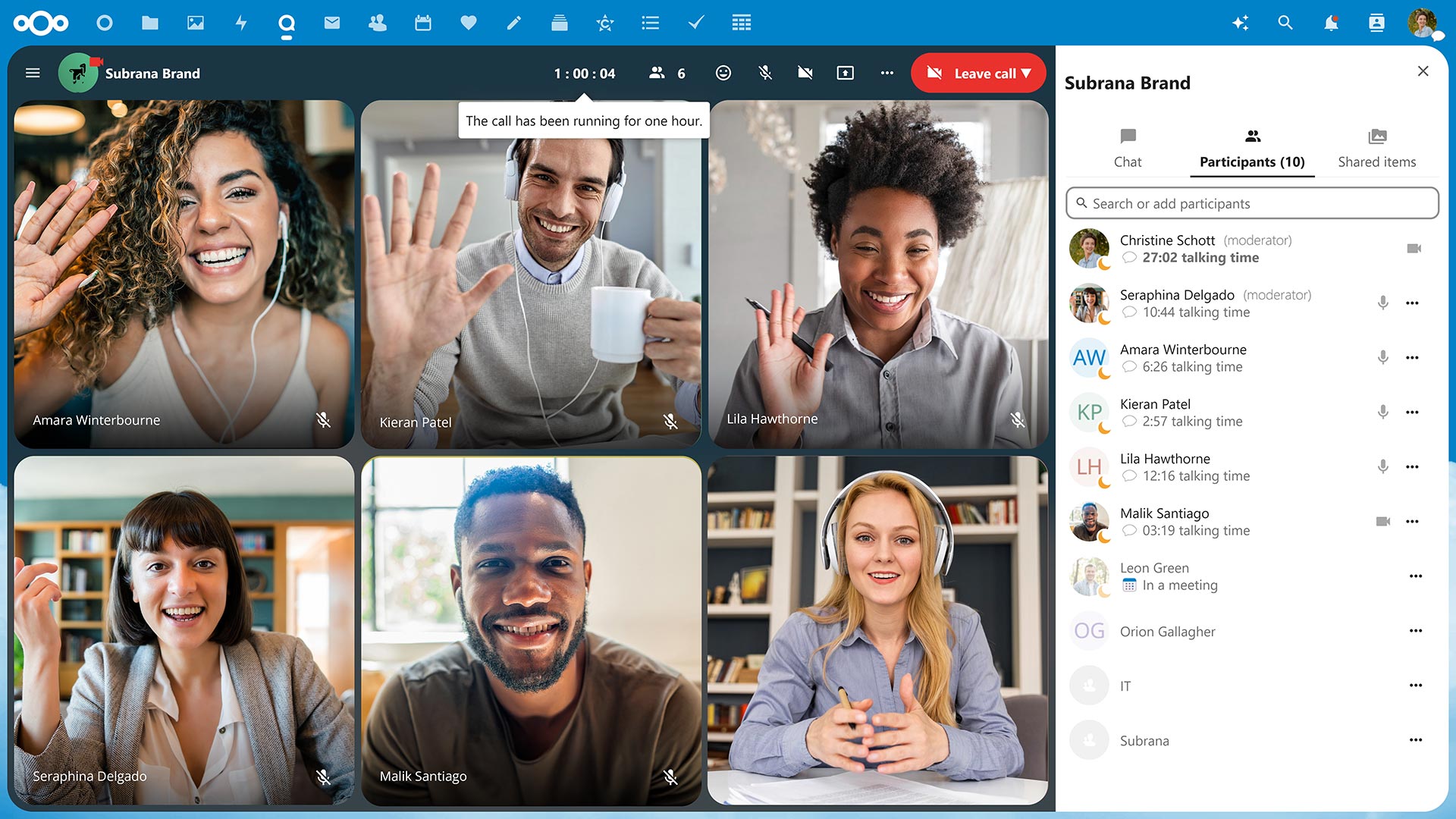
Screen sharing with profile view
Let others in the call see you while you share your screen to foster a more personal encounter.
Easy recording
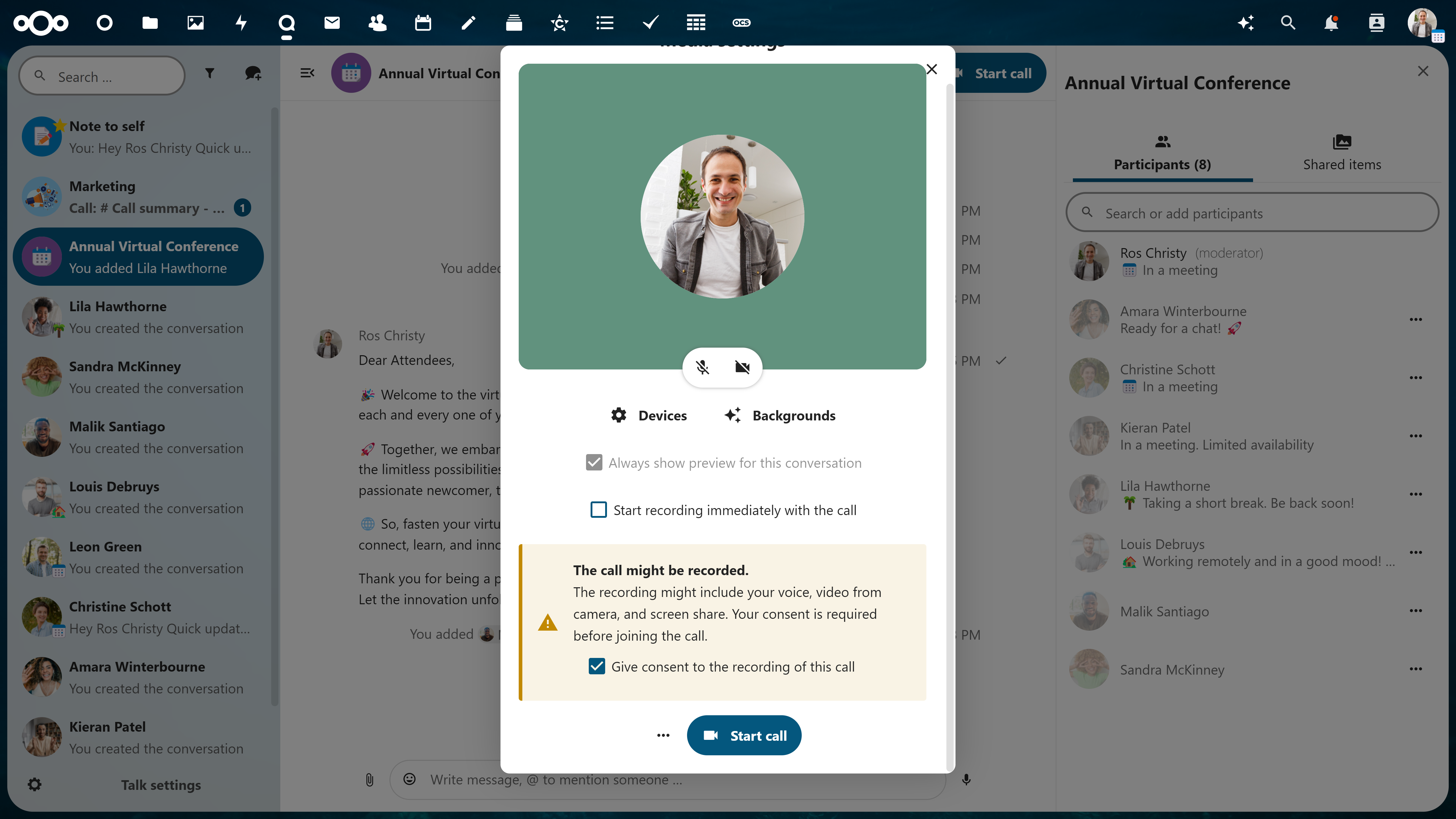
Record your video conferences for record keeping or later use. Before anyone joins the call, a popup to consent for recording is delivered to ensure full transparency to participants. Download and save your recording in your Nextcloud.
Support for large group conferencing
Lots of participants? No problem. Large groups are well-managed and you won’t be able to tell the difference.
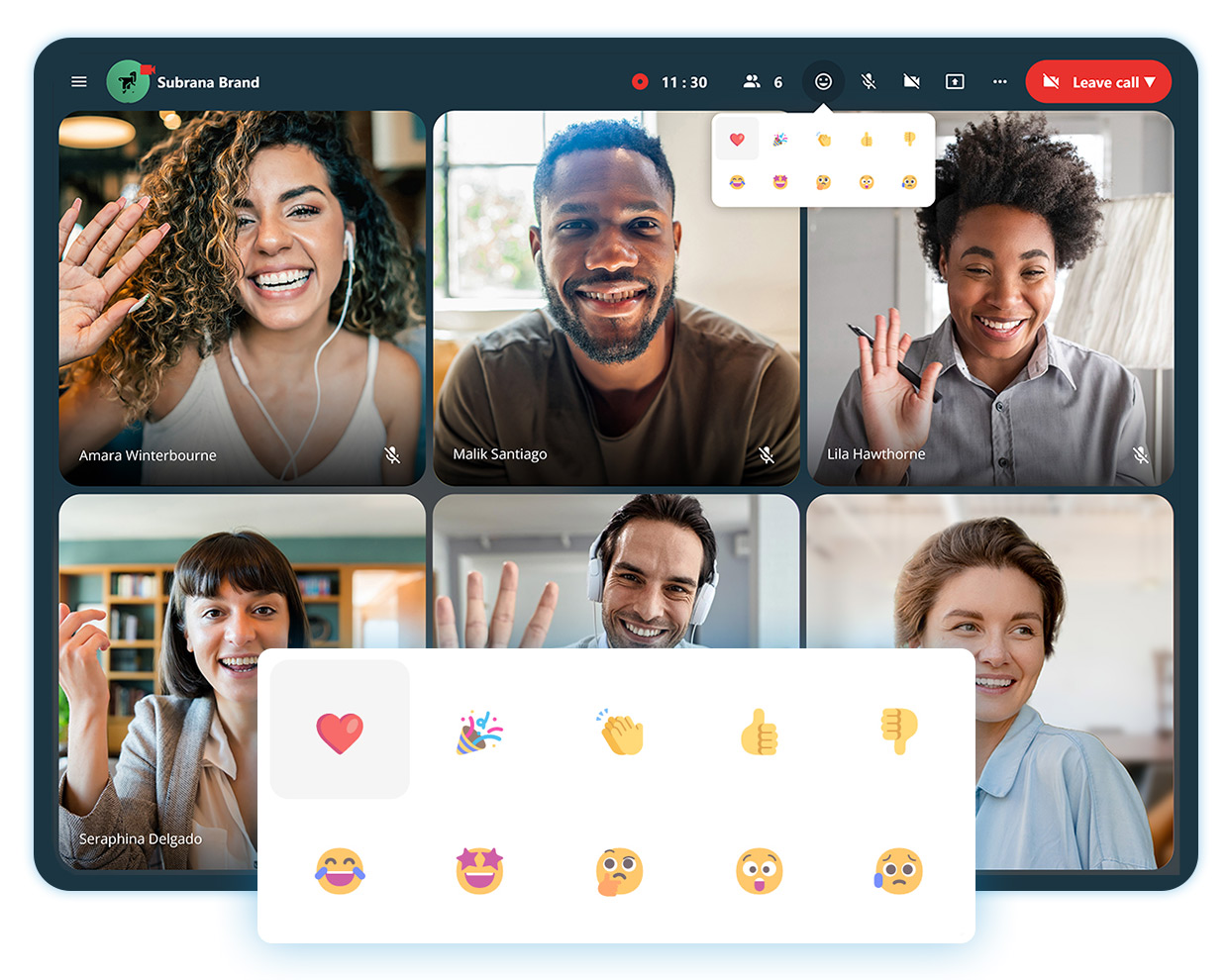
Reactions in calls
Express your feelings in a call to acknowledge someone’s statement, but not go as far as disrupting.
Track call duration and speaker talking times
After one hour, you’ll get a notification that you’ve hit the hour mark so you can stay aware of your time and others’. You’ll also never have to guess how long you’ve been talking, as speaker talking times will be tracked and noted at the end of the call.
Available on web and mobile devices
Take video conferencing from your office, home or on mobile with iOS and Android like never before.
Why it works: Integrated with your Nextcloud
Nextcloud is unique in the sense that everything is connected. You can explore incredible integration capabilities with the rest of your Content Collaboration Platform.
Not sure what that entails?
Nextcloud operates as a one-stop-shop platform integrating its own file storage, email, chat/video platforms and more so you can work efficiently and flexibly.
For example, if you’re in the middle of a call in Nextcloud Talk with a colleague and want to share a proposal your team has been working on, you can open the document directly from the chat sidebar. This is due to Files and Talk being integrated which saves you a lot of time and effort.
The astonishing advantages of Nextcloud operating as a single platform doesn’t stop here – enable hundreds, even thousands, of integration possibilities across all apps with Nextcloud as a Single Platform.
Watch the webinar recording
Prefer to listen? We hosted an entire webinar on the security features of Nextcloud Talk – check it out today!
Take it a step further with Nextcloud Talk’s High Performance Backend (HPB).
Designed for larger organizations, Nextcloud Talk’s High Performance Backend offers the capacity, reliability and features enterprises need to conduct their business privately, securely and efficiently.
Unbeatable convenience
Dial-in by a phone line to join a call with SIP bridge
Conduct large scale webinars, public broadcasting or video conferencing with lobby
As a HPB customer, you will notice improved connection speed and network efficiency after the implementation due to lowering the load from calls on the Nextcloud server.
With open-source technology, you have the opportunity to have full reign over your data. Whether you self-host on your own server or use a trusted hosting provider, your communications data happens and remains on your server, unlike popular alternatives like Microsoft Teams or Slack.
This unique protection extends further with our encrypted technologies by even keeping metadata at bay.
Nextcloud Talk chat and video was designed with your privacy in mind
Get in touch
We’re ready to show you what video conferencing can really be like. Try out Nextcloud Talk’s open source software.
Dans ce tutoriel, on va voir comment supprimer les fichiers de plus X jour à l’aide de PowerShell. Ce type de script est souvent utilisé en entreprise sur des serveurs afin de faire une rotation de logs. Si on prend l’exemple de IIS, les logs ne sont jamais effacés, ce qui fait que au bout ...
Dans ce tutoriel, je vais vous expliquer comment créer un alias sous PowerShell et pour illustrer ce tutoriel, nous allons créer l’alias touch qui permet sous Linux de créer un fichier. Pour commencer, je vous invite à lire le tutoriel : Powershell : créer un fichier texte et écrire dedans si nous ne savais pas ...
Dans ce article, je vais vous donner un exemple de script d’ouverture de session écrit en PowerShell. Pourquoi écrire un script en PowerShell d’ouverture de session alors que VBScript fonctionne comment présenter dans les tutoriels suivants : Pour une raison « simple », le langage vbs ne va plus être pris en charge nativement dans Windows 11 ...
Thank you for choosing Nextcloud. We look forward to serving you next year, wishing you all the best and hoping that it brings you joy, success, and endless possibilities with Nextcloud by your side. Our annual Wrap-Up is packed with exciting updates, insights, and behind-the-scenes stories that showcase the dedication and hard work of our team and community in 2023. Beep… boop… beep.
Nextcloud Assistant
Incredible company growth
Nextcloud GmbH is set to exceed its growth goals this year with already over 60% higher bookings compared to 2022, adding hundreds of new Enterprise customers and partners. We are very proud to continue our growing streak, achieved in an organic, sustainable way, without relying on external investors. We are deeply grateful for the trust you’ve shown us and we will continue to prove you made the right decision!
To accommodate our growth had to change offices, and in both Berlin and Stuttgart, we now have new, bigger and more centrally located offices. In Berlin, you can find us pretty much next to the Friedrichstrasse station in the heart of the city. In Stuttgart we moved less far, only a few blocks from where we used to be at Rotebühlplatz. Of course, most team members continue to work from home from all over the world!
We are now over 100 team members spanning 20 countries, all working remotely or in our offices in Berlin and Stuttgart. With a third of them joining us in 2023, we witnessed an impressive team growth!
Notably, eight team members are working students who joined Nextcloud to start their career early in the software industry, gaining valuable experience and knowledge alongside their studies.
Welcoming talent from all walks of life, Nextcloud is dedicated to seeking bright minds all across the globe. This year, team members from seven new locations joined us: Cameroon, Finland, Georgia, Hungary, India, Taiwan and Wales (UK).
Nextcloud crew at the Enterprise Day in Munich
A thriving community
Of course we are more than a company! Nextcloud’s success would not be possible without a healthy, thriving community of contributors behind Nextcloud. In 2023, we have seen many lines of code weaving the world’s leading open-source collaboration platform.
25k+ GitHub commits
Done by the Nextcloud team and community.
9k+ new forum members
+7.8k new topics and +36.6k new posts on the Nextcloud Community forum.
100+ security experts thanked
With 100+ reports resolved this year, our Security team demonstrated an incredibly swift response time: 2 hours on average.
76 new app uploads
Numerous new integrations submitted, ready to use in Nextcloud.
Technology
All these amazing people worked together and made tons of changes to Nextcloud itself, bringing our users not 1, not 2, not 3 but FOUR releases!
Growing pace with Hub launching 4x
Hub 4
Hub 4 brings ethical AI to Nextcloud, introducing content generation features backed by pioneering open source AI models. Smart Picker arrives in multiple core apps, offering easy sharing of multiple items like files, cards, tables, locations, Collectives, and much more. It is also the first time the Tables app appears in Hub, along with Notes as a core app.
Hub 5
Hub 5 earns Nextcloud Hub the title of the 1st self-hosted AI-powered workspace with numerous features and AI models joining the stack. The ecosystem evolves: Tables receives elaborate formatting tools, chatting and conferencing in Talk is much more intuitive, and new integrations like Notion, Outlook and Teams become available.
Hub 6
With Hub 6, the whole platform advances towards a smarter collaboration suite. Nextcloud Assistant arrives in Hub, introducing a sleek AI interface and diverse in-app text processing tools. Multiple improvements in Talk, Dashboard, Groupware and other apps provide better focus and a healthier online working culture.
Hub 7
Finally, with our latest release, we make Hub even more interconnected and synergetic. Cross-app features like Unified Search and out-of-office message highlight this version’s focus on integrity, while user-focused platform-wide improvements and ongoing investment in AI augmentation further elevate Hub experience.
High-profile achievements
Cloud Computing Insider Award
For the 7th time in a row, we were nominated for a Cloud Computing Insider award. This year, we won Gold in the Cloud Content Management category.
European SFS Award
In 2023, Nextcloud’s founder Frank Karlitschek accepted the European SFS award in the Name of Nextcloud, its community and team.
European Award by Acteurs du Libre
Held at Open Source Experience Paris, the Acteurs du Libre award ceremony welcomed Nextcloud on stage to receive the European Award in collaboration with APELL.
Pioneering ethical AI
This year, Nextcloud has been committed to introducing and advancing AI capabilities in Hub, embracing transparency, choice and fair technologies. Ethical AI has become a highlight of 2023, with our efforts to help our users make informed decisions while having access to the best-in-class solutions. With dozens of AI integrations available in Nextcloud to this day, there are options matching everyone’s needs: remote or local, established or emerging, universal or leading in their niche.
Welcome Nextcloud Assistant
Nextcloud Assistant is a 100% open-source AI assistant that doesn’t prey on your data! It offers a friendly, native interface to an AI model of your choice, hosted locally or remotely. Use it in Mail to summarize threads, in Text to analyze and generate content, in Talk to augment your conversation, or anywhere in Hub via the toolbar to perform quick text related tasks.
Ethical AI Rating
With numerous AI models and services available in Nextcloud, we want you to to be aware of the risks you take. Our Ethical AI Rating, labeling apps based on code transparency, deployment model, and availability of training data, helps you build your AI stack with confidence.
Collaboration with the German government
The German state of Schleswig-Holstein has made a bet on Nextcloud to foster digitization of the state affairs, including the AI strategy. In collaboration with the State Chancellery, we are developing a language model tailored to unique state administration tasks while keeping digital threats at bay. Announced with the Hub 7 release, the development of Nextcloud Assistant Context Chat is the first fruit borne from this collaboration. Read the full story to learn more.
A leap forward in global tech decentralization
In our vision, data privacy and digital sovereignty don’t go well together with the Big Tech domination. Not only do we make software enjoyed by private users, government and businesses alike, but we also want to tip the scales in the global technological decentralization. In this regard, 2023 has been a success!
What made this year special:
Anti-trust coalition and Digital Markets Act
On behalf of the coalition of the independent European technology providers, Nextcloud has filed a collective anti-trust complaint with German authorities which spiked an investigation into Microsoft’s market domination. In September 2023, the Digital Markets Act went into effect, requiring Microsoft to revise its alleged market-distorting behavior by March 2024.
EU bets on Nextcloud to replace SharePoint
The impending end of support for the SharePoint Server leads to a growing need for alternatives. Government agencies in particular face concerns regarding data sovereignty and vendor lock-in, leaning towards on-premises collaboration tools. The European Data Protection Supervisor (EDPS) sets the standard for data protection with Nextcloud, being one of the most prominent examples of Nextcloud implementation in the European public sector.
Roundcube joins the Nextcloud family
Earlier this year, Nextcloud and Roundcube announced a merger bringing the open-source email giant under Nextcloud’s stewardship. “The merger not only underscores the collective strength of the open source community, but also highlights our enduring commitment to privacy, security, and user empowerment.” – underlines Nextcloud founder Frank Karlitschek. Read the story in our blog and join the discussion on the forum.
Moments that mattered: event recap
34 events
We attended 34 events around the world, exhibiting, speaking, and meeting our community: FOSDEM, Cloud Expo Europe, it-sa, GITEX Global, Smart City Expo, and many other key industry gatherings.
60 webinars
From educating our users about new functionality and administration to the use of Nextcloud in various professional settings, this year’s streams covered a hefty number of practical topics with over 5500 sign-ups.
On September 16th and 17th, we hosted the annual Nextcloud Conference under the motto “Trust, Transparency, Together.” Packed with insightful talks and panels, the event aired the announcement of Hub 6, Max Schrems’ EU-US data privacy keynote, Katrin Fritsch’s keynote on green internet, and Simon Phipps’ talk about the Fourth Sector.
Looking back at the marvelous time we spent together at MotionLab.Berlin, we invite you to read the Day 1 and Day 2 recaps. Session recordings are available on our YouTube playlist:
Nextcloud Enterprise Day
This year, we organized two events for Nextcloud enterprise community — Enterprise Day in Munich on June 13 and a special Enterprise Day France on December 5. Often held bi-annually, Nextcloud Enterprise Day helps us understand the needs of the business and government markets, setting the right course for feature development and integration. If you wish to participate next year, stay tuned for the announcement!
New developer program
This year, we welcomed the new Developer Program that offers you free promotion and opens a new window of possibilities for growth.! Now you have the opportunity to build apps in any language for tens of millions of Nextcloud users worldwide. What’s more, all core apps are now fully documented with OpenAPI by OCS (Open Collaboration Services). Make use of our documentation and examples to build an app that may just become the next #1 tool of choice!
And, of course, we announced it at our conference and advanced the state of technology with Nextcloud Hub 7: you can now build Nextcloud apps in your favorite programming language! No longer is PHP the only option, but Python, Go, Ruby, Rust, Java – bring it on!
Last but not least — welcome a fully redesigned app store and the new app ecosystem offering a better UI as well as smoother downloads and installation.
Content that you liked the most
This year, we wrote 126 blogs, published over 90 videos, aired 3 successful podcasts, and created 13 community newsletters — all with the biggest engagement yet.
Every year is a new challenge, yet the world keeps spinning and we remain a team of people who believe in the greater good. That’s why we built Nextcloud, a mighty open-source collaboration engine set to put you back in control over your data and make your working life comfortable. Thank you all, and cheers to all the great things that await us in 2024!
With millions of Nextcloud users, there are a wide variety of needs and requirements for a private cloud server. Release channels allow you to pick a versioning strategy that fits you.
The release process
Check out this video that goes through how our release channels work!
We make new versions available incrementally to user installations in our Stable channel. When a major new version comes out, we wait about one week and only when no problems are found, we start the roll out in steps of about 20% of our user base per week.
That means if you maintain several servers, some get it sooner than others. For instance, sometimes an issue is found that was not caught during our pre-release testing, so we delay the roll-out until the fix is available.
As a result, a new release is typically only available in the Stable channel after the first minor release. Sometimes it can take even a bit longer. Users can always upgrade sooner by choosing the beta channel, which typically tracks stable releases immediately after publishing.
After upgrading to the new major release from the Beta channel, you can switch back to stable where you will be notified of minor releases as usual.
Release and maintenance schedule
You can find the release and maintenance schedule on GitHub
Whether you want the latest features, want to help with testing, or just want to wait until everything is perfectly ready to go, we’ve got options for you. We offer 4 release channels: Production, Stable, Beta and Daily. See the table below and compare to find what works best for you or your organization.
Release channel
Use case
Get it here
Production
This channel is used to deliver the Nextcloud Enterprise build to our customers.
Our customers have access to a special build of Nextcloud, giving them the reliable Enterprise solution they need for the best possible experience.
This channel delivers the latest feature releases ready for most users at minimal risk.
Note that Nextcloud does staged roll-outs, making releases incrementally available to the user base over time. We are very careful about new major releases, usually only making them available after the first minor bug fix release. To update sooner to the new version, use the Beta channel. Around big releases the Beta channel delivers the new major version.
Betas and release candidates are the versions of choice for testers in preparation for an Nextcloud release. They provide a short-term-stable point to report bugs against. Grab these to make sure the upcoming release works well on your infrastructure.
Automatically generated snapshot tarballs and betas track daily Nextcloud development. These are suitable to check if bugs are fixed but can break any time.
Daily
Daily builds are meant to reproduce bugs as well as to enable testers to follow the development of the next major version.
You can choose a release channel of your preference in the Administrator settings in your Nextcloud instance if you have installed Nextcloud from an archive.
How upgrading works
When upgrading, you can only upgrade to a newer version. Skipping major versions when upgrading and downgrading to older versions is not supported by Nextcloud. For example, if you went via ‘beta’ to 14.0.0rc4 and ‘stable’ is on 13.0.5, you’d have to wait until 14.0.0 or later is in ‘stable’ until a new update will become available.
Note: If you are looking to grab an archive of a specific version you can find links to them in our changelog.
How releases function
Normally, releases don’t show up in the updater app right away. We usually stagger releases out to watch the impact and hold off in case very serious problems pop up. In practice, most bugfix releases are available within a week, major releases to a proportion of the users on release day in the Stable channel; we will increase that percentage usually to 100% after the first bugfix release. Packages for the Release channels might be available in distributions, docker images, Snap and so on, this is up to the packagers and communities developing for those platforms.
To upgrade in the safest way possible, always update to the latest minor release before upgrading to a new version. As an extreme example, to upgrade from 9 all the way to 12.0.5, upgrade 9.0.x to 9.0.6, then upgrade to 10.0.6, 11.0.7, then 12.0.5. We try to set up our updater to do this automatically for you whenever possible.
Protecting data in schools, universities, and other educational institutions is paramount for the sake of organizations and their students. The security measures safeguarding personal information, external communication and collaborative work needs to be intact and transparent.
With Nextcloud Hub, educational institutions can easily protect their data stored on-premises to ensure utmost security. Let’s take a look at how Nextcloud functions for faculty, student’s and researchers.
Data privacy and compliance for educators
School administrators and educators are entrusted with the future of their students and their privacy. Student’s personal information must be safeguarded and kept on-premises at the school or university. Nextcloud ensures the utmost security so you can store, share and archive files with transparency and precision.
“We wanted to offer an alternative service to the Google or Microsoft office suites which would be compatible with our data sovereignty policy.”
Sorbonne University, case study
For many schools and universities, data privacy and compliance can be difficult to achieve when working with proprietary software. What schools can achieve with Nextcloud is local hosting of data on your own server and full control over the IT infrastructure.
Student remote learning and collaboration
Students learn best when the tech they use is reliable. They need to be able to easily collaborate with other students, work on homework and submit assignments and projects. Nextcloud offers an intuitive platform that students can use with ease and connect with from anywhere. When it comes to remote learning, Nextcloud provides:
Video calls with break out rooms
Real-time editing in documents
Secure chat with peers and teachers
File storage with administrator controls
Integrations with popular e-platforms
Access from web, mobile and desktop interfaces
And much more!
Whatever the needs of your school, university, or institution, they can be met with Nextcloud.
Benefits of Nextcloud Enterprise
Only Nextcloud Enterprise offers educational institutions the reliability, security and compliance they need to confidently deploy software in critical environments
University researchers and PhD students work with a cumbersome amount of data. Some data is easy to store like files and documents, whereas others like images and video, sound recordings and measurement data take on a lot of storage capacity. The Nextcloud platform can handle large amounts of data, scales easily and can be stored locally on your server.
Success stories in education
Sorbonne University
Nextcloud provided the University with a sovereign cloud solution for their researchers, students and staff.
Nextcloud offers schools and universities full control over their data, IT infrastructure and future with the Nextcloud Hub solution. With ease of use for student’s, seamless collaboration for educators and capacity for researchers, Nextcloud can fit the needs for all departments.
Nextcloud in Education
Nextcloud is a pioneer in leading educational institutions to a data sovereign future
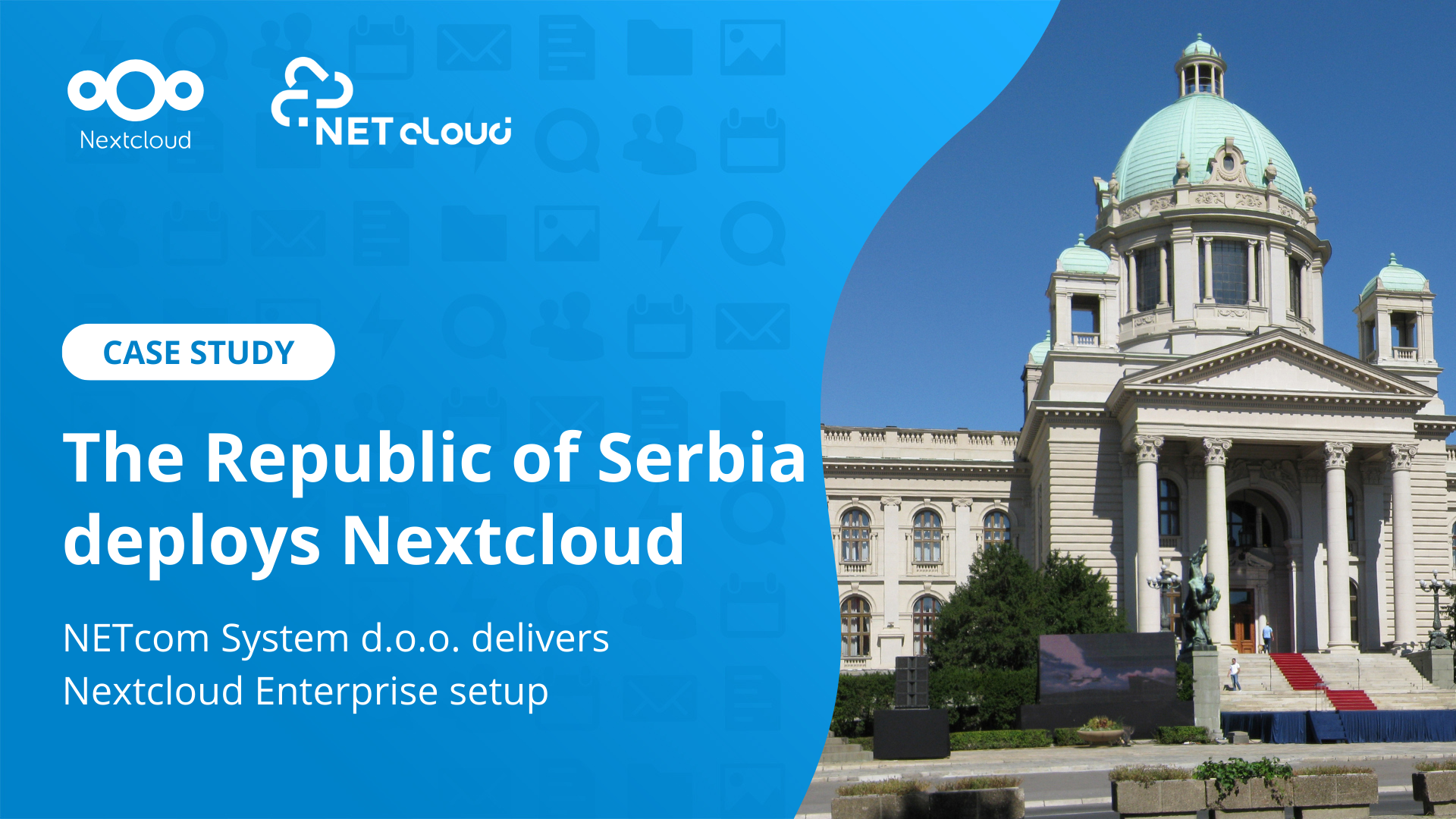
The Republic of Serbia’s National Assembly is the highest representative body holding constitutional and legislative power in Serbia. Made up of 250 deputies, they elect government leaders, adopt and amend the Constitution, and appoint state officials. Due to the nature of their work, it’s fundamental to utilize a secure and compliant platform that they can trust and rely on.
In this summary of our newest government case study, follow along and discover the Republic of Serbia’s unique challenges, how Nextcloud was implemented, and ultimately how our solution fits the needs for its legislators and their data.
The challenge
The Serbian government believes digitalization is expected to bring many benefits to the general public, civil sector and government institutions. Through its national digitalization project, they intend to promote digitization of state and civil institutions. One way to achieve this is through implementing a more innovative IT solution for its government.
In the past, the Serbian government relied on a VPN and SMB (Server Message Block) for accessing and sharing files. However, it wasn’t user friendly and there were often issues that arose that wasted IT staff resources. It was time to look for a solution.
Requirements for the project
All data kept in Serbia
Compliant with data privacy laws
Supports large files
Meets reliability and performance standards
Supports mobile clients
Integrate with Serbia’s national digitalization project
Choosing a new solution
IT company NETcom System d.o.o. worked closely with the National Assembly’s Operations, Communication and IT sectors to find a new solution. They proposed Nextcloud because of its ability to run your own server on-premises, enable secure document sharing, and facilitate team collaboration.
“Data security is paramount when choosing software solutions that our institution needs.”
Dario Kukolj, Head of Operations and Technical Affairs and Information Technology Sector
A digitally sovereign state
With the implementation of Nextcloud, the Serbian government regained control over their data and achieved digital sovereignty. The National Assembly leaders can now collaborate on projects easily and rely on everything they need in one place. They can also benefit from secure sharing of documents to external parties and be reassured by overall increased security.
Read the case study
For more details and the full case study of the Serbian government, download now!

 Connexion