Vue normale

Il y a de nouveaux articles disponibles, cliquez pour rafraîchir la page.
À partir d’avant-hierNextcloud

Nextcloud Talk: Open-source online video conferencing software

8 mars 2024 à 10:00

Finding the right video conferencing software can be a challenge.

You ask yourself, what features do I need?

Can it scale up and still be reliable for my whole company?

In today’s world, we demand only the highest caliber online communication tools to meet our needs.

They need to bring you to the next level and break barriers.

That’s why in this blog, you’ll discover why individuals and businesses alike are turning to Nextcloud Talk for its unmatched features, security and seamless collaboration.

Nextcloud Talk: Open-Source online video conferencing software

A collaborative video conferencing tool

Nextcloud Talk is an open-source video conferencing and chat application. Designed to keep all your online conversations private, whether by video or chat, all data is kept on your own servers and no data – not even metadata – can be leaked.

The features you need for your meetings:

Video conferencing in Nextcloud offers essential and purposeful features to make video calls optimal.

Nextcloud Talk call presenting

👋 Screen sharing with profile view

Let others in the call see you while you share your screen to foster a more personal encounter.
Nextcloud Talk: Recording consent

🎦 Easy recording

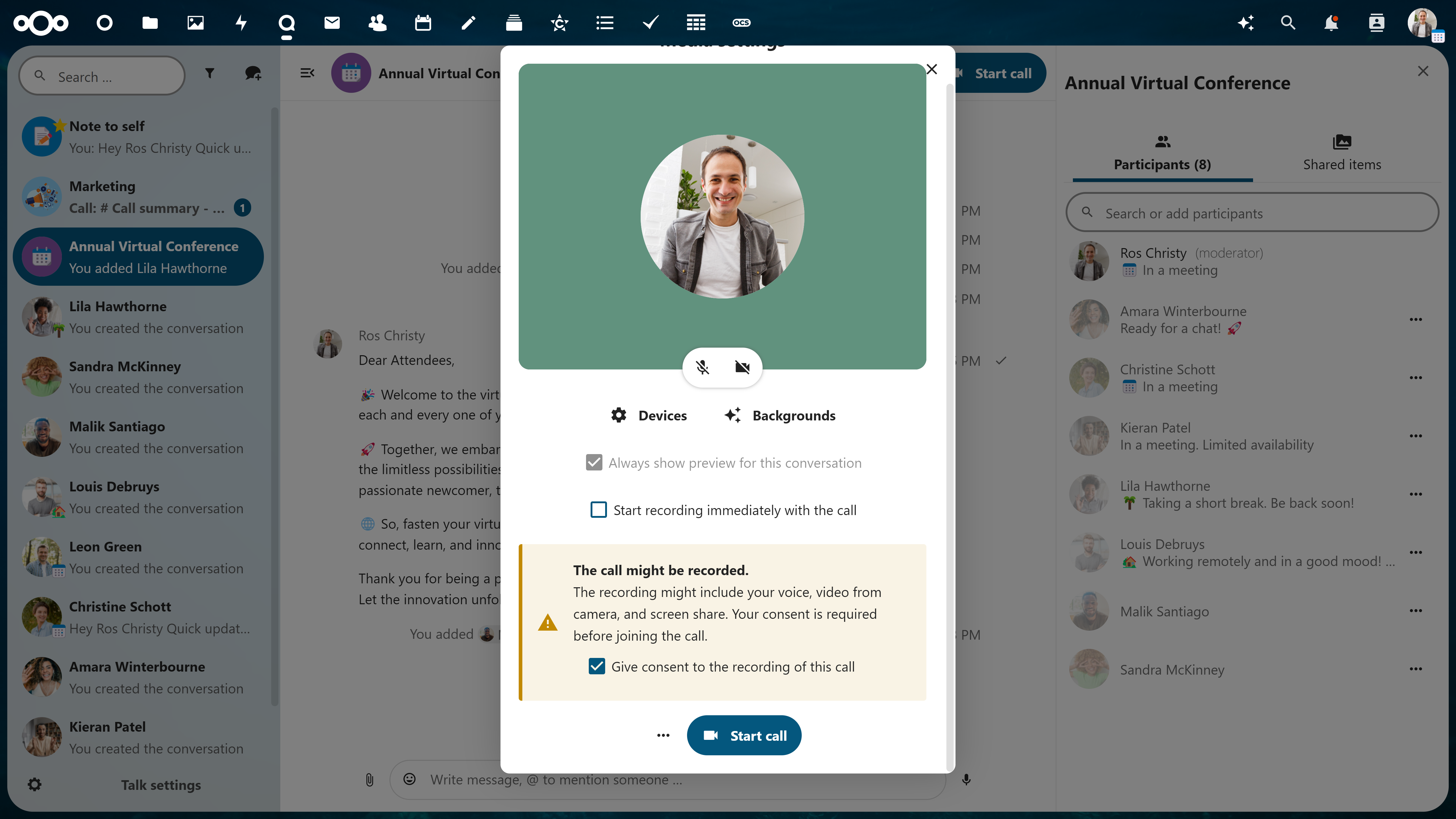
Record your video conferences for record keeping or later use. Before anyone joins the call, a popup to consent for recording is delivered to ensure full transparency to participants. Download and save your recording in your Nextcloud.
partners-meeting-call-summary

👥 Support for large group conferencing

Lots of participants? No problem. Large groups are well-managed and you won’t be able to tell the difference.
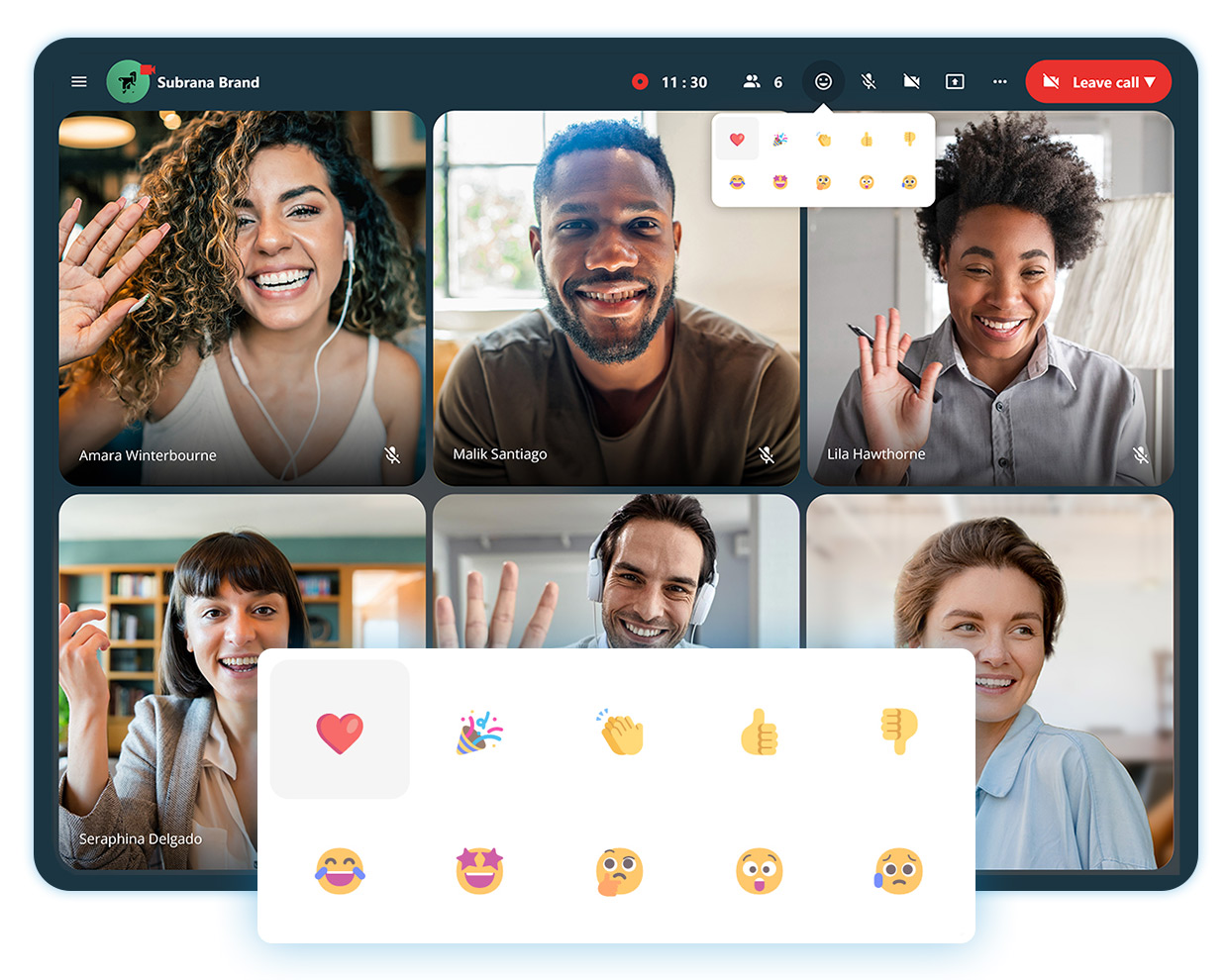
nextcloud-talk-reactions-during-calls

🤩 Reactions in calls

Express your feelings in a call to acknowledge someone’s statement, but not go as far as disrupting.
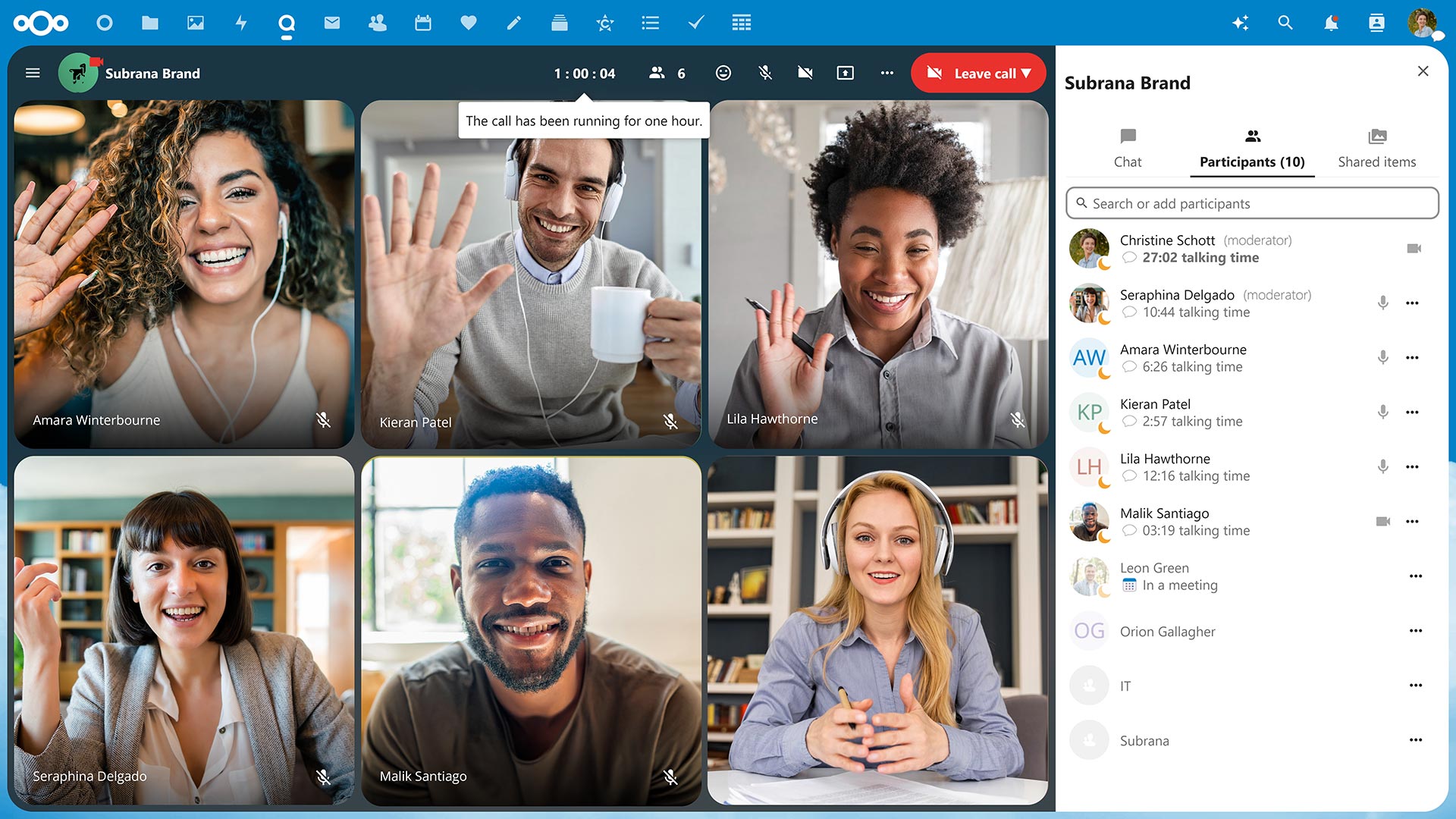
hub7-talk-60-minute-call-notification-with-avatars

📉 Track call duration and speaker talking times

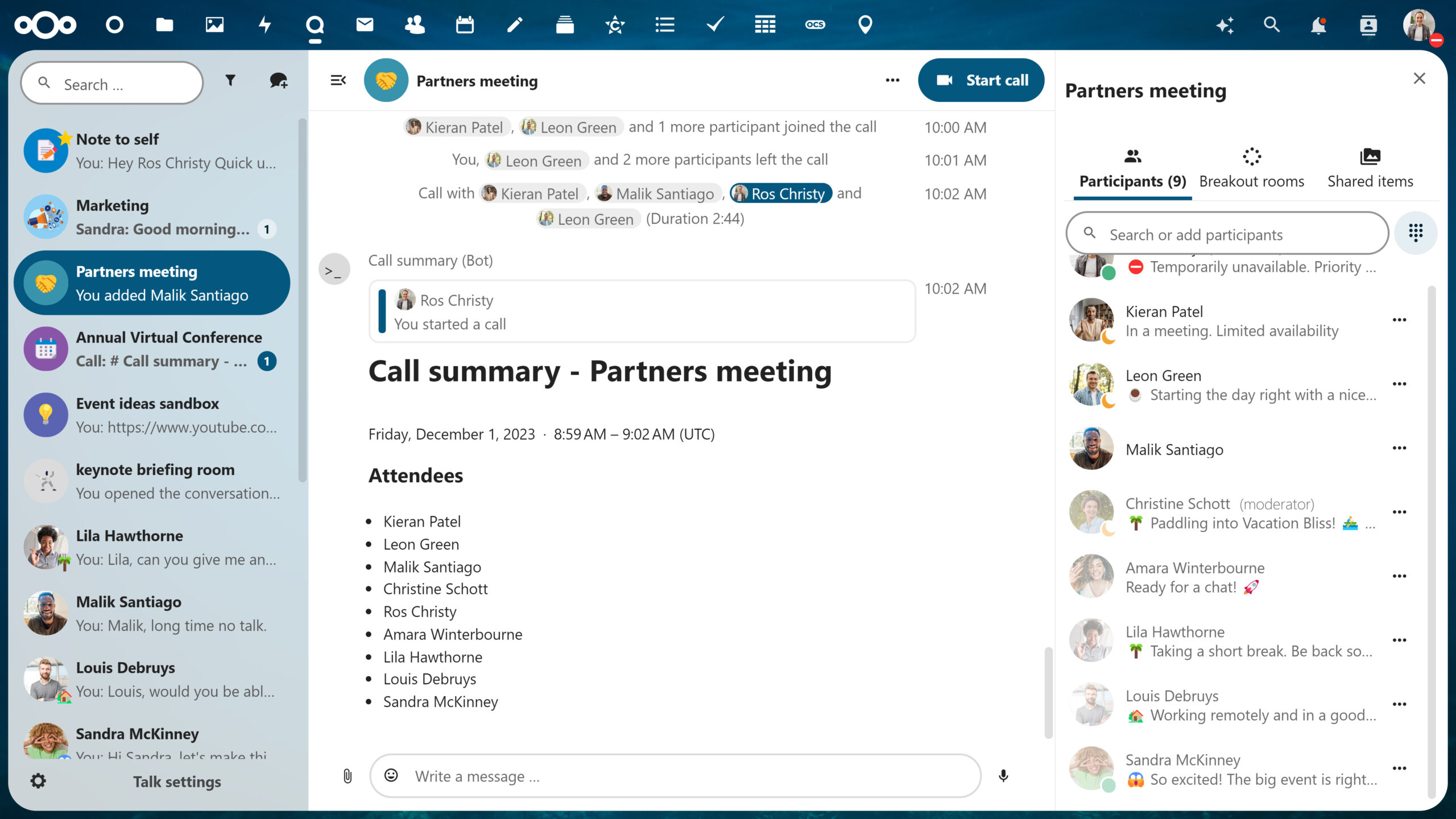
After one hour, you’ll get a notification that you’ve hit the hour mark so you can stay aware of your time and others’. You’ll also never have to guess how long you’ve been talking, as speaker talking times will be tracked and noted at the end of the call.

Nextcloud-talk-clients

📱Available on web and mobile devices

Take video conferencing from your office, home or on mobile with iOS and Android like never before.

Why it works: Integrated with your Nextcloud 🔗

Nextcloud is unique in the sense that everything is connected. You can explore incredible integration capabilities with the rest of your Content Collaboration Platform.

Not sure what that entails?

Nextcloud operates as a one-stop-shop platform integrating its own file storage, email, chat/video platforms and more so you can work efficiently and flexibly.

For example, if you’re in the middle of a call in Nextcloud Talk with a colleague and want to share a proposal your team has been working on, you can open the document directly from the chat sidebar. This is due to Files and Talk being integrated which saves you a lot of time and effort.

The astonishing advantages of Nextcloud operating as a single platform doesn’t stop here – enable hundreds, even thousands, of integration possibilities across all apps with Nextcloud as a Single Platform.

Watch the webinar recording

Prefer to listen? We hosted an entire webinar on the security features of Nextcloud Talk – check it out today!

Watch recording

High Performance Backend

Take it a step further with Nextcloud Talk’s High Performance Backend (HPB).

Designed for larger organizations, Nextcloud Talk’s High Performance Backend offers the capacity, reliability and features enterprises need to conduct their business privately, securely and efficiently.

Unbeatable convenience

  • Dial-in by a phone line to join a call with SIP bridge
  • Conduct large scale webinars, public broadcasting or video conferencing with lobby

As a HPB customer, you will notice improved connection speed and network efficiency after the implementation due to lowering the load from calls on the Nextcloud server.

Why open-source video conferencing

With open-source technology, you have the opportunity to have full reign over your data. Whether you self-host on your own server or use a trusted hosting provider, your communications data happens and remains on your server, unlike popular alternatives like Microsoft Teams or Slack.

This unique protection extends further with our encrypted technologies by even keeping metadata at bay.

Nextcloud Talk chat and video was designed with your privacy in mind

Get in touch

We’re ready to show you what video conferencing can really be like. Try out Nextcloud Talk’s open source software.

Get me Nextcloud Talk

The post Nextcloud Talk: Open-source online video conferencing software appeared first on Nextcloud.
Nextcloud Forms is here to keep your surveys private

21 février 2024 à 09:30

Did you know a third of people who abandon a survey form do so because they worry about privacy and security? We understand, pretty much all those forms are hosted at Google or other, data-vacuuming services. Well, we have good news to you surveyors! You can use Nextcloud Forms as part of Nextcloud Hub.

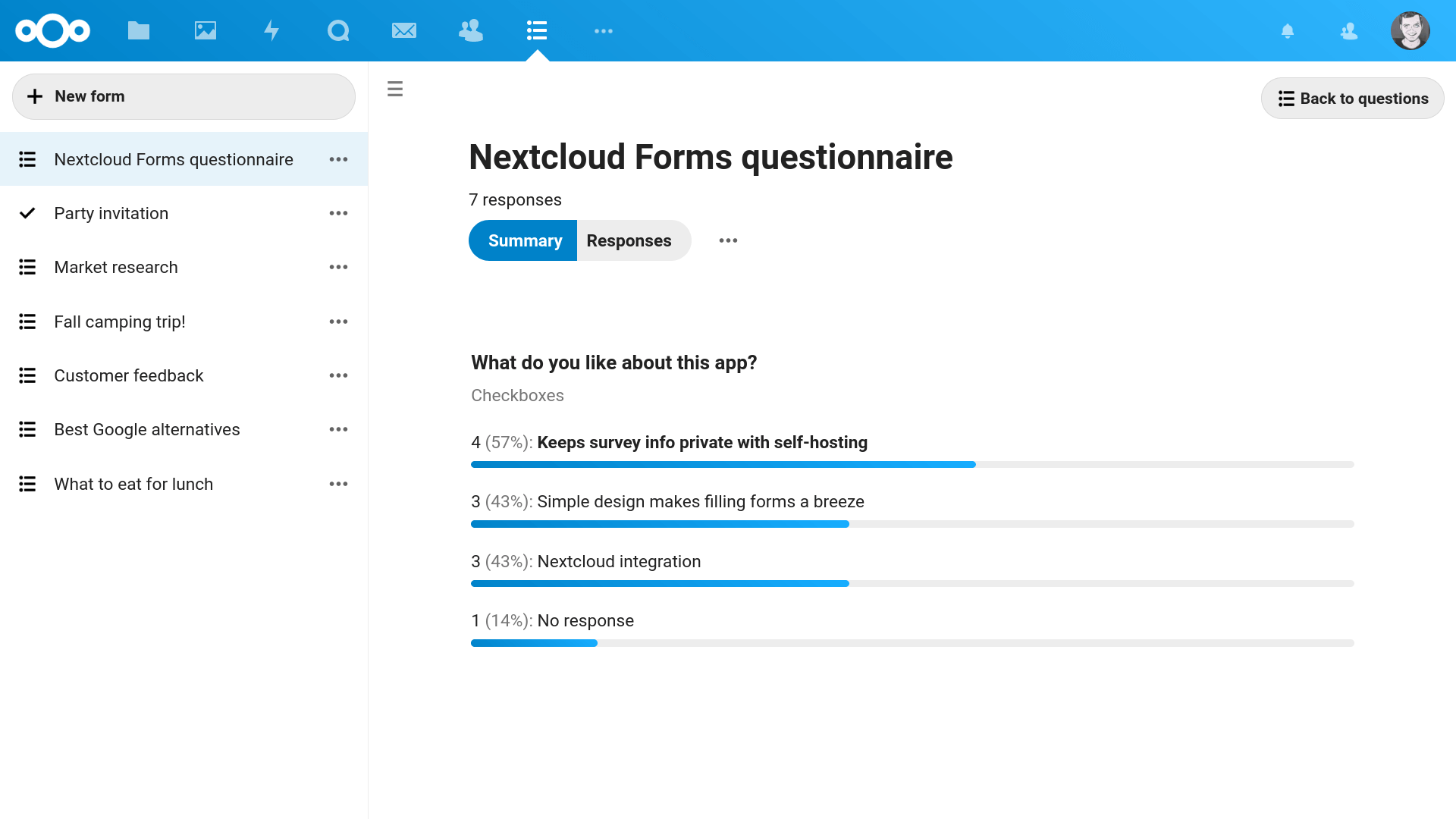
With Nextcloud Forms, you can create as many forms, with as many questions, and shared with as many people as you like – without any limitations. You keep your form and the data you collect on Nextcloud. And you can easily analyze and share the results with pretty and insightful graphs.

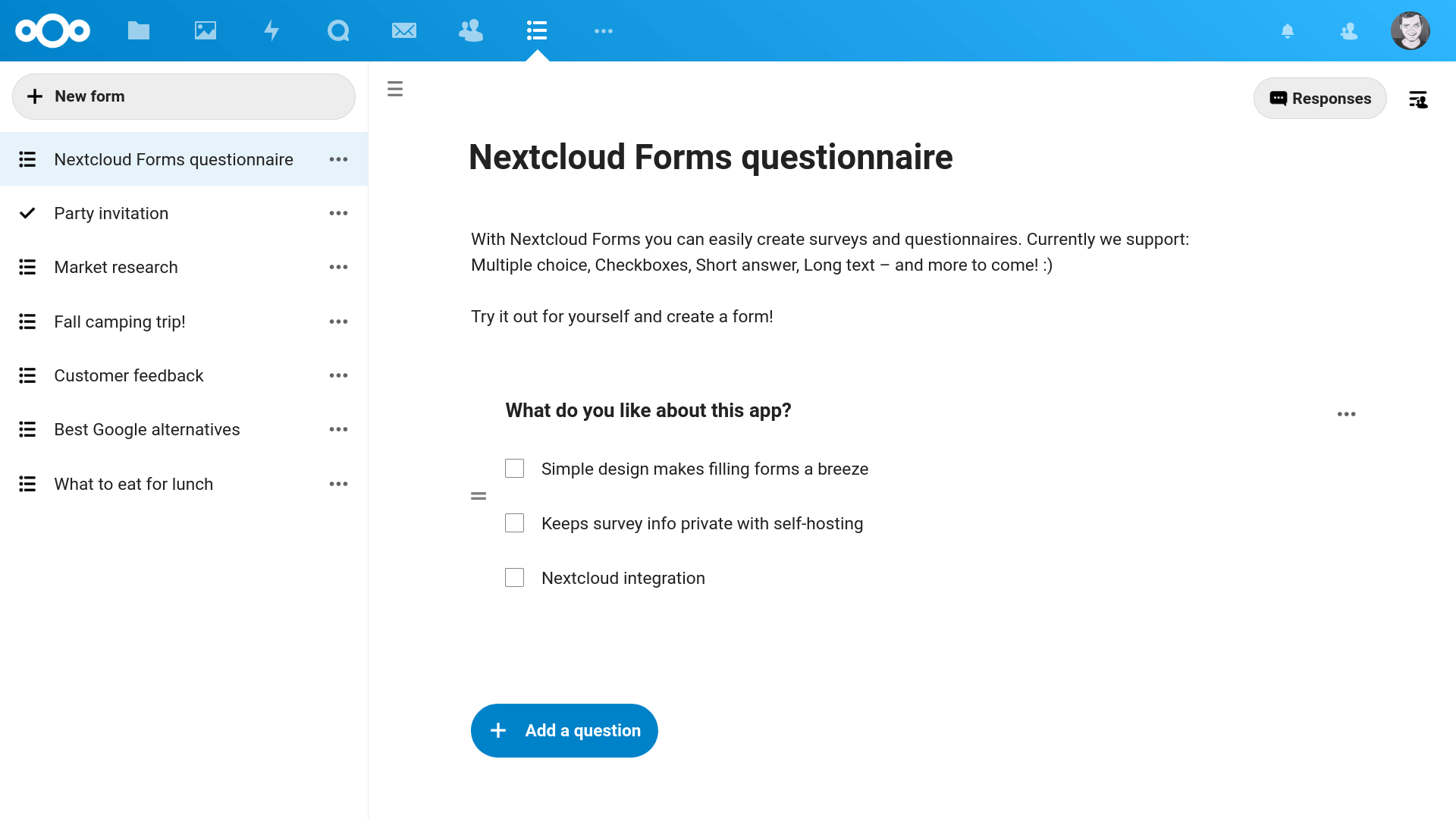
Create secure forms and surveys

Similar to other solutions, this app makes it easy to create surveys for anything from market research or customer feedback to planning an office party. And with Nextcloud Forms, data remains secure on the Nextcloud server and the privacy of respondents is respected.

The Forms app lets you choose from a range of question types such as checkboxes, multiple choice, dropdowns, short answer and long text. That should cover most use cases and we are working on more question types!

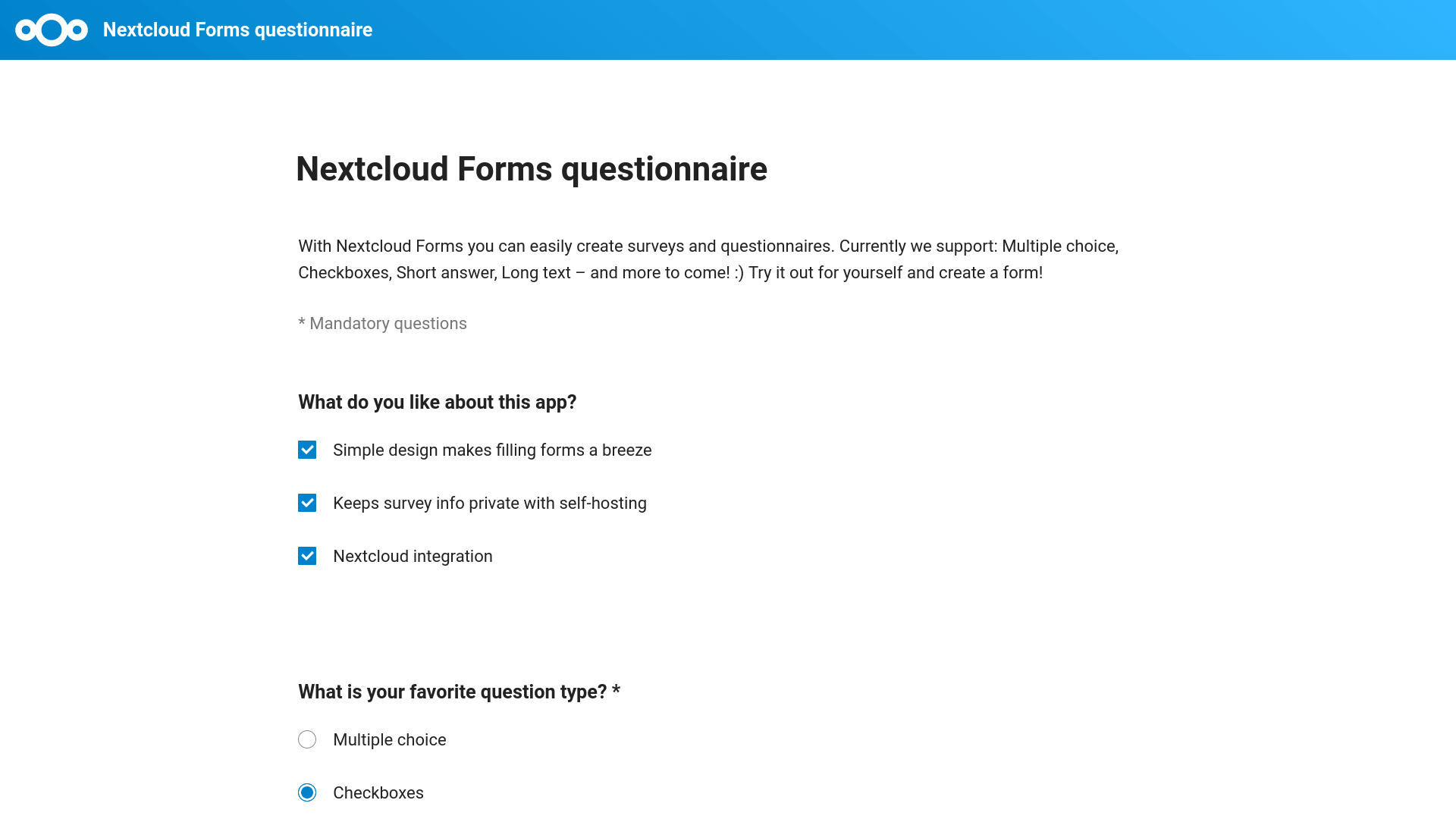
Share forms with anyone

You can share your forms via a link to anyone, or even directly to specific users on your Nextcloud server or to the whole Nextcloud instance. For improved security it is possible to set an expiration date. There is no limitation on the amount of forms or questions you can create nor the links you can share or the number of people who can reply. Also important: Forms is responsive and will look good on any device or screen!

Visualize and export the results

Responses are visualized either as summary statistics with charts which make it easy to analyze the results. You can also see the individual responses if you need to dig deeper or have a small number of respondents.

You can export your forms in CSV. The format is also compatible with Google Forms so you can work with any tool or workflow designed for integration with the app.

We extensively use the Forms app for our user surveys and application forms and we would love to know what you think and we invite you to get involved to make Forms even better!

Add the Forms app to Nextcloud with just one click and get surveying!

Install now

The post Nextcloud Forms is here to keep your surveys private appeared first on Nextcloud.

Sendent: An Outlook add-in to protect your data

13 février 2024 à 14:07
Sendent Outlook add-in for Nextcloud

About Sendent for Outlook

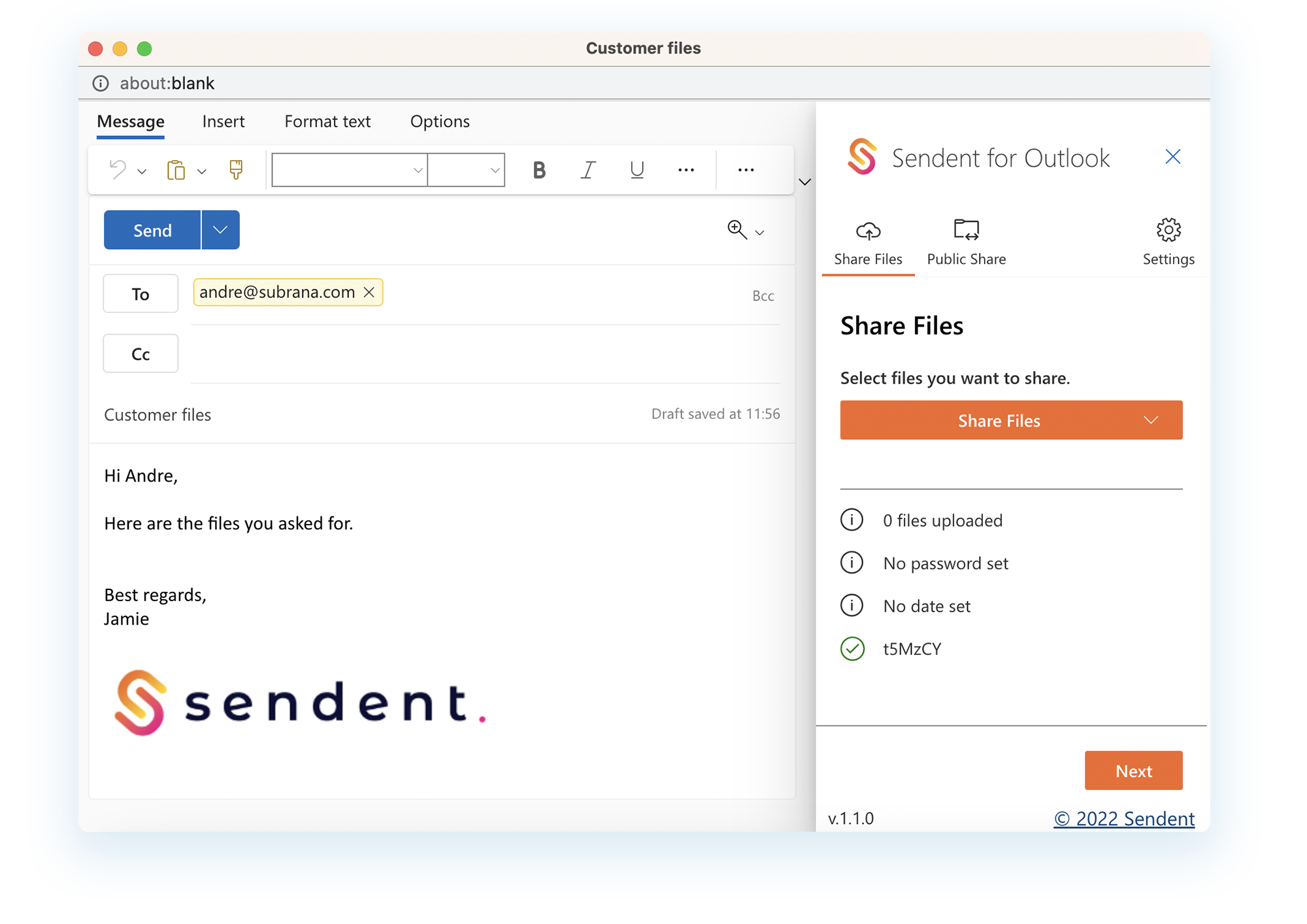
Sendent offers a host of powerful solutions for Outlook users, allowing them to easily integrate Nextcloud into their workflow for secure and easy sharing of any files with Nextcloud links. Thanks to the user-friendly setup, administrators and users can get started with Sendent for Outlook in just a few clicks, avoiding any learning and training. That makes the add-in a handy addition for teams leveraging multi-app environments.

Sendent for Outlook works with Microsoft Outlook 2013, 2016 and 365 for Windows, Outlook for Mac, and Outlook for the Web.

With this Outlook add-in, you can:

  • Convert email attachments into Nextcloud links for easy sharing.
  • Insert upload links directly into emails, enabling recipients to upload files with ease.
  • Add passwords and expiration dates to links for added security, with the option of customizing password and expiration settings.
  • Configure the add-in to automatically upload attachments over a certain size, streamlining the sharing process.
  • Use the easy file selection dialog to insert links to files stored on their Nextcloud account.
  • Save valuable storage space on email servers by reducing the need to store large amounts of attachments in multiple email boxes.

Sign up for the webinar!

In this webinar we demonstrate the integration of Microsoft Outlook and Nextcloud Hub using Sendent for Outlook.

Sign up

Secure email attachments with Sendent

Apply custom security measures

System administrators can customize the add-in’s rules to meet their specific needs, including triggers on a specific attachment size to automatically upload attachments, adjust email templates, and maintain compliance with retention policies. By utilizing these features, businesses can maintain complete control over their data and keep it safe from potential threats.

Sendent Outlook add-in for Nextcloud macOS
Nextcloud Sendent Outlook integration

Keep costs in control

The add-in also helps IT departments save valuable storage space on email servers. By reducing the need to store large amounts of attachments in multiple email boxes, the add-in decreases network traffic and frees up server resources, leading to improved performance and efficiency.

How secure is Sendent for Outlook?

We are committed to keeping your data protected while allowing you to share files with ease. When it comes to data sharing, privacy-conscious organizations require privacy-centered solutions.

The Outlook add-in offers various ways to enhance the security of your data:

  • Secure file sharing: You can exchange data with clients and partners without compromising your security. Create a Public Share to allow collaborators to upload files and folders to your secure server.
  • Password protection for your emails: You can set Sendent to generate a unique strong password every time you share data through Microsoft Outlook. The stronger the passwords you use, the harder it is for hackers to crack them and gain access to your data.
  • Expiration dates for file access: When you’re working with people outside of your organization, you might want to limit their access to your server when your projects are complete. Control access to your data by putting an expiration date on all your shared files and links.
  • Withdrawing shared files: Accidentally sent a sensitive file to the wrong person? With Sendent, you can withdraw the data straight from Outlook to keep it secure.
  • Activity Tracker: If you host a lot of important files on your private server, you want to know who else has their hands on your data. You can check the Activity Tracker to verify if the file has already been accessed.

Feature highlights: Secure Mail and Guest Accounts

Secure Mail for guaranteed compliance

Elevate your email security with Sendent’s Secure Mail feature specifically designed for data-sensitive industries like banking, law, and healthcare.

Secure Mail allows users to protect their email content from interception by uploading the email and its attachments to their Nextcloud instance. No sensitive content is shared via the mail server. Additionally, they can password-protect the link for added security.

Guest Accounts for private sharing

With Guest Accounts, you can create a secure and private account for anyone who needs access to your data on a frequent base. This could be a client, a vendor, or a partner who requires access to specific files or emails. The recipient will receive an email invitation with a link to your Nextcloud instance where they can access the secure guest account that contains all earlier shared correspondence.

Guest accounts can be customized to suit your specific needs. You can set permissions for each guest account, allowing you to control what files and folders they can access. This ensures that sensitive information remains confidential and that you have complete control over who can view and download your data.

If a guest account has been set up for the recipient, the add-in will detect this and share the message directly to the guest account, including an internal link in the email notification. The recipient can then access the email by logging into their secure guest account.

Secure your mail with Sendent

Sharing and storing files via email can be a risky business, but with Sendent for Outlook, you can streamline your workflow and reduce the IT headaches caused by risky email attachments. By using Nextcloud to store and share files securely, companies can enforce data availability, retention, and safety policies to ensure that sensitive information remains protected.

Why use Sendent Outlook add-in:

  • Boost productivity with a user-friendly interface
  • Enjoy a fully integrated solution with key Nextcloud settings
  • Benefit from centralized control for administrators
  • Protect your email content and attachments with Secure Mail
  • Customize email templates to your liking
  • Implement easily and quickly for customers, employees, and IT departments

Make collaboration easier within your organization by implementing Sendent for Outlook. Reach out to our sales team to learn more about this Outlook integration and get the app.

Sign up for the webinar!

In this webinar, we demonstrate the integration of Microsoft Outlook and Nextcloud Hub using Sendent for Outlook.

Sign up

Available plans

FreeStandardPlus
Available for Outlook for Windows (VSTO add-in)➕➕➕
Available for Outlook for Windows, macOS, and Web (web add-in)➕➕➕
Share large files and create Public Shares➕➕➕
Nextcloud Talk integration*➕➕➕
Withdraw shared files➕➕
Activate triggers to automatically activate Sendent➕➕
Activity Tracker➕➕
Default Sendent branding➕➕
Custom branding and theming➕
Custom email templates➕
Advanced UI branding*➕
Send passwords separately➕
Secure Mail➕
Create and connect files to Guest Accounts➕

*Currently available for VSTO add-in only.

Sendent for Outlook is available for business and private use. Businesses can directly contact our Nextcloud sales team to test Sendent for Outlook.

Download Outlook integration data sheet

Download

The post Sendent: An Outlook add-in to protect your data appeared first on Nextcloud.

Major update to Nextcloud Outlook add-in is now available

9 janvier 2024 à 10:03

We’re excited to share some news from our partner Sendent — the brand new web add-in for Outlook is here, and we can’t wait for you to try it out. Fully rewritten, the app features compatibility with macOS, Windows and web interfaces. Read on to learn more.

About Sendent Outlook add-in

Leveraging Nextcloud’s powerful sharing capabilities, Sendent simplifies and enhances file sharing by sending secure Nextcloud links instead of traditional direct attachments. The Sendent Outlook add-in seamlessly integrates your Nextcloud with Outlook, facilitating the efficient sending of emails without the need to switch between applications.

Why use outlook add in?

  • Simplified Collaboration: Streamline Nextcloud file sharing seamlessly within Outlook. 
  • Enhanced Productivity: Save time and minimize the risk of data leaks.
  • Secure Emailing: Protect your emails and attachments from unauthorized access.
  • Compliance Control: Set central company policies for sharing files via email for all users.
  • Cost-efficiency: Save on exchange storage costs.

New: macOS and web compatibility

The most important upgrade in the app is cross-platformity. The new version is available for Windows, Mac, and web users alike, ensuring a consistent and productive experience for everyone. It’s a small step for technology but a big change for businesses using multiple operating systems, as the add-in is not exclusive to Windows users anymore.

To achieve this, the app has been rebuilt from ground-up, with the app’s features streamlined in the new code base. More features and improvements are coming soon, including a Nextcloud talk integration.

Sendent Outlook add-in for Nextcloud macOS

New user interface

The update brings a completely new UI that makes sharing even easier and more user-friendly. You can edit emails inline while uploading files at the same time.

There’s also a wizard that guides you through all the steps so that even for new users, you will be able to use Sendent within a matter of minutes.

Migration and old version support

Acknowledging the diverse user base, Sendent remains committed to supporting the old Outlook add-in for users who have yet to migrate to the latest version. However, users embracing the new Outlook will find themselves seamlessly transitioning to the new web add-in, unlocking a host of new features and improvements.

Microsoft has indicated its intention to phase out COM/VSTO add-ins, with the latest version of Outlook 365 no longer supporting them. While users of Outlook 2021 and older can still utilize COM/VSTO add-ins, Sendent subscribers are required to switch to the web add-in when upgrading to the new Outlook.

For those moving to the new version, Sendent is ready to address any limitations and facilitate a smooth transition. Everyone is encouraged to provide feedback on the new app and its features via community forum.

Get the free app

The app is already available with a free plan for all users to explore all improvements and new features free of charge. Paid options will be released in the upcoming weeks, offering business-grade features for corporate clients. To try the new free add-in, sign-up for the app on the Sendent website.

Please note that in order to use the add-in, Outlook must be connected with Microsoft Exchange, Microsoft 365 or Outlook.com. IMAP and POP3 account support is limited by Microsoft at the moment.

Your feedback is appreciated!

You have a chance to help Sendent improve the app and request desired updates directly. Submit your feedback and suggestions on the Nextcloud Community forum to let the developer team know what they should work on next. The Sendent team will monitor your feedback regularly.

The post Major update to Nextcloud Outlook add-in is now available appeared first on Nextcloud.

❌
❌