
Vue normale

Il y a de nouveaux articles disponibles, cliquez pour rafraîchir la page.
À partir d’avant-hierWindows Insider Blog

Releasing Windows 10 Build 19045.4233 to Release Preview Channel

14 mars 2024 à 19:17
UPDATE 3/19: We have released Windows 10 22H2 Build 19045.4235 (KB5035941) to the Release Preview Channel for those Insiders who are on Windows 10, version 22H2. This update is just a re-release with the same changes documented below on 3/14.
Hello Windows Insiders, today we are releasing Windows 10 22H2 Build 19045.4233 (KB5035941) to the Release Preview Channel for those Insiders who are on Windows 10, version 22H2. This update includes the following features and improvements:
  • New! This update adds Windows Spotlight to your desktop background. This feature displays new images as your desktop wallpaper. If you want to know more about an image, click or tap the Learn More button, which takes you to Bing. To turn on this feature, go to Settings > Personalization > Background > Personalize your background. Choose Windows spotlightNote this feature might not be available to all users because it will roll out gradually.
  • New! This update adds more content to your lock screen. In addition to weather, sports, traffic, and finance content will appear.  To turn on this feature, go to Settings > Personalization > Lock screenNote this feature might not be available to all users because it will roll out gradually.
  • New! This update affects Windows Hello for Business. IT admins can now use mobile device management (MDM) to turn off the prompt that appears when users sign in to an Entra-joined machine. To do this, they can turn on the “DisablePostLogonProvisioning” policy setting. After a user signs in, provisioning is off for Windows 10 and Windows 11 devices.
  • When you sign in, you might see a message that invites you to upgrade to Windows 11. This message only appears if your device is eligible for an upgrade. Note this feature might not be available to all users because it will roll out gradually.
  • This update supports daylight saving time (DST) changes in Palestine. To learn more, see Interim guidance for DST changes announced by Palestinian Authority for 2024, 2025.
  • This update supports daylight saving time (DST) changes in Kazakhstan. To learn more, see Interim guidance for Kazakhstan time zone changes 2024.
  • This update supports daylight saving time (DST) changes in Samoa. To learn more, see Interim guidance for Samoa DST changes 2021.
  • This update changes the English name of the former Republic of Turkey. The new, official name is the Republic of Türkiye.
  • This update addresses an issue that affects the COM+ component. Some applications that depend on it stop responding.
  • This update addresses an issue that stops some apps and features from being available. This occurs after you upgrade to Windows 11.
  • This update addresses a deadlock issue in CloudAP. It occurs when different users sign in and sign out at the same time on virtual machines.
  • This update addresses an issue that affects a network resource. You cannot access it from a Remote Desktop session. This occurs when you turn on the Remote Credential Guard feature and the client is Windows 11, version 22H2 or higher.
  • This update addresses an issue that affects Microsoft Edge. It fails to open on Surface Hub (Team OS).
  • This update affects the Antimalware Scan Interface (AMSI) AmsiUtil class. It helps to detect the bypass of the AMSI scan. This update also addresses some long-term issues that expose your device to threats.
  • This update addresses an issue that affects the time service. You can configure it using mobile device management (MDM) or a Group Policy Object (GPO). But the Windows Settings app does not match what you have configured.
  • This update addresses an issue that affects the touch keyboard. It does not open sometimes.
  • This update addresses an issue that occurs when you use LoadImage() to load a top-down bitmap. If the bitmap has a negative height, the image does not load and the function returns NULL.
  • This update addresses an issue that affects scanners. They stop responding when you connect to them using eSCL over USB.
  • This update makes Country and Operator Settings Asset (COSA) profiles up to date for some mobile operators.
  • This update addresses an issue that affects the existing AppLocker rule collection enforcement mode. It is not overwritten when rules merge with a collection that has no rules. This occurs when the enforcement mode is set to “Not Configured.”
  • This update addresses an issue that affects the Group Policy service. It fails after you use LGPO.exe to apply an audit policy to the system.
  • This update addresses a reliability issue. It affects a Virtual Remote App product when you use a custom shell to open it.
Thanks, The Windows Insider Program Team

Photos app for Windows 11 update brings improvements for Windows Insiders

3 mai 2023 à 22:39
Hello Windows Insiders, The Photos app in Windows 11 lets you view, organize, and share photos from your PC, OneDrive, and iCloud. Today, we begin to roll out an update to the Photos app to Insiders in the Canary and Dev Channels. This update includes a broad set of new features, improvements, and fixes based on feedback. With this update, we are introducing:

New Slideshow Experience

This was a top feature request we received from the community since launching the new Photos app in Windows 11 last Fall. You can now relive your memories and view photos in a slideshow format, complete with transitions, animations, and 25 original music soundtracks to choose from. Click on any photo to start the slideshow or choose multiple photos to watch them together. [caption id="attachment_176239" align="alignnone" width="1024"]Create photo slideshows with music and animations. Create photo slideshows with music and animations.[/caption]
Timeline Scrollbar

This was another top feature request. We are re-introducing the timeline scrollbar to the All Photos, OneDrive, and iCloud Photos gallery views which groups photos by year and month. With the scrollbar, you can now easily jump to any point in time and find the photos you want. [caption id="attachment_176240" align="alignnone" width="1024"]Scroll through the timeline to find the photos you need. Scroll through the timeline to find the photos you need.[/caption]

Spot Fix

Use the Spot Fix feature to remove blemishes or unwanted areas in your photo. [caption id="attachment_176241" align="alignnone" width="1024"]New Spot Fix feature to fix blemishes. New Spot Fix feature to fix blemishes.[/caption]

Other Fixes and Improvements

  • Auto Enhance is now available for use without having to install the 93MB add-on.
  • When importing photos from external devices, you can now drag and drop to choose the photos you want and use the quick toggle to confirm the files that have been selected.
  • Hidden iCloud Photos will no longer display in the gallery.
  • Fixed an issue where audio on video files is muted by default. The app now plays the audio by default and persists user settings across videos.
  • Copying and pasting a photo from the Photos app into Outlook and Teams now inserts the image inline by default instead of adding an attachment.
  • Multi-select photos: hold down the SHIFT key while selecting photos in the gallery now selects multiple consecutive photos in a row; holding down the CTRL key selects multiple non-consecutive photos.
To get these new features and fixes, update your Photos app to version number 2023.11050.2013.0 or higher. As always, we look forward to hearing your thoughts, so please send in your feedback. FEEDBACK: Please file feedback in Feedback Hub (WIN + F) under Apps > Photos. Thanks, Yvonne Hsieh, Principal PM Manager – Windows Photos

Releasing Windows 11 Build 22000.1757 to the Release Preview Channel

16 mars 2023 à 21:38
Hello Windows Insiders, today we’re releasing Windows 11 Build 22000.1757 (KB5023774) to Insiders in the Release Preview Channel on Windows 11 (original release).   This update includes the following improvements:
  • This update addresses an issue that affects the command line. It fails when you set the system locale to Japanese and cmd.exe is configured in legacy mode.
  • This update addresses an issue that affects the Notepad box in Settings. It fails to show all the available options.
  • This update addresses an issue that affects Microsoft PowerPoint. It stops responding. This occurs when you use accessibility tools.
  • The update addresses an issue that affects the Remote Procedure Call Service (rpcss.exe). The issue might cause a race condition between the Distributed Component Object Model (DCOM) and the Microsoft Remote Procedure Call (RPC) endpoint mapper.
  • This update affects the ms-appinstaller URI. It now works with the DesktopAppInstaller policy.
  • This update addresses an issue that affects Microsoft PowerPoint. It stops responding on the Azure Virtual Desktop. This occurs while you are using Think-Cell Features.
  • This update addresses an issue that affects Windows Search. Windows Search fails inside of Windows container images.
  • This update addresses an issue that affects the Microsoft HTML Application Host (HTA). This issue blocks code execution that uses Microsoft HTA. This occurs when you turn on Windows Defender Application Control (WDAC) User Mode Code Integrity (UMCI) enforced mode.
  • This update addresses an issue that affects Desired State Configuration. It loses its previously configured options. This occurs if metaconfig.mof is missing.
  • This update addresses compatibility issues that affect some printers. These printers use Windows Graphical Device Interface (GDI) printer drivers. These drivers do not completely adhere to GDI specifications.
  • This update addresses an issue that affects the Simple Certificate Enrollment Protocol (SCEP) certificate. The system reports some SCEP certificate installations as failed. Instead, the system should report them as pending.
  • This update addresses an issue that affects the new Windows Runtime (WinRT) API. This issue stops an application from querying for location information using MBIM2.0+.
  • This update addresses an issue that affects USB printers. The system classifies them as multimedia devices even though they are not.
  • This update addresses an issue that affects the Fast Identity Online 2.0 (FIDO2) PIN credential icon. It does not appear on the credentials screen of an external monitor. This occurs when that monitor is attached to a closed laptop.
  • This update affects the “Set a default associations configuration file” Group Policy Object (GPO). You can now use it to create an extension to specific applications.
  • This update addresses an issue that affects the SharedPC account manager. It cannot delete multiple accounts during cleanup.
  • This update addresses an issue that affects Xbox subscribers. If you purchase an Xbox subscription using the "Redeem code" option, the Xbox subscription card does not appear on the Settings Accounts page. This occurs when recurring billing is off.
  • This update addresses an issue that might affect lsass.exe. It might stop responding. This occurs when it sends a Lightweight Directory Access Protocol (LDAP) query to a domain controller that has a very large LDAP filter.
Thanks, Windows Insider Program Team

Announcing Windows 11 Insider Preview Build 22621.1250 and 22623.1250

2 février 2023 à 18:04
Hello Windows Insiders, today we are releasing Windows 11 Insider Preview Build 22621.1250 and Build 22623.1250 (KB5023008) to the Beta Channel.
  • Build 22623.1250 = New features rolling out.
  • Build 22621.1250 = New features off by default.
REMINDER: Insiders who were previously on Build 22622 will automatically get moved to Build 22623 via an enablement package. The enablement package artificially increments the build number for the update with new features getting rolled out and turned on to make it easier to differentiate from devices with the update with features off by default. This approach is being used for the Beta Channel only and is not indicative of any changes or plans for final feature rollouts. Insiders who landed in the group with new features turned off by default (Build 22621.xxxx) can check for updates and choose to install the update that will have features rolling out (Build 22623.xxx).

Changes and Improvements in 22621.1250 & 22623.1250

[Search on the Taskbar]

  • We are adding a new policy for IT administrators to manage how the search box on the taskbar appears in their organizations. See this blog post for details.

Fixes in Build 22623.1250

[Task Manager]

  • Typing F in the search box should work again now.
  • Fixed an issue where Narrator wasn’t reading out some of the text in dialogs.
  • Dragging the window using the search box area should work now (like other areas of the title bar).
  • If you do a search and then press the down arrow, keyboard focus should now move from the search box into the results.
  • Fixed an issue where ending processes in the Details tab wasn’t showing a confirmation dialog.
  • Increasing the text scaling should no longer result in a “see more” button appearing with no contents.
  • Fixed an issue where focus might not get set properly to search, leading to Narrator not saying that focus was on the search box.
  • If you have a contrast theme enabled and select one of the rows in the Processes page, that row should now show that it’s selected.

[Search on the Taskbar]

  • Fixed an issue where the search box would randomly disappear sometimes when you clicked it (leaving a blank space on the taskbar).
  • Fixed an issue where the search box was shifting to the side slightly when you clicked it.
  • If you have the taskbar set to auto-hide and press the Windows key and start typing, the taskbar should no longer unexpectedly hide.

About the Beta Channel

The Beta Channel will be the place we preview experiences that are closer to what we will ship to our general customers. Because the Dev and Beta Channels represent parallel development paths from our engineers, there may be cases where features and experiences show up in the Beta Channel first. However, this does not mean every feature we try out in the Beta Channel will ship. We encourage Insiders to read this blog post that outlines the ways we’ll try things out with Insiders in both the Dev and Beta Channels.

Important Insider Links

Thanks, Amanda & Brandon

Announcing Windows 11 Insider Preview Build 22621.1037 and 22623.1037

15 décembre 2022 à 22:05
Hello Windows Insiders, today we are releasing Windows 11 Insider Preview Build 22621.1037 and Build 22623.1037 (KB5021304) to the Beta Channel. This will be our last Beta Channel flight for the holidays. We’ll be back with new builds in January 2023!
  • Build 22623.1037= New features rolling out.
  • Build 22621.1037 = New features off by default.
REMINDER: Insiders who were previously on Build 22622 will automatically get moved to Build 22623 via an enablement package. The enablement package artificially increments the build number for the update with new features getting rolled out and turned on to make it easier to differentiate from devices with the update with features off by default. This approach is being used for the Beta Channel only and is not indicative of any changes or plans for final feature rollouts. Insiders who landed in the group with new features turned off by default (Build 22621.xxxx) can check for updates and choose to install the update that will have features rolling out (Build 22623.xxx).

What’s new in Build 22623.1037

Voice Access Improvements

Voice access is now more flexible and supports interaction with UI controls having different names such as:
  • Names which contain numbers in them, for example the Calculator app where you can now directly say “Click 5”.
  • Names without any whitespaces between them, for example in Excel, under the Insert tab, you can interact with UI controls like “PivotTable” and “PivotChart” directly by saying “click pivot table” or “click pivot chart”.
  • Names with special characters in them, for example items like “Bluetooth & devices” or “Dial – up”. You can now say “click Bluetooth and devices” or “click dial hyphen up” and interact with these UI controls.
We have improved the horizontal scroll experience where we now support scrolling to the extreme left and right ends of a page, and you can do a continuous scroll left/right similar to what is already present in vertical scroll experience. We have also added support for UI controls such as spin controls, thumb control and split buttons which enables you to interact with these controls with “click” command or by using number overlays. Commands that move the cursor in a text box now execute instantly and issues with snapping commands that snap a window left or right are fixed. In addition, we have added support for the following commands:
To do this Say this
Close the voice access application “Close voice access”, “Exit voice access”, “Quit voice access”
Open a new application “Show [application name]” , e.g., “Show Edge”
Close an application “Exit/Quit [application name]”, e.g., “Exit Word”, “Quit Edge”
Show grid overlay on your screen “Show window grid”
Pull up the command help list “Show command list”, “Show commands”
Release a held down key “Release”
Move cursor in a text box “Move forward 5 characters”, “Go back 2 lines”, “Go to start of document”, “Move to beginning of line”
Select the desired no. of characters/lines “Select forward/backward [count] characters/lines”, e.g., “Select forward 5 characters”
Delete selected text or last dictated text “Strike that”
Paste text in a text box “Paste here”, “paste that”
Apply bold formatting to specific text “Boldface [text]”, e.g., “boldface hello world”
Capitalize selected text or last dictated text “Cap that”
FEEDBACK: Please file feedback in Feedback Hub (WIN + F) under Accessibility > Voice Access.

Changes and Improvements for BOTH Build 22621.1037 & 22623.1037

[Search on the Taskbar]

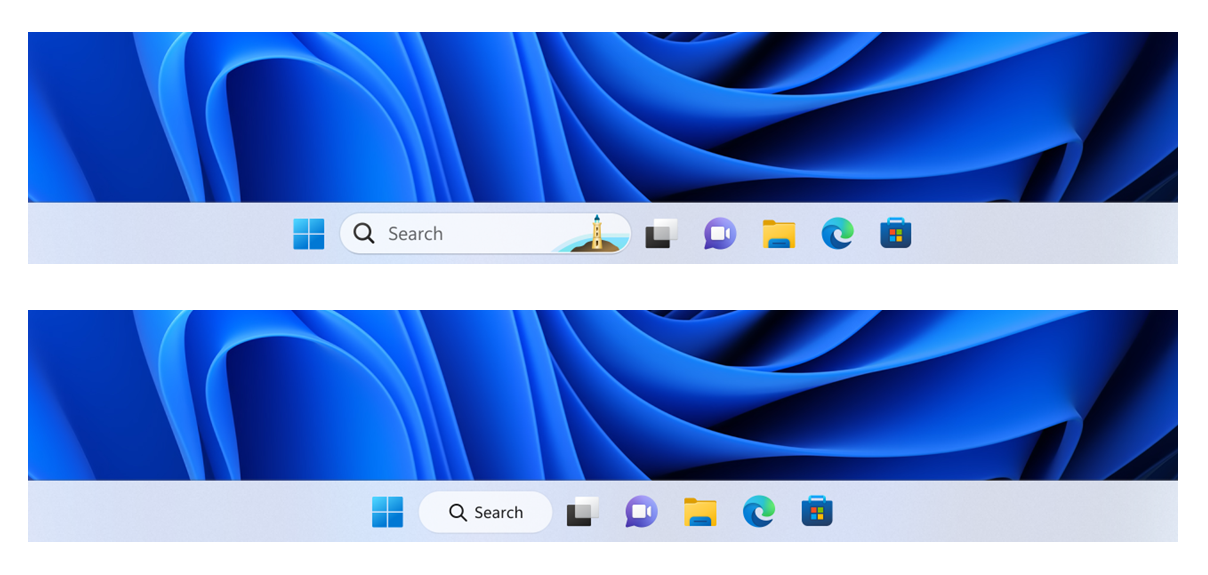
  • In this build, we are continuing to try out different treatments for how search looks on the taskbar. We are excited to learn from your feedback on this, so please let us know what you think via Feedback Hub if you see the different treatments on your PC. Insiders who get this experience will have the ability to change the treatment of search on taskbar in settings under Settings > Personalization > Taskbar > Taskbar Items.
[caption id="attachment_175997" align="alignnone" width="649"]Example of different treatments we are trying out for how search looks on the taskbar. Example of different treatments we are trying out for how search looks on the taskbar.[/caption]

Fixes in Build 22623.1037

[Taskbar & System Tray]

  • Updated the Quick Settings icons in the taskbar when using a screen reader so if you set focus to each of the icons it no longer includes the words system state and instead just says what the icon is (for example instead of “system volume state” it just says “volume”).
  • Fixed a few more explorer.exe crashes relating to recent taskbar changes.

[Task Manager]

  • We fixed the issue causing Task Manager to become unresponsive when using the search box at the top of Task Manager.

Fixes for BOTH Build 22621.1037 & Build 22623.1037

  • We fixed a known issue that might have affected Task Manager. It might have displayed certain elements in the user interface (UI) in unexpected colors. Some parts of the UI might not have been readable. This issue might have occurred if you had "Choose your mode" set to "Custom" in the Personalization > Colors section of Settings.
  • We fixed an issue that might have affected Data Protection Application Programming Interface (DPAPI) decryption. The decryption of a certificate private key might have failed. Because of that, virtual private network (VPN) and other 802.1 certificate-based authentication might have failed. This issue might have occurred when you encrypted the DPAPI master key with a wrong value.

Known issues

[Search on the Taskbar]

The following known issues only apply for Windows Insiders who received one of the different treatments for how search looks on the taskbar as mentioned above in this blog post:
  • You may see issues with the search box on taskbar not rendering correctly and displaying visual artifacts.

[Task Manager]

  • Filtering by publisher name does not match correctly on the Processes page.
  • Some services may not show in the Services page after filtering is applied.
  • If a new process is starting while a filter is set, then that process may appear for a split second in the filtered list.
  • Some dialogs may not render in the correct theme when applied from Task Manager Settings page.
  • The data content area of the Processes page may flash once when theme changes are applied in the Task Manager Settings page.
  • The Startup apps page in Task manager does not list any apps for some Insiders. If you are impacted, please use Settings > Apps > Startup for the time being.

About the Beta Channel

The Beta Channel will be the place we preview experiences that are closer to what we will ship to our general customers. Because the Dev and Beta Channels represent parallel development paths from our engineers, there may be cases where features and experiences show up in the Beta Channel first. However, this does not mean every feature we try out in the Beta Channel will ship. We encourage Insiders to read this blog post that outlines the ways we’ll try things out with Insiders in both the Dev and Beta Channels.

Important Insider Links

Thanks, Amanda & Brandon
❌
❌