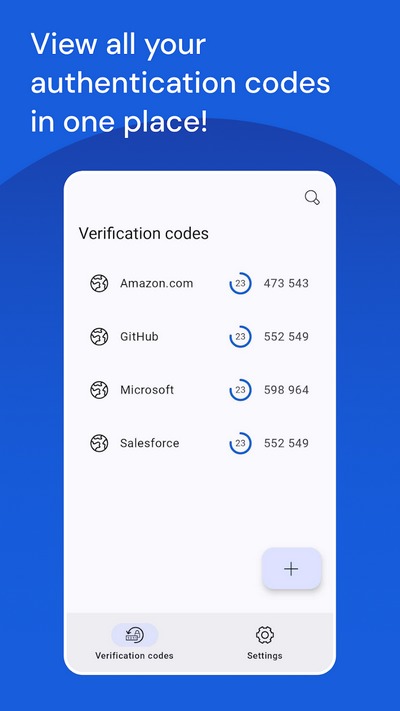
Bitwarden Authenticator, c'est le nom de la nouvelle application mobile lancée par Bitwarden ! Son objectif : générer des codes TOTP utilisables dans le cadre de l'authentification multifacteurs (MFA).
Bitwarden, éditeur du célèbre gestionnaire de mots de passe du même nom, a lancé une nouvelle application pour Android et iOS. Cette application sert à générer des mots de passe à usage unique basé sur le temps, c'est-à-dire des codes TOTP (Time-based one-time password), pour les comptes enregistrés dans l'application. Il peut s'agir d'un compte de n'importe quel service ou site web à condition que celui-ci propose l'authentification multifacteurs basée sur cette méthode très répandue.
Dans le gestionnaire de mots de passe Bitwarden, il y a déjà une fonctionnalité pour générer des codes TOTP, mais elle est réservée aux utilisateurs payants. D'ailleurs, cette fonctionnalité sera maintenue : "L'Authenticator intégré restera disponible avec les abonnements payants.", peut-on lire sur le site de Bitwarden.
A contrario, l'application Bitwarden Authenticator est gratuite pour tous les utilisateurs, y compris ceux qui n'utilisent pas Bitwarden. Elle vient s'ajouter à la longue liste des applications de gestion de comptes telles que Microsoft Authenticator, Google Authenticator, FreeOTP ou encore Authy.
Pour ajouter un compte à l'application Bitwarden Authenticator, l'utilisateur n'a qu'une chose à faire : scanner le QR code généré par le service ou le site web.
La feuille de route de Bitwarden Authenticator
Pour le moment, l'application, bien que stable, n'en est qu'à la phase 1 de son lancement. Cela signifie que cette première version est limitée en termes de fonctionnalités, et notamment vis-à-vis des applications concurrentes.
Comme le montre l'image ci-dessous, correspondante à la feuille de route de Bitwarden Authenticator, d'autres fonctionnalités seront ajoutées par la suite. Il y aura notamment la possibilité de synchroniser ses comptes Bitwarden Authenticator sur les serveurs de Bitwarden, et les retrouver dans son coffre-fort de mots de passe. Il est également prévu l'ajout d'un mode de restauration et la prise en charge du 2FA par notifications ("Push-based 2FA").
Source : Bitwarden
Bitwarden Authenticator : une application open source
Sachez que ces applications sont open source, donc leur code source sont disponibles sur GitHub (Android - iOS). Enfin, voici les liens pour télécharger cette application :
Google a finalisé son nouveau réseau "Localiser mon appareil" et le déploiement est en cours sur certains smartphones ! Voici ce qu'il faut savoir sur cette nouveauté à destination des utilisateurs d'Android !
Il y a près d'un an, à l'occasion de sa conférence Google I/O 2023, la firme de Mountain View avait dévoilé la nouvelle version de son réseau "Localiser mon appareil", ou "Find my device" en anglais, dans le but de proposer quelque chose d'équivalent au réseau "Localiser" d'Apple. Il va être capable de s'appuyer sur des millions d'appareils Android (sous Android 9 ou version ultérieure), en s'appuyant sur le Bluetooth.
Google souhaite que ce réseau fonctionne sur tous les appareils Android équipés des services Google Play. En utilisant les smartphones comme balises relais, il va permettre à terme de localiser d'autres appareils à proximité, notamment des trackers Bluetooth, des écouteurs sans-fil, des enceintes sans-fil, ou encore des montres connectées.
Pour que ce projet puisse aboutir, Google et Apple ont dû travailler main dans la main afin d'intégrer les protections nécessaires pour détecter les trackers Bluetooth indésirables (un mouchard placé dans un sac, alors qu'il ne vous appartient pas, par exemple). Ces travaux semblent finalisés puisque Google a commencé à déployer le nouveau réseau "Localiser mon appareil" sur certains smartphones Android.
Le déploiement a commencé aux États-Unis et au Canada
Ces dernières heures, Google a lancé son nouveau réseau "Localiser mon appareil" aux États-Unis et au Canada. En Europe, nous allons devoir attendre.
Dans un premier temps, il permet de localiser les smartphones et tablettes Android égarés, puis Google devrait ajouter la prise en charge des casques audio un peu plus tard... Quant à la prise en charge des trackers Bluetooth tiers, elle est prévue pour le mois de mai 2024, notamment pour ceux de Pebblebee et Chipolo. D'autres fabricants devraient également proposer des trackers compatibles.
Source : Google
Si vous utilisez un Pixel 8 ou Pixel 8 Pro, sachez que Google a prévu un petit bonus : la possibilité de localiser l'appareil même lorsqu'il est éteint ou qu'il n'a plus de batterie. De façon générale, pour utiliser cette fonctionnalité, l'application "Localiser mon Appareil" doit être utilisée. Il y a plusieurs modes de fonctionnement, notamment pour indiquer si vous souhaitez participer ou non à ce réseau.
Enfin, Google a mis en ligne un article complet pour aborder la sécurité et la confidentialité de son réseau "Localiser mon appareil". L'entreprise américaine souhaite rassurer ses utilisateurs et elle affirme que les données de localisation sont chiffrées de bout en bout. Vous pouvez aussi retrouver l'annonce de Google sur cette page.
Darcula, c'est le nom d'une nouvelle plateforme de type "Phishing-as-a-Service" (PhaaS) qui permet d'usurper l'identité de différentes marques et organisations à partir de 20 000 domaines dans le but de voler les identifiants des utilisateurs sur mobile, aussi bien sur Android que sur iPhone. Faisons le point sur cette menace.
Alors que la plateforme Tycoon 2FA cible les utilisateurs de Microsoft 365 et Gmail sur ordinateur, Darcula quant à lui s'intéresse plutôt aux utilisateurs de smartphones Android et d'iPhone. Pour cela, des messages malveillants sont envoyés aux utilisateurs directement sur Google Messages (via le protocole RCS) et iMessage. Nous notons l'abandon du SMS traditionnel au profit du protocole RCS et d'iMessage, ce qui permet aux cybercriminels d'envoyer des messages protégés par le chiffrement de bout en bout, contrairement aux SMS. Ainsi, il n'est pas possible d'analyser le contenu du message pour le bloquer avant qu'il n'atteigne l'appareil de l'utilisateur.
Darcula : 200 modèles prêts à l'emploi
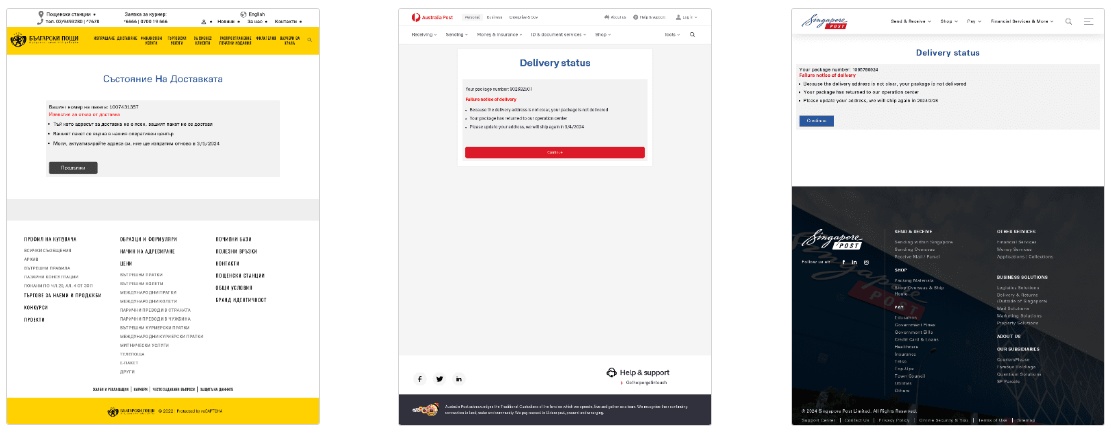
Le kit Darcula peut être utilisé par les cybercriminels pour usurper l'identité de services de livraison, mais aussi de services financiers, gouvernementaux, fiscaux, de sociétés de télécommunications, ou encore des compagnies aériennes. Au total, les abonnés ont accès à 200 modèles de messages et de pages malveillantes pour usurper l'identité des marques. Le contenu s'adapte également en fonction de la langue locale de l'utilisateur pris pour cible.
"La plateforme Darcula prétend prendre en charge environ 200 modèles d'hameçonnage, couvrant un large éventail de marques basées dans plus de 100 pays différents.", peut-on lire dans un rapport mis en ligne par Netcraft.
Source : Netcraft
Les cybercriminels n'ont qu'à choisir une marque et un script de configuration s'occupe d'effectuer la configuration dans un conteneur Docker. D'ailleurs, la plateforme Darcula utilise le registre de conteneurs Harbor pour héberger l'image Docker.
L'utilisation du protocole RCS et de iMessage
L'utilisation du protocole RCS et d'iMessage pour émettre les messages malveillants obligent les pirates à contourner certaines restrictions. Il y a notamment des restrictions pour l'envoi en masse de messages. Du côté d'Apple, c'est interdit, ce qui conduit les cybercriminels à utiliser plusieurs comptes Apple ID différents et des fermes d'iPhone pour envoyer les messages. Chez Google, une restriction a été récemment mise en place pour empêcher les appareils rootés d'envoyer ou de recevoir des messages RCS.
En complément, iMessage intègre une protection un peu plus contraignante pour les cybercriminels : l'utilisateur peut cliquer sur un lien présent dans un iMessage uniquement s'il a déjà communiqué avec l'expéditeur du message en question. Pour cela, le message indique clairement à l'utilisateur qu'il doit répondre au message par un "Y" ou un "1" afin de pouvoir accéder au lien.
Source : Darcula
Darcula, une plateforme en pleine croissance
"Au total, Netcraft a détecté plus de 20 000 domaines liés à la cybercriminalité, répartis sur 11 000 adresses IP, qui ciblent plus de 100 marques.". De nombreux domaines en ".com" et ".top" sont utilisés par les cybercriminels et un tiers des hôtes sont protégés par les services de Cloudflare.
Par ailleurs, le document de Netcraft précise également 120 domaines supplémentaires sont créés chaque jour dans le but d'héberger des pages de phishing. Preuve que cette plateforme de PhaaS est en pleine croissance. À chaque fois, l'objectif des pirates est le même : voler les données confidentielles et/ou bancaires des utilisateurs, en fonction du template utilisé.
Même si nous tous plus ou moins habitués à recevoir ces messages suspects, restons vigilants...
Dans ce tutoriel, nous allons voir comment changer de pays sur Google Play pour accéder au catalogue d'applications Android d'un autre pays. En effet, vous l'ignorez peut-être, mais certaines applications sont disponibles uniquement dans certaines régions, ou à l'inverse, indisponibles dans certaines régions. Par exemple, ceci peut être utile pour un français en voyage à l'étranger ou expatrié dans un autre pays.
Pour contourner cette limitation, que ce soit à partir d'un smartphone ou d'une tablette Android, ou même en effectuant la configuration depuis votre ordinateur, vous devez utiliser un VPN. Il existe différentes solutions sur le marché des VPN grand public. Dans cet article, nous allons utiliser la solution CyberGhost VPN.
L'alternative consiste à utiliser un site permettant de télécharger le package APK de l'application que vous souhaitez obtenir, mais ceci signifie que vous n'utilisez plus le magasin d'applications officiel. Bien que ça puisse fonctionner, sachez que certains packages APK peuvent être infectés par un malware, ce qui expose votre appareil et vos données. De plus, vous n'aurez pas les futures mises à jour de l'application en question. Il est recommandé de changer de pays dans Google Play en passant par un VPN.
Avant de commencer : vous devez savoir une chose importante : vous pouvez changer de pays dans le Google Play Store qu’une fois par an. Votre moyen de paiement et votre solde sont également spécifiques à chaque pays/région.
II. 83% de réduction sur l'abonnement CyberGhost VPN
Sur ce marché, CyberGhost VPN est l'un des leaders et cet article est également l'occasion de vous parler de la promotion actuellement disponible sur l'abonnement. Voici l'offre proposée :
En bref, pour moins de 50 euros, vous pouvez bénéficier de CyberGhost VPN pendant 2 ans et 4 mois ! Sachez qu'un seul et même abonnement peut être utilisé sur 7 appareils différents, en simultané ! Cette offre est valide jusqu'au 7 décembre 2023.
III. À quoi sert le VPN de CyberGhost ?
Au-delà du scénario évoqué dans cet article, sachez que vous pouvez utiliser ce VPN dans différentes situations. Tout d'abord, il vous permettra de naviguer sur Internet de façon plus anonyme, ce qui renforcera la protection de votre vie privée sur le Web. Le trafic à destination d'Internet étant envoyé par l'intermédiaire du tunnel VPN, il est protégé grâce au chiffrement, donc vous pouvez activer le VPN lorsque vous êtes connecté au réseau d'un hôtel, d'un restaurant, d'un train, etc.
Par ailleurs, le VPN peut s'avérer utile pour du P2P, mais aussi pour accéder à des catalogues de contenus d'autres pays (par exemple, le catalogue de streaming de Netflix US). Enfin, sachez qu'à partir du moment où le VPN est actif, certains flux sont filtrés, donc vous bénéficier d'une protection pour bloquer certains logiciels malveillants et éliminer la publicité (attention, il y a des exceptions, notamment sur YouTube).
CyberGhost VPN peut être utilisé sur différents types d'appareils : PC, smartphones, tablettes, smart TV, consoles de jeux, etc...
Pour en savoir plus sur CyberGhost, lisez notre précédent article :
IV. Android : accéder à un autre catalogue sur Google Play
Actuellement, l'appareil Android est associé à un compte Google dont le pays est la France. Nous allons modifier le pays rattaché à ce compte pour basculer sur les États-Unis.
A. Se connecter au VPN
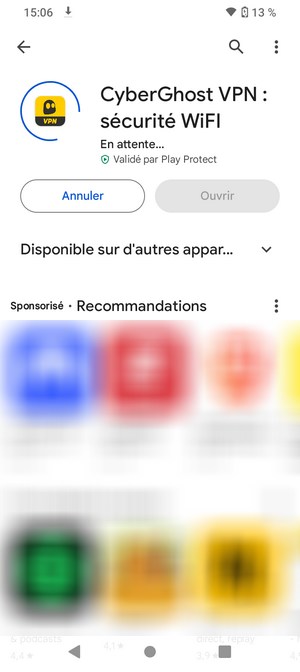
La première étape consiste à se connecter à un VPN, sur un serveur aux États-Unis, pour simuler notre présence sur le sol américain. Vous devez donc installer CyberGhost VPN sur votre appareil Android et vous connecter à votre compte.
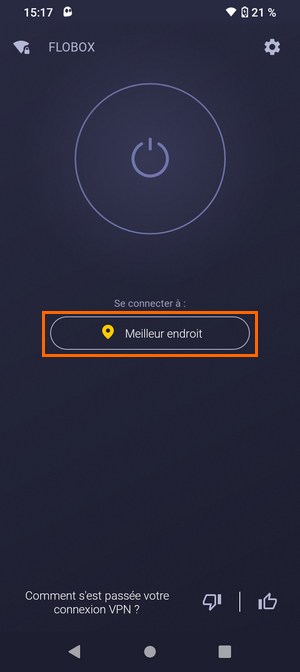
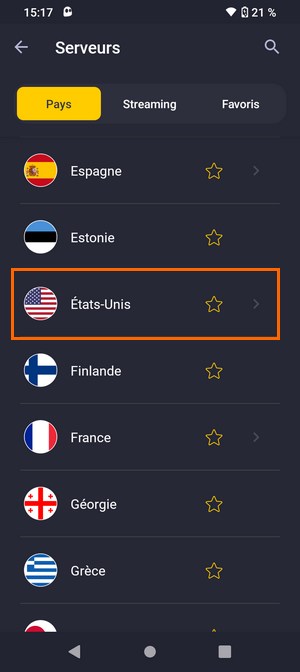
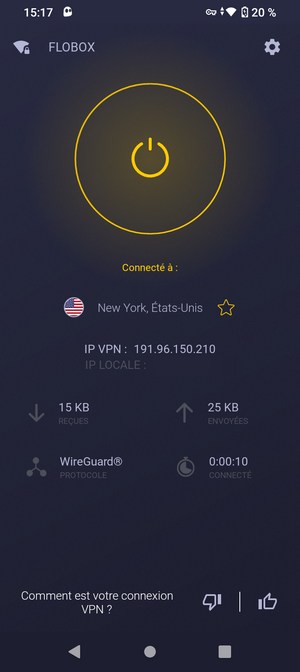
Au sein de l'application CyberGhost VPN, choisissez le pays correspondant à celui que vous souhaitez définir dans Google Play et lancez la connexion. Pour ma part, ce sera "États-Unis". Une fois que la connexion VPN est active, le bouton Power est jaune et vous avez une adresse IP VPN.
Laissez le VPN actif et suivez la suite de cette procédure.
B. Effacer les données de Google Play Store
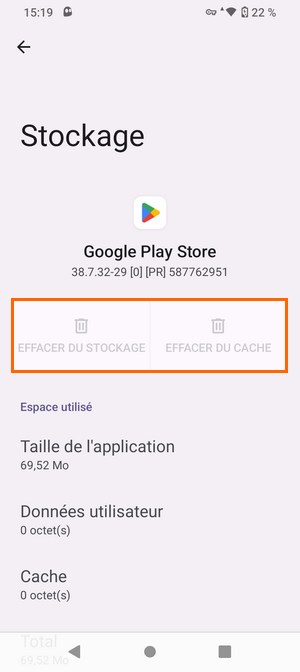
La seconde étape consiste à supprimer les données de l'application Google Play Store. Il s'agit bien des données de cette application, ce qui n'aura pas d'impact sur les applications installées sur votre appareil.
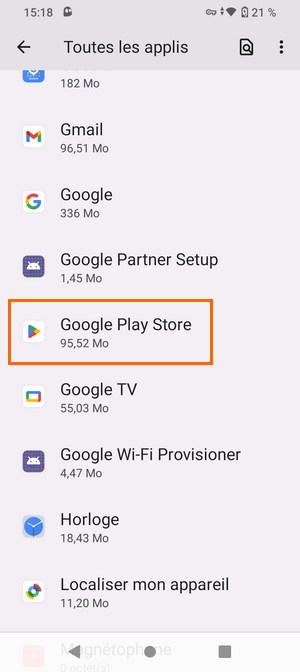
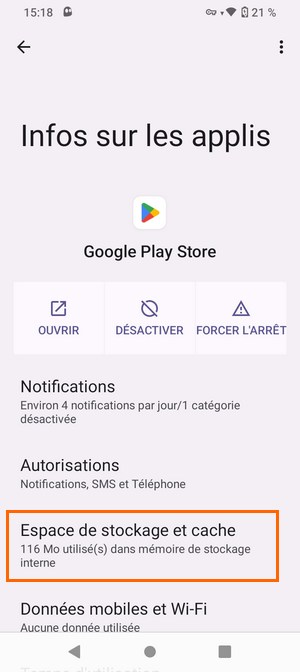
À partir des paramètres de votre appareil, accédez à la liste des applications.... Et appuyez sur "Google Play Store". Ici, appuyez sur "Espace de stockage et cache" puis supprimez les données via les deux boutons "Effacer du stockage" et "Effacer du cache". Selon votre version d'Android et la marque de votre appareil, l'intitulé de ces options peut varier.
Quand c'est fait, vous pouvez passer à l'étape suivante.
C. Changer le pays dans le Play Store
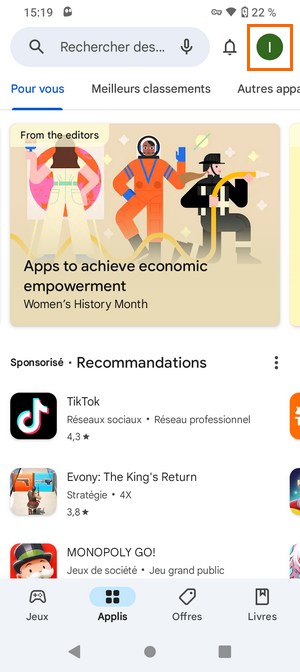
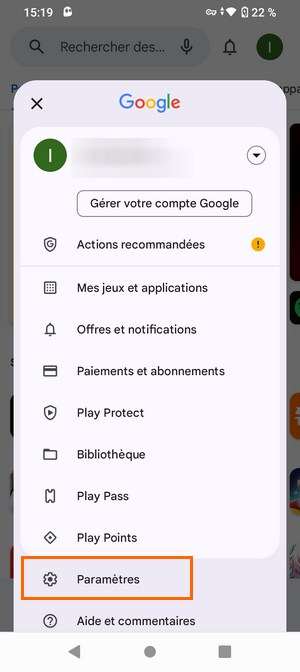
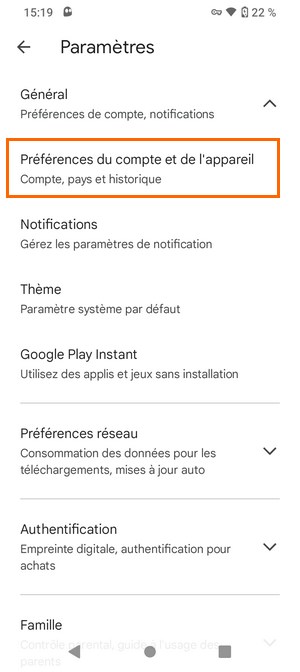
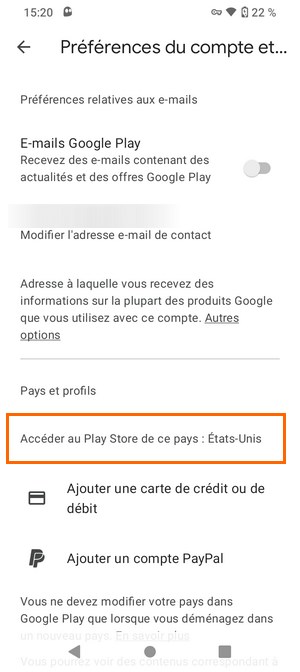
Ouvrez l'application Google Play Store sur votre appareil, toujours en étant connecté au VPN. Appuyez sur votre avatar en haut à droite, puis sur le bouton "Paramètres". Ensuite, appuyez sur "Préférences du compte et de l'appareil" et vous devriez voir des informations sous "Pays et profils". Ici, il y a notamment une phrase intitulée "Accéder au Play Store de ce pays : États-Unis". Vous l'aurez compris, le Play Store vous propose de changer de pays.
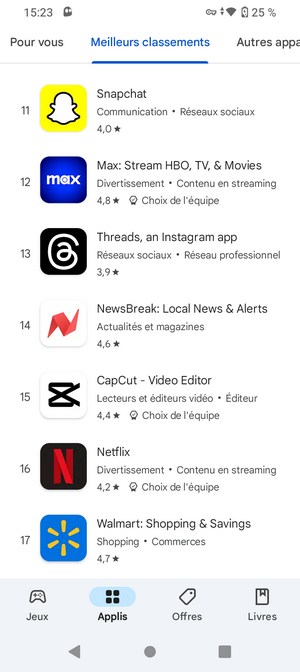
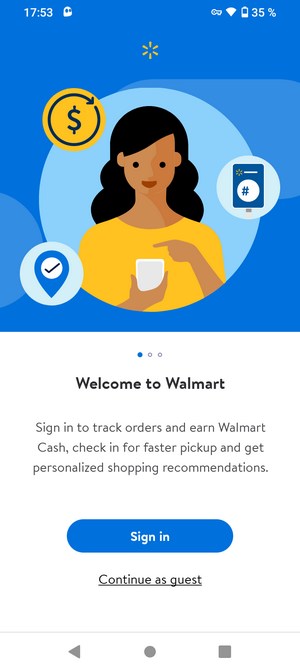
Puisque nous sommes "connectés" au Play Store d'un autre pays, nous pouvons que le classement des meilleures applications est différent de celui de la France. Par exemple, nous avons l'application de Walmart, une chaine de supermarché populaire présente en Amérique. Désormais, nous pouvons installer ces applications, y compris celle de Walmart qui, en principe, n'est pas accessible depuis la France.
Dans certains cas, il est possible que l'application Play Store vous oblige à ajouter un moyen de paiement afin de pouvoir basculer sur un autre pays. Ceci est problématique si vous souhaitez effectuer ce changement ponctuellement... Pour contourner ce prérequis qui peut s'avérer embêtant, vous devez vous connecter au VPN dans le pays cible, et créer un nouveau compte Google à partir de là. Ainsi, ce nouveau compte sera associé à ce pays et vous pourrez toujours utiliser votre compte principal sur votre appareil.
V. CyberGhost VPN : quelques chiffres et informations clés
Si vous avez encore quelques minutes devant vous et que vous souhaitez en savoir plus sur la solution CyberGhost, vous pouvez lire cette partie de l'article !
CyberGhost VPN a été créé en 2004 et cette solution a été lancée par CyberGhost SA, une entreprise basée à Bucarest, en Roumanie. Depuis quelques années, CyberGhost VPN appartient à Kape Technologies PLC, une entreprise spécialisée dans la fourniture de logiciels destinés aux consommateurs et axés sur la protection de la vie privée. Aujourd'hui, CyberGhost VPN revendique 38 millions d'utilisateurs à travers le monde.
Avant que l'on rendre dans le vif du sujet, voici quelques informations importantes :
Tarif de l'abonnement : 2,03€ par mois
Nombre d'appareils avec un seul abonnement : 7 appareils différents (en même temps)
Satisfait ou remboursé : Vous avez 45 jours pour tester le service et demander un remboursement
Applications : Windows, macOS, Linux, Android, iOS, ainsi qu'Android TV, Fire TV Stick et certains routeurs
Nombre de serveurs : plus de 10 600 serveurs répartis dans 100 pays
Protocoles VPN pris en charge : OpenVPN, IKEv2, WireGuard
Mode P2P : oui
Killswitch : oui
Filtrage DNS pour éliminer les publicités : oui
Attribution d'une adresse IP dédiée : oui (payant)
Avis Trustpilot : 4.4 sur 5 avec plus de 19 300 avis
VII. Conclusion
En suivant cette procédure, vous devriez être en mesure de changer de pays dans le Google Play Store grâce à l'utilisation d'une connexion VPN. Pensez à bien activer le VPN avant de chercher à modifier la configuration du Play Store.
We've shipped an update for Windows Subsystem for Android™ on Windows 11 to all Windows Insider channels. This update (2309.40000.8.0) includes improvements to system and graphics reliability.
If you are having issues with Windows Subsystem for Android™ – please file feedback via Feedback Hub under Apps > Windows Subsystem for Android™. For more information about troubleshooting and submitting feedback: Troubleshooting and FAQ for mobile apps on Windows. If you’re a developer, please give feedback at our Github site.
Thanks,
Windows Subsystem for Android™ Team
We've shipped an update for Windows Subsystem for Android™ on Windows 11 to all Windows Insider channels. This update (2308.40000.3.0) includes improvements to system and graphics reliability.
What’s New
Platform reliability improvements
Localhost loopback support for "Local network access" experimental feature
Clipboard reliability and performance improvements
Kernel update to improve compatibility with running ARM applications on x64 processors
Giving feedback
If you are having issues with Windows Subsystem for Android™ – please file feedback via Feedback Hub under Apps > Windows Subsystem for Android™. For more information about troubleshooting and submitting feedback: Troubleshooting and FAQ for mobile apps on Windows. If you’re a developer, please give feedback at our Github site.Thanks,Windows Subsystem for Android™ Team
We've shipped an update for Windows Subsystem for Android™ on Windows 11 to all Windows Insider channels. This update (2307.40000.5.0) includes improvements to system and graphics reliability.
What’s New
Platform stability improvements.
Updated latest Chromium WebView to version 115.
Android 13 security updates.
Giving feedback
If you are having issues with Windows Subsystem for Android™ – please file feedback via Feedback Hub under Apps > Windows Subsystem for Android™. For more information about troubleshooting and submitting feedback: Troubleshooting and FAQ for mobile apps on Windows. If you’re a developer, please give feedback at our Github site.Thanks,Windows Subsystem for Android™ Team
We've shipped an update for Windows Subsystem for Android™ on Windows 11 to all Windows Insider channels. This update (2305.40000.4.0) will add the long-requested file sharing, settings updates, and graphics fixes.
What’s New
File sharing enabled.
File transfer using drag and drop and copy and paste.
Windows Subsystem for Android Settings (renamed to just "Windows Subsystem for Android") redesign, including displaying all installed Android apps.
Enable apps that specify android.hardware.type.pc in their manifest to opt into receiving raw input events.
Wi-Fi API compatibility improvements.
Camera hardware compatibility improvements.
Linux kernel security update.
Updated latest Chromium WebView to version 113.
Android 13 security updates.
What is File Sharing?
We’ve been listening to the community, and many of you have been asking us to support sharing files between Windows and the Subsystem. We are pleased to announce that Windows Subsystem for Android™ can now share your Windows user folders, like Documents and Pictures, with the Subsystem, so scenarios like uploading a photo to a social media app or editing a video in a creative app work seamlessly. Folder sharing is enabled by default for preview users and can be toggled on and off in Windows Subsystem for Android™ Settings. When folder sharing is enabled, your Windows user profile folder (e.g., “C:\Users\John Doe”) is shared as “/sdcard/Windows” in the Subsystem.
Privacy
Your privacy and security are important to us, so Android™ apps can only view or edit your files with your permission. Apps must show a system dialog to request your permission, and permission can be revoked at any time from app settings. The Subsystem also guards against malicious apps that would abuse your permission by scanning all Android™ apps with your antivirus software during installation and blocking threats, whether you installed the app from the Amazon Appstore or installed it with developer tools.
Limitations
There are a few restrictions you should be aware of:
Only files in your Windows user profile folder are available to the Subsystem. Windows system folders, Program Files, other users’ folders, external drives, etc. are not supported.
Only files the Subsystem saves to “/sdcard/Windows” are available to Windows. When opening files in other folders from an Android™ app, the Subsystem offers the option of copying the file to Windows and opening it there.
Windows hidden files/folders like AppData and Android hidden files/folders (dot prefixed names) are excluded from sharing.
Executable file types, like “.exe” are excluded from sharing to protect your security. If the Subsystem tries to save a file with a blocked extension to “/sdcard/Windows”, the save will fail.
Cloud storage files must be downloaded to your device. If your cloud storage provider includes online-only files in File Explorer, the online-only files will not be available to the Subsystem until you download them. Simply open an online-only file in File Explorer to download it and make it available to the Subsystem. You can also modify your cloud storage settings to make some or all of your files always available offline.
The Subsystem needs to index shared files before apps can access them. Indexing is usually quick but may take longer if you have a lot of files. Recent files are prioritized, so if you can’t find a file in an Android™ app, try opening it from File Explorer first.
You can also share individual files with specific Android™ apps, even if folder sharing is disabled. Simply drag and drop files from File Explorer to any open Android™ app that supports sharing files. Some Android™ apps also support pasting files copied to the Windows clipboard. In these cases, apps only receive read access to the shared file.
Giving feedback
If you are having issues with Windows Subsystem for Android™ – please file feedback via Feedback Hub under Apps > Windows Subsystem for Android™. For more information about troubleshooting and submitting feedback: Troubleshooting and FAQ for mobile apps on Windows. If you’re a developer, please give feedback at our Github site.
Thanks,
Windows Subsystem for Android™ Team
We've shipped an update for Windows Subsystem for Android™ on Windows 11 to all Windows Insider channels. This update (2304.40000.5.0) will add package verification, improved reliability and AppLink support.
What’s New
Package verification for apps on WSA: Android apps are scanned using anti-virus software installed on Windows prior to app installation.
Ability for users to configure how much memory to assign to Android
Android apps will be launched when a user opens the supported app link from any app (Android AppLink support)
Linux kernel updated to 5.15.94
WSA reliability and performance improvements
Giving feedback
If you are having issues with Windows Subsystem for Android™ – please file feedback via Feedback Hub under Apps > Windows Subsystem for Android™. For more information about troubleshooting and submitting feedback: Troubleshooting and FAQ for mobile apps on Windows. If you’re a developer, please give feedback at our Github site.
Thanks,
Windows Subsystem for Android™ Team
Today we are shipping an update (2303.40000.3.0) for Windows Subsystem for Android™ on Windows 11 to all Windows Insider channels. This update will improve reliability, security and enable picture-in-picture (PIP).
Picture-in-picture
For apps that use the Android PIP feature, the subsystem now supports this behavior. With the flexibility of having apps in windowed mode and all of the great Windows resize and snap features, this makes multitasking within Android apps even easier.
What's New
Picture-in-picture mode supported
A new "Partially running" system setting added to WSA Settings app, which runs the subsystem with minimal resources but apps launch quicker than "As needed" mode
Linux kernel updated to 5.15.78
Improvements to platform reliability
Android 13 security updates
Giving feedback
If you are having issues with Windows Subsystem for Android™ – please file feedback via Feedback Hub under Apps > Windows Subsystem for Android™. For more information about troubleshooting and submitting feedback: Troubleshooting and FAQ for mobile apps on Windows. If you’re a developer, please give feedback at our Github site.
Thanks,
Windows Subsystem for Android™ Team
Today we are shipping an update for Windows Subsystem for Android™ on Windows 11 to all Windows Insider channels. This update (2301.40000.4.0) will make improvements to the camera experience, graphics improvements, general reliability, and security updates.
What’s New
Improved audio input latency and reliability
Improvements to camera experience (camera metadata now exposed to camera apps)
Improvements to framerate performance: certain benchmarks have improved by 10%-20% on ARM and 40%-50% on x64
Fixed zooming out in apps using touchpad or mouse
Improvements to platform reliability
Using latest Chromium WebView to version 108
Synchronizing global microphone and camera privacy toggles between Windows and Android apps
Android 13 security updates
Giving feedback
If you are having issues with Windows Subsystem for Android™ – please file feedback via Feedback Hub under Apps > Windows Subsystem for Android™. For more information about troubleshooting and submitting feedback: Troubleshooting and FAQ for mobile apps on Windows. If you’re a developer, please give feedback at our Github site.
Thanks,
Windows Subsystem for Android™ Team
Today we are shipping an update for Windows Subsystem for Android™ on Windows 11 to all Windows Insider channels. This update (2211.40000.11.0) will update WSA to Android 13, general reliability, and performance.
What’s New
Windows Subsystem for Android updated to Android 13
Improvements in boot performance
Improvements to mouse click input
Improvements in clipboard stability
Improvements to application resizing
Reliability improvements to media files opening in Windows
Jumplist entries for applications supporting app shortcuts
Giving feedback
If you are having issues with Windows Subsystem for Android™ – please file feedback via Feedback Hub under Apps > Windows Subsystem for Android™. For more information about troubleshooting and submitting feedback: Troubleshooting and FAQ for mobile apps on Windows. If you’re a developer, please give feedback at our Github site.
Thanks,
Windows Subsystem for Android™ Team
Hello Windows Insiders,
Today we are shipping an update for Windows Subsystem for Android™ on Windows 11 to all Windows Insider Dev and Beta Channels. This update (2210.40000.7.0) will improve camera, general reliability, and performance.
What’s New
Enhancement of audio recording quality
Enhancement of OAuth scenarios
Support for MPEG2 decoding
Improvements to the camera experience when the device is not equipped with a camera
Improvements in input reliability
Chromium update to 106
Giving feedback
If you are having issues with Windows Subsystem for Android™ – please file feedback via Feedback Hub under Apps > Windows Subsystem for Android™. For more information about troubleshooting and submitting feedback: Troubleshooting and FAQ for mobile apps on Windows.
Thanks,
Windows Insider Program Team
Hello Windows Insiders, today we are shipping an update for Windows Subsystem for Android™ on Windows 11 to the Windows Insider Dev and Beta Channels. This update (2209.40000.26.0) will improve security, camera, general reliability, and performance.
UPDATE: This update has rolled out to the Release Preview Channel as well as of 10/31.
What’s New
Improvements to the Camera HAL
Improvements to clipboard stability
Improvements to multi-threaded (>8 core) performance
Improved security for graphic streaming
Reliability improvements for package launches
Security updates for ANGLE and GSK
Annotated telemetry with package installation sources
Window with legal information has been fixed
Security updates to the Linux kernel
Enhancements to platform stability
Updated to Chromium WebView 105
Giving feedback
If you are having issues with Windows Subsystem for Android™ – please file feedback via Feedback Hub under Apps > Windows Subsystem for Android™. For more information about troubleshooting and submitting feedback: Troubleshooting and FAQ for mobile apps on Windows.
Thanks,
Windows Insider Program Team
Hello Windows Insiders,
Today we are shipping an update for Windows Subsystem for Android™ on Windows 11 to all Windows Insider channels (U.S. and Japan only). This update (version 2208.40000.4.0) will improve security, input issues, general reliability, and performance.
What’s New
Reliability fixes for App Not Responding (ANR) errors
Improvements to input compatibility shims
Improvements to scrolling (smoothness) in apps
Usability Improvements to the Windows Subsystem for Android Settings app
Startup performance improvements
Fixed crashes when copying and pasting extremely large content
UX improvements for the game controls dialog
Improvements to networking
General graphics improvements
Improvements for gamepad when using multiple apps
Improved performance of uninstalling apps
Fixed video playback issue for apps
Updated to Chromium WebView 104
Linux kernel security updates
Giving feedback
If you are having issues with Windows Subsystem for Android™ – please file feedback via Feedback Hub under Apps > Windows Subsystem for Android™. For more information about troubleshooting and submitting feedback: Troubleshooting and FAQ for mobile apps on Windows.
Thanks,
Windows Insider Program Team
Hello Windows Insiders,
Today we are shipping an update for Windows Subsystem for Android™ on Windows 11 to all Windows Insider channels (U.S. and Japan only). This update (version 2207.40000.8.0) will improve general input issues, networking, windowing, security and reliability including several updates to the Windows Subsystem for Android Settings app.
What’s New
New compatibility shim to allow apps to maintain aspect ratio but still support resize
Accessibility improvements to the Windows Subsystem for Android Settings app
New compatibility shims in the Windows Subsystem for Android Settings app
Fixed problems with restarting apps
Apps that update toast notifications instead of using progress toasts have better behavior
Game controls user education dialog for apps with compatibility shims enabled
Improvements with handling VPN
Scrollbar fix for Windows Subsystem for Android Settings compatibility page
User crash data and system app crash data is now being reported
“No internet available” toast notification is now suppressed
Custom Android toasts now render correctly
Amazon Appstore 60.09 update
Android security update
Improved reliability
Giving feedback
If you are having issues with Windows Subsystem for Android™ – please file feedback via Feedback Hub under Apps > Windows Subsystem for Android™. For more information about troubleshooting and submitting feedback: Troubleshooting and FAQ for mobile apps on Windows.
Thanks,
Windows Insider Program Team
Hello Windows Insiders,
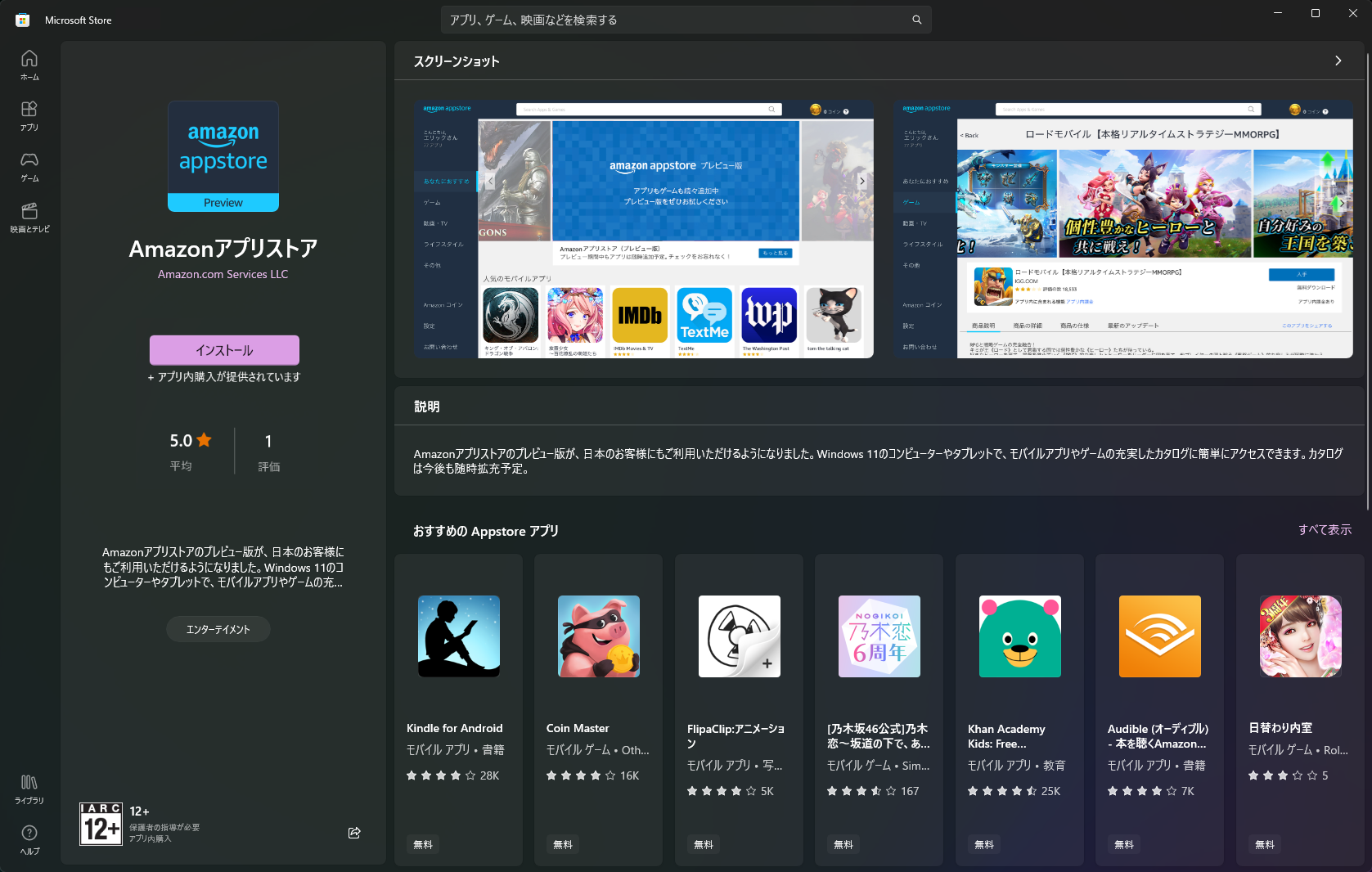
Today we are expanding the preview of Android™ Apps on Windows 11 to Windows Insiders in Japan. We are excited to take this first step on our path to make this preview available in other countries and regions.
[caption id="attachment_175818" align="alignnone" width="1024"] Amazon Appstore in the Microsoft Store for Japanese Windows Insiders.[/caption]
For the best experience, Insiders should update to Microsoft Store version 22206.1401.6 (or higher) to install the latest version of the Amazon Appstore. Insiders must also be on Windows 11 Version 22H2 (or higher) on devices that meet the requirements for Windows Subsystem for Android™. As a reminder, check out this blog post on the latest update for Windows Subsystem for Android ™ and the latest improvements available to Windows Insiders in the U.S. and now Japan.
Insiders who run into issues with Android™ Apps on Windows 11 can file feedback via Feedback Hub under Apps > Windows Subsystem for Android™. For more information about troubleshooting and submitting feedback: Troubleshooting and FAQ for mobile apps on Windows.
Thanks,
Windows Insider Program Team
EDITOR'S NOTE 8/23: Updated the screenshot to show the most current visuals in the Microsoft Store for Windows Insiders in Japan.
Hello Windows Insiders,
Today we are shipping an update for Windows Subsystem for Android™ on Windows 11 to all Windows Insider channels (U.S. only). This update (version 2206.40000.15.0) includes several new updates such as updates for input compatibility in apps such as games, networking and windowing improvements, and reliability updates.
What’s New
New suite of shims available to toggle in the Windows Subsystem for Android Settings app which enables better experiences in several apps
Compatibility for games with joysticks (mapped to WASD)
Compatibility for gamepad in games
Compatibility for aiming in games with arrow keys
Compatibility for sliding in games with arrow keys
Scrolling improvements
Networking improvements
Android minimum window size defaulted to 220dp
Improved dialog when unsupported VPN is detected
New toggle to view/save diagnostic data in the Windows Subsystem for Android Settings app
Security updates
General reliability fixes, including improvements to diagnostic sizes
Graphics improvements
Known Issues
Some VPNs may not work with Advanced Networking. If you use a VPN and find Android apps do not have network connectivity, please disable Advanced Networking in the Windows Subsystem for Android Settings app
Giving feedback
If you are having issues with Windows Subsystem for Android™ – please file feedback via Feedback Hub under Apps > Windows Subsystem for Android™. For more information about troubleshooting and submitting feedback: Troubleshooting and FAQ for mobile apps on Windows.
Thanks,
Windows Insider Program Team
Hello Windows Insiders,
Today we are shipping an update for Windows Subsystem for Android™ on Windows 11 to all Windows Insider channels (U.S. only). This update (version 2205.40000.14.0) includes several new updates as well as routine improvements to the platform and reliability.
What’s New
Advanced Networking
We’ve made a huge change to networking! We’re now introducing advanced networking, which enables app access to local network devices for ARM computers, allowing apps to take advantage of this functionality. We’ve also enabled IPv6 and VPN connectivity, enhancing the networking functionalities of the subsystem.
Settings App Update
We’ve updated the Windows Subsystem for Android Settings app to now account for advanced networking. This means the IP address has been removed from the Developer section in the Settings app as the subsystem no longer has a different IP from your computer.
Full Changelog
Enabled Advanced Networking functionality, including app access to local network devices for ARM
VM IP address removed from Settings app. With Advanced Networking, now the IP address of the VM is the same as the host/computer IP.
Fixes for non-resizable app content on maximize or resizing
Fixes for scrolling with mouse and trackpad in apps
Android May Kernel patches
Android windows marked secure can no longer be screenshotted
Improve web browser launching
Enable doze and app standby while charging for improved power saving
ADB debug prompts redirected to Windows for improved security
Updated to Chromium WebView 101
Fixes for graphics including app flickering and graphics corruption
Fixes for video playback
AV1 Codec support
Enabled IPv6 and VPN Connectivity
Increased the performance and reliability connecting to virtual WIFI in the container
Video playback apps can now prevent the screen from turning off in Windows
Known Issues
Some VPNs may not work with Advanced Networking. If you use a VPN and find Android apps do not have network connectivity, please disable Advanced Networking in the Windows Subsystem for Android Settings app
Giving feedback
If you are having issues with Windows Subsystem for Android™ – please file feedback via Feedback Hub under Apps > Windows Subsystem for Android™. For more information about troubleshooting and submitting feedback: Troubleshooting and FAQ for mobile apps on Windows.
Thanks,
Windows Insider Program Team

 Connexion